
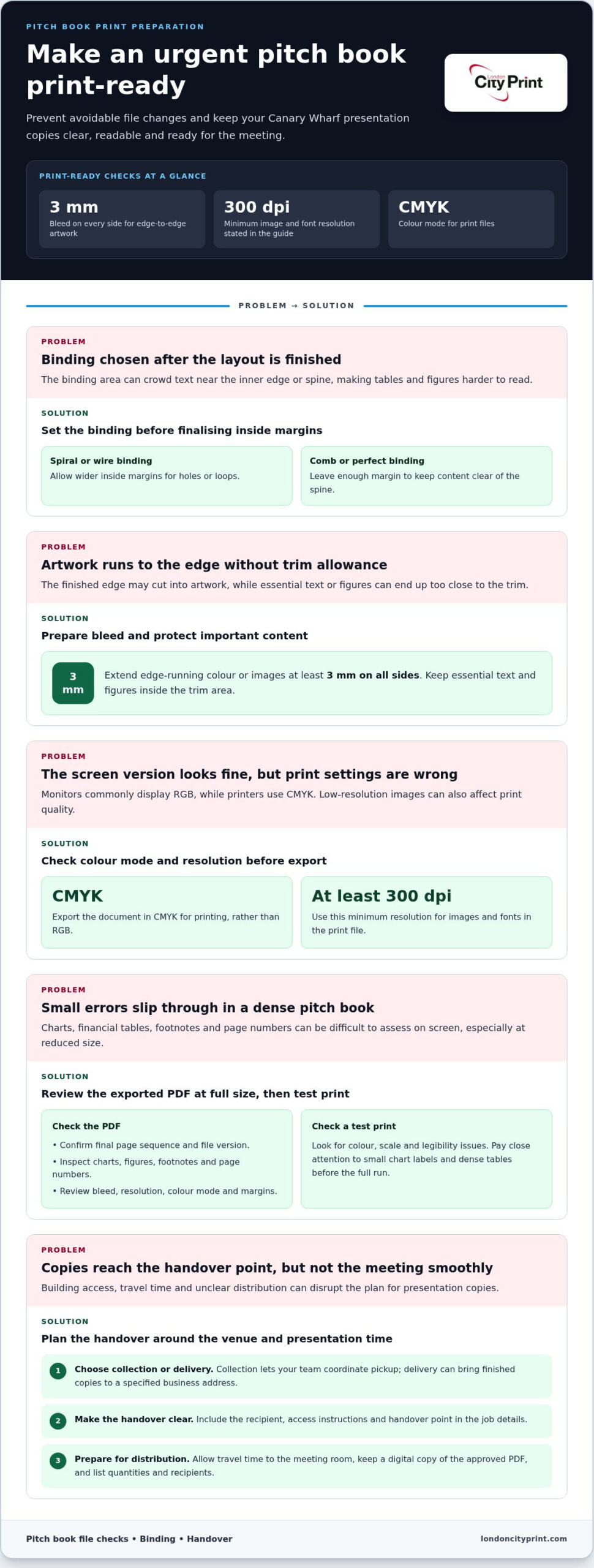
Choose the binding before you finalise the page layout. For pitch book printing in Canary Wharf, allow wider inside margins for spiral or wire binding, while comb or perfect binding needs margins that keep content clear of the spine. Set up at least 3 mm of bleed on every side for artwork that runs to the edge.
A polished pitch book depends on more than strong financial content. Paper weight, finished size, colour settings and binding all affect how the document reads, handles and presents in a meeting. Choosing these details early also helps avoid unnecessary file changes when deadlines are tight.
This guide explains how to arrange pages for different binding styles and choose paper stock, thickness and size for your presentation. You’ll also learn how to prepare print-ready files, including image resolution and colour mode, and how copy quantity can affect production. Use these practical decisions to brief an urgent pitch book print job clearly.
Key Takeaways
- Match the binding to how the pitch book needs to open, handle and present in a meeting.
- Choose the finished size and paper thickness together, so the page count creates a practical book rather than an awkwardly bulky one.
- Set up print files with the right colour mode and image resolution, then proof the layout before production.
- Copy quantity helps determine the printing method, while your deadline and finish guide the production plan.
- Plan delivery or collection around the presentation schedule, and prepare the final files and specifications before arranging the print job.
Urgent pitch book and presentation printing
For pitch book printing in Canary Wharf, prepare the final page sequence, print file and handover plan before production begins. A complete, print-ready file helps reduce last-minute corrections when a presentation deadline is close.
Urgent Presentation Printing
Urgent printing involves the production steps that turn a finished pitch book or presentation into meeting-ready copies. Before sending files, confirm the page order, finished size, copy quantity and binding choice. Review the exported PDF at full size, including charts, footnotes and page numbers. These checks can catch layout errors before they affect every copy.
Set up artwork with at least 3 mm of bleed on all sides when colour or images extend to the trimmed edge. Keep essential text and figures inside the trim area so they remain visible after finishing. Use images and fonts at a resolution of at least 300 dpi for print quality. Export the document in CMYK rather than RGB, since monitors commonly display RGB while printers use CMYK.
Check the binding before finalising inside margins. Spiral and wire binding need wider inside margins to allow for holes or loops. Comb and perfect binding need enough margin to keep text clear of the spine. For example, a financial table close to the inner edge may be harder to read if the layout doesn’t allow for the binding area.
- Confirm the final page sequence and file version.
- Review bleed, image resolution, colour mode and margins.
- Proofread charts, figures, footnotes and page numbers.
A test print can reveal colour, scale or legibility issues that are easy to miss on screen. Pay particular attention to small chart labels and dense tables. Checking these details before the full run helps prevent corrections from disrupting the presentation schedule.
Local Delivery and Collection
For a Canary Wharf meeting, plan the handover around the venue and presentation time. Collection lets your team coordinate pickup and take the books directly to the meeting. Delivery can bring finished copies to a specified business address. Either way, include the recipient, access instructions and a clear handover point in the job details.
Allow time to travel from the handover point to the meeting room, especially if reception or building access adds a step. Keep a digital copy of the approved PDF with the presentation team and separate spare copies from the main set. A simple list of quantities and recipients helps colleagues distribute the right pitch books.
Custom sizes and book thickness
Choose a finished size that suits the material, not just the screen layout. Portrait format works well for narrative pages, while landscape can give financial tables and wide charts more room. Before setting the document, identify the largest graphic or table and check that its labels will remain readable at the finished size.
Custom dimensions can make a pitch book easier to handle or better suited to a particular page layout. They also affect how the pages sit together and feel in the hand. For a non-standard format, set the page size in the source document first. Avoid resizing a finished PDF at the last minute, as scaling can shrink text and chart details.
Page count alone doesn’t determine finished thickness. Paper weight, sheet count, cover stock and binding all contribute. A higher basis weight may help an undated pitch book last longer, especially when teams reuse it for meetings. However, heavier paper adds bulk across every sheet. Balance durability against portability by considering how often readers will handle the book and whether they need to carry it between meetings.
Consider the cover separately from the inner pages. A sturdier cover can help protect pages that are handled often, while lighter inner stock can keep a long document manageable. Coated paper can make colours stand out, which may suit charts or brand graphics. For text-heavy analysis, prioritise readability and comfortable page turning over a glossy finish.
Estimate the finished thickness using the complete specification, not a single-sheet sample. Gather the final page count, stock choices and binding style, then review a dummy or digital layout at the intended size. A dummy helps you assess page turning and bulk before locking the design. Check that the cover suits the finished book and that the format fits your presentation folder or meeting materials.
Use this sequence to finalise the specification:
- Choose portrait or landscape orientation based on the widest chart or table.
- Set custom dimensions in the source file before exporting.
- Select inner stock for legibility, colour and handling needs.
- Review the full page count with the cover and binding included.
For a short, frequently updated pitch book, prioritise easy handling and a format that suits your charts. For an undated reference document, consider higher basis weight and a protective cover. If you need help turning your selected format and stock into a print-ready file, explore professional print support.
Financial pitch book printing
Financial pitch books need clear figures, tables and investment details in print. Choose paper, binding and print method to suit the document’s purpose and copy quantity.
Financial Document Printing
Start by identifying the pages readers will examine most closely. A valuation table, transaction timeline or financial model needs enough space to keep labels and figures easy to follow. Coated paper can make colour charts stand out, while heavier stock may suit a book intended for repeated use. Balance these choices against the finished book’s thickness and handling.
Binding affects both presentation and practical use. Wire binding can look refined and hold pages securely, but it may limit page count. Consider the finished page total and how often readers need to consult different sections. For a meeting where attendees refer to tables while discussing assumptions, a binding that opens flat can help. Plan the page layout and binding together rather than treating them as separate decisions.
Copy quantity also affects the print method. Digital and litho production are among the options, and run size helps determine which approach fits. A small set of books with changing content calls for a different production plan from a larger batch with stable content. Finalise the page count, quantity and binding before confirming the production specification.
Nearby Pitch Book Printers
For a Canary Wharf print job, match production requirements to the contents of your financial document. Your specification should bring together the chosen format, stock, binding and quantity. Pay particular attention to dense tables, colour charts and repeated page elements, as these details affect how useful each copy will be during a live presentation.
Prepare a concise production brief with the meeting date, copy quantity, page count, finished size, paper choices and binding preference. Include a representative spread with a chart and a detailed table. This makes the layout requirements clear and helps identify practical issues before production. Label the latest approved file clearly so an earlier draft doesn’t go to print.
Choose a production method that suits the run size, deadline and job specifications. The print plan should account for the stock, binding and finishing steps, not just the time needed to print the pages. If content may change, keep an editable source file and identify which PDF is approved. This gives your team a clear route from final review to finished financial pitch books.
Convert files from RGB to CMYK before printing, using a colour profile that matches the printer’s specifications. Proofread and test print before finalising, making adjustments as needed. Copy quantity will likely affect the choice of binding and print method.
Which printers near Canary Wharf print pitch books?
Choose a printer whose production capabilities suit your pitch book, deadline and handover plan. For a Canary Wharf presentation, focus on binding, paper options, colour reproduction, file preparation and the route from finished copies to the meeting room. A nearby address alone doesn’t show whether the printer can meet the document’s technical requirements.
Start with the specification. State the finished size, page count, copy quantity, stock preference and binding style in one brief. Ask how the chosen binding affects page opening and inside margins. For example, a book with detailed financial tables needs enough space near the spine to keep figures visible. The production team should understand how these choices work together.
Next, match print production to the run. Digital printing is efficient for short runs under 500 units, while laser, inkjet, web offset and sheetfed presses are methods to consider as quantity changes. The right choice depends on the copy count, colour requirements and finishing steps. A short run with frequently revised figures presents different production needs from a larger set using approved, fixed content.
Review file preparation before sending the final artwork. Check page size, fonts, image resolution, colour profile and bleed. Confirm that charts, footnotes and tables remain legible in the exported PDF. Inspect a dense valuation table at its finished print size, not only on a large monitor. If a proof reveals an error, make sure the correction is clear before production continues.
Use these points to compare a printer’s suitability:
- Can it produce the binding and finished format your layout requires?
- Does it offer paper choices that suit both charts and text-heavy pages?
- Can it explain how quantity affects the printing method?
- Does its file review cover colour, fonts, resolution and trim?
- Can you agree a clear collection or delivery handover for Canary Wharf?
Set out the deadline as a sequence: file approval, production, finishing and handover. A clear schedule helps show where late content changes could affect completion. Include the presentation location, recipient and access details in the handover instructions. Keep the approved PDF with the final specification so your team can identify the correct version if questions arise.
A suitable printer makes production decisions clear before work begins. Compare the proposed process with your actual pages, quantity and meeting needs, then choose the option that fits the complete job, not just the location.
Which local pitch book printers offer delivery or collection near Canary Wharf?
For a Canary Wharf presentation, compare handover arrangements as well as print specifications. Delivery brings finished copies to an agreed address; collection gives your team direct control over pickup. Choose the option that suits your meeting location, building access and available time.
Before placing an order, write down the destination and handover details. Include the building name, reception instructions, recipient’s name and a contact number. For example, a delivery to an office tower may require the recipient to meet the driver at reception. Clear instructions help avoid confusion when the print job is ready.
Collection may suit a team member already travelling from a nearby office to the meeting. Confirm the collection address, ready time and name needed at pickup. Assign one colleague to collect the pitch books and another to check the copy count and packaging before leaving. This separates production from the final journey.
For delivery, plan around the meeting schedule rather than the print schedule alone. Include time to receive, count and distribute the copies at the venue. If the presentation takes place at Canary Wharf, identify the exact building entrance and the person who can accept the package. A street address without access details may not give the driver enough information.
Use this checklist to compare a printer’s handover process:
- Can you state a delivery address or collection point clearly?
- Who will receive or collect the finished pitch books?
- What access instructions apply to reception or the meeting venue?
- How will your team check the copy count and condition?
- Is there a backup colleague if the named recipient becomes unavailable?
Keep the handover details with the final print specification. Include the approved file name, copy quantity, destination and recipient. If your team updates the document, label the final version clearly so nobody mistakes it for an earlier draft. One clear set of instructions supports a smoother handoff from production to presentation.
When comparing printers serving Canary Wharf, focus on the arrangements they can provide for your particular job. Confirm the handover plan, responsibilities and timing as part of your production brief. For help preparing a print job, arrange your print requirements with the team.
London City Print: Booklets and Brochures
London City Print produces Booklets and Brochures for business presentations and other printed materials. If your pitch book needs binding, Wire Binding lets pages lie flat for easy reference during meetings.
Include your intended size, page count, paper preference and binding requirements in the print brief. For supporting presentation materials, Posters and Roller Banners can communicate key information in a meeting space, while Foam Board Printing suits rigid display needs.
When your files and specification are ready, contact London City Print to discuss your booklet or brochure printing requirements.
Move your pitch book from plan to print
Give your next presentation a clear production brief that connects the printed book with the wider meeting environment. For pitch book printing in Canary Wharf, consider how attendees will use the document alongside supporting materials. London City Print offers Booklets and Brochures, Posters and Wire Binding for printed presentation materials in different formats.
A focused conversation about your project can turn your intended use into a practical print specification. Share what the pitch book needs to communicate, how your team will use it and which supporting materials would help. This gives you a clear starting point for the next production decision.
Contact London City Print to discuss your pitch book and take the next step with confidence.
Frequently Asked Questions
How do I arrange pages for pitch book printing?
Arrange pages in an order that helps readers understand the investment case and reach a decision. Start with an executive summary, then present the opportunity, market context, strategy and financial analysis. Follow with risks, proposed terms or next steps, then supporting appendices. For example, place detailed assumptions after the summary financials so readers can consult the evidence without interrupting the main narrative.
Should I submit my PDF in spreads or individual pages?
Submit individual pages in reading order unless the printer requests a different file setup. A single-page PDF lets the production team arrange pages for the selected binding and finished format. Spreads can cause confusion if pages need to be repositioned or a cover handled separately. Before export, check that the first page is the front cover and that blank pages appear where your design requires them.
What are typical turnaround times for pitch book printing in Canary Wharf?
Turnaround depends on the full production sequence, not printing alone. Copy quantity, page count, stock, binding, proof approval and finishing all affect the schedule. A short run with an approved file and straightforward finishing involves fewer steps than a large run that needs corrections. Build time for proof review and the final handover into your meeting plan.
Can Canary Wharf printers provide same-day or urgent pitch book printing?
Same-day printing and same-day binding are available 24 hours a day in London. A pitch book’s completion time still depends on its quantity, format, binding and finishing requirements. To support an urgent job, prepare one approved PDF, a written specification and a named handover contact. London City Print provides Booklets and Brochures and Wire Binding for relevant printed presentation materials.
What paper stocks, cover finishes, and binding options are available for pitch books?
Paper choices include coated stock for stronger colour impact and heavier-weight paper for a book intended for repeated use. Choose stock according to whether the pages contain detailed text, financial charts or both. Binding options differ in appearance and handling: wire binding opens flat, while perfect binding creates a spine-bound format. Match your selection to how readers will use the book.
What file format and artwork specifications do printers require for pitch book printing?
Prepare a high-resolution PDF at the final page size, with fonts embedded and images suitable for print. Set the document’s colour mode to CMYK and include at least 3 mm of bleed on every side where artwork reaches the edge. Keep critical figures clear of trim areas. Review the exported PDF page by page, checking charts, footnotes, page numbers and any intentional blank pages.
How do pitch book printing prices and quality compare among Canary Wharf printers?
Compare printers by whether they can handle your chosen format, stock, binding and quantity. Check that dense tables, colour charts and repeated page elements remain clear in a representative spread.