For eco-friendly flyer printing in the UK, the stated turnaround is 5-7 working days. Set your campaign schedule around that production window, with delivery timing also considered when you choose when flyers need to arrive.
A deadline matters, but it’s only one part of a successful flyer project. Your message needs to be clear, the format must suit its purpose, and the artwork needs to be ready for print. Settling these decisions early makes the job easier to organise and helps avoid last-minute changes that can disrupt production.
This guide covers recycled paper choices, flyer and leaflet formats, UK delivery planning, and single- or double-sided colour printing. It also explains practical artwork checks, including image quality and readable text. Use it to prepare a clear brief and settle the key production details before sending your files to print.
Key Takeaways
- Compare recycled paper weights against your flyer’s purpose: lighter stocks suit easy distribution, while heavier options create a more substantial feel.
- Choose a format that fits your message and handout plan, with recycled flyer sizes including A6, A5, A4 and DL.
- Allow 5-7 working days for the stated flyer turnaround when planning UK delivery, and build production time into your campaign schedule.
- Prepare artwork in CMYK at 300 dpi and include 3 mm bleed on every side to help achieve a clean, print-ready result.
- Decide whether single- or double-sided printing best fits your content, then organise the layout so key information stays easy to scan.
What recycled paper stock do you offer?
Recycled flyer specifications vary by product, so compare the paper weight, recycled content and material description before choosing. FSC-certified paper and water-based inks are separate environmental considerations to assess for a print project.
Recycled Paper Stock Choices
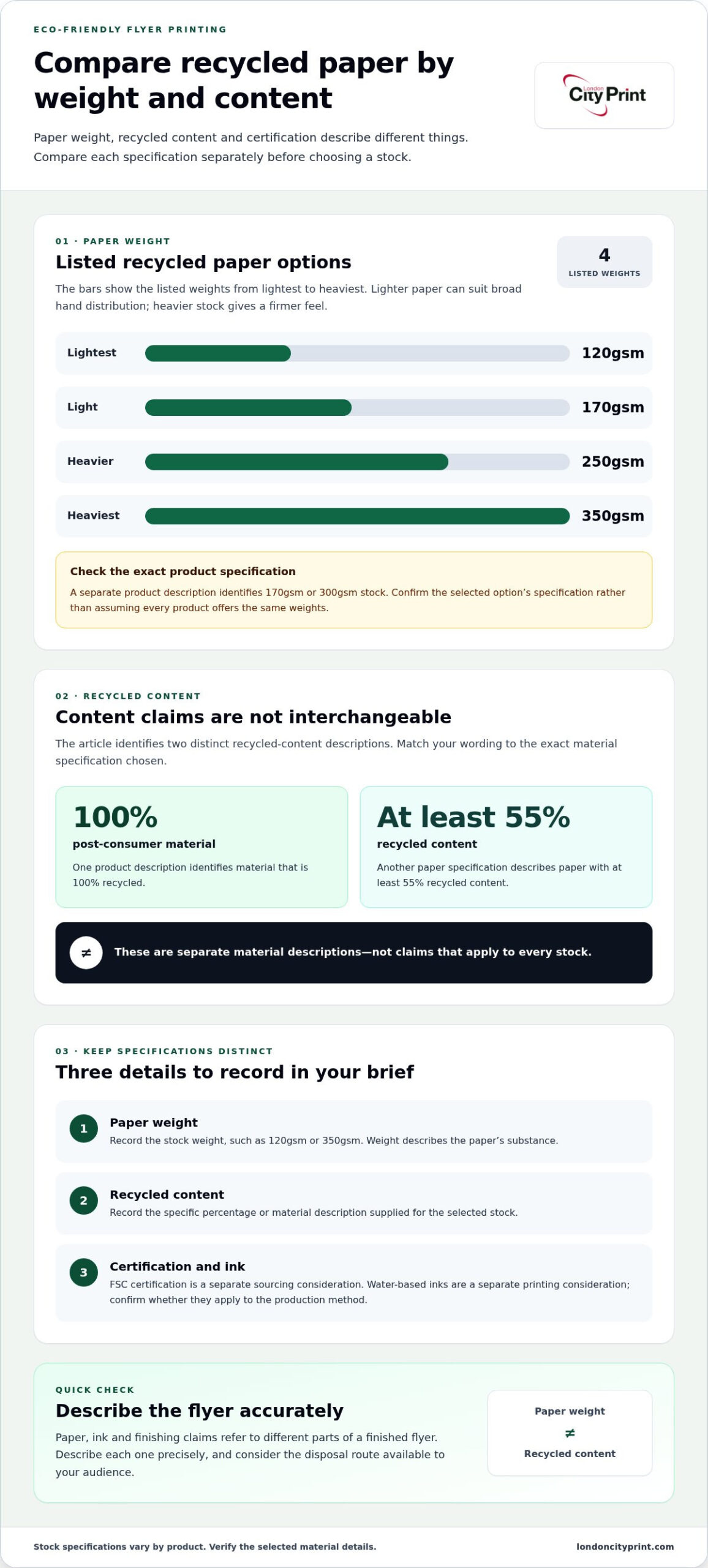
Recycled paper options list weights of 120gsm, 170gsm, 250gsm and 350gsm. A separate product description identifies 170gsm or 300gsm stock, so check the exact specification for the option you select. Lighter paper can suit flyers intended for broad hand distribution. Heavier stock gives the sheet a firmer feel, which may suit a handout readers are likely to keep.
Recycled Paper Content
Look for a specific recycled-content statement rather than relying on the word “recycled” alone. One product description identifies post-consumer material that is 100% recycled; another paper specification describes paper with at least 55% recycled content. These are distinct claims, not interchangeable descriptions of every stock. Match your environmental wording to the exact material specification selected for the print run.
Paper weight and recycled content answer different questions. A weight such as 170gsm describes the paper’s substance, while a percentage describes its recycled material content. Record both details when preparing a purchasing brief, especially if your organisation needs to report on the stock used.
Alternative Eco Flyer Materials
FSC-certified paper is an alternative sourcing consideration to recycled content. Certification and recycled-content descriptions refer to different material attributes, so state them separately in procurement notes. Water-based HP Latex inks are another environmental consideration for printing, but the ink system should be relevant to the specific production method. Avoid assuming one material or ink claim applies to every part of a finished flyer.
Are there UK regulations for recyclable or compostable printed flyers? A material label alone doesn’t establish that a complete flyer can be recycled or composted in every location. Describe the paper and any coatings accurately, and consider the disposal route available to the intended audience.
When choosing eco-friendly flyer printing in the UK, look for clear details about recycled content, paper weight and certification for the stock being used. Comparing these specifics helps you distinguish a material specification from a broad environmental claim.
To reduce paper use, edit the copy before layout, remove non-essential content and use both sides when you need more room. Choose a format that fits the message without excessive blank space. For example, put secondary details on the reverse rather than enlarging the sheet just to fit them.
Keep paper, ink and finishing claims distinct in your brief. Identify recycled content as a paper attribute, and specify water-based ink only when it applies to the production process. Precise wording avoids suggesting that one environmental feature describes the entire flyer.
Flyer and leaflet sizes
Available flyer formats include A7, A6, A5, A4 and DL. Recycled flyer options include A6, A5, A4 and DL, so compare the exact format range with your content before laying out artwork.
Flyer Size Options
A7 measures 74 mm × 105 mm, making it the smallest listed flyer size. A6 and A5 offer progressively more page area, while A4 gives you room for a larger layout. DL provides a long, narrow format. Choose based on the amount of information readers need, not just the space available in your design software.
Start with the content: headline, main message, contact details and response action. For a short event reminder, A7 or A6 may provide enough room. A service handout with several details may need A5 or A4. If you have a narrow design in mind, consider DL. These examples help you compare layouts; the final choice should keep every essential element clear.
Leaflet Formats
Recycled leaflets are listed in A6, A5, A4 and DL formats. Select the format before building the layout, then decide whether your information belongs on one side or both. For example, an A5 leaflet can keep a main message and supporting details on a familiar page shape, while DL suits a slim, portrait-oriented design.
Make the format work for the way readers will handle the leaflet. A compact A6 design can be convenient to distribute, while A4 gives longer copy more room. If you choose double-sided artwork, plan the two faces together: keep the main message prominent, then use the reverse for details that support it.
Set the document dimensions to the finished size instead of scaling a different layout during export. Use guides to align headings, images and text, then check the final PDF at its intended size. Pay particular attention to multi-column layouts and narrow DL formats, where text can become crowded or line breaks awkward.
Matching the artwork canvas to the chosen A7, A6, A5, A4 or DL format supports an accurate trim. Prepare your file around the selected size, then use flyer printing for a finished piece aligned with your design.
UK delivery and production speed
The stated flyer turnaround is 5-7 working days. Use that window as a planning reference, and distinguish production time from the time needed for delivery to your UK destination.
A reliable schedule starts with a fixed distribution date. Work backwards from the day your flyers must be in hand, allowing time for artwork preparation, production and transit. For example, a campaign launching on a particular weekday needs flyers delivered before that launch, not on the same day. The 5-7 working day turnaround helps set expectations, but it does not define a separate courier transit period.
Artwork readiness can affect the production schedule. Before submitting a file, confirm its final size, page count, single- or double-sided layout and paper stock. Check that text and images appear correctly and that the PDF matches the intended format. A late headline or image change may require a fresh file review and disrupt your campaign timeline.
Use this sequence to organise your order and delivery plan:
- Set the handout date. Identify the event, mailing or campaign launch when recipients need the flyers.
- Prepare the final artwork. Confirm dimensions, content and print layout before sending the approved file.
- Allow for the stated turnaround. Build the 5-7 working day production window into your schedule.
- Plan for transit. Factor in the destination and the delivery arrangements for your UK address or event venue.
For UK-wide delivery, provide a clear address and a realistic receipt date. A central office, regional branch or event venue may each need a different handover plan. Confirm who can receive the parcel, where it should go and whether the location has access restrictions. These details help ensure your print run arrives at a suitable address.
For an event, arrange delivery before the morning the flyers are needed. This gives your team time to check the quantity and distribute them before the doors open. If the venue changes, update the delivery details before dispatch arrangements begin. Keep the final artwork and delivery address together in the same job record.
Eco-friendly flyer printing in the UK still needs careful deadline planning. Recycled stock selection, print quantity and artwork approval all form part of the production brief. Keep those decisions together, then align the requested delivery destination with your campaign schedule. The key distinction is simple: the stated 5-7 working day turnaround informs production planning, while transit depends on the delivery arrangement and destination.
Full-colour single- or double-sided printing
Choose single-sided printing for a focused message on one face, or double-sided printing when you need more room. Full-colour printing uses CMYK, a four-colour process that produces a range of printed colours.
A single-sided flyer can keep an event notice, offer or contact message together on one face. The main headline leads into the essential details in a clear reading sequence. Double-sided printing gives you space for supporting information, such as directions, service details or a response prompt, without changing the sheet size.
Full-colour printing is specified at 300 dpi. Prepare your images at a suitable resolution for the final print dimensions, and set the document’s colour mode to CMYK. Colours displayed on a monitor can differ from printed colours, so review the artwork on screen before approval. A strong contrast between text and background also helps readers scan key details, such as an event date or telephone number.
Plan both sides as one connected layout. Put the primary message on the front and use the reverse for information that helps readers take the next step. For example, a community event flyer could show its title and venue on one side, with programme and access details on the other. Check orientation and alignment so both sides read correctly after trimming.
To assess a UK printer’s environmental claims, identify the precise claim, such as recycled paper content or a named certification, and establish which material or production stage it covers. For a certification, compare its details with the issuing organisation’s records.
Printing choices contribute to a sustainable brief, but keep claims precise. A recycled-paper specification describes the stock; it does not automatically certify the ink, coating or finished flyer. If you make an environmental statement in the artwork, match it to the documented material claim. For example, describe the paper as recycled only when that statement applies to the selected stock.
Before approving a full-colour job, review these production points:
- Side count: Confirm whether the artwork contains one designed face or two.
- Colour setup: Prepare the file in CMYK and check important colours and contrast.
- Image quality: Review images at final size against the stated 300 dpi specification.
- Environmental wording: Align each claim with the exact paper or certification detail it describes.
This final review helps keep the message, colour artwork and environmental description consistent on both sides.
Image resolution and minimum font size
Print-ready artwork needs sharp images and legible text at the flyer’s finished size. The recycled flyer specification gives full-colour printing at 300 dpi, so prepare and review images against the final dimensions.
Resolution describes how much image detail appears within a printed area. A photograph that looks sharp on a phone may blur when enlarged across an A5 flyer. Check each image in your layout software at its placed size, not only in the original file. Avoid enlarging small web graphics, as scaling cannot restore detail that the source image lacks.
Use the specified 300 dpi output setting for images in the artwork. Resolution and dimensions work together: changing an image’s size can change its effective resolution. For example, enlarging a small product photo to fill a large panel reduces detail per printed inch. Keep the original image dimensions where possible, and replace any image that looks soft at its intended size.
The smallest readable font depends on the typeface, weight, contrast and viewing conditions, so no single point size works for every flyer. Test small text in the final-size PDF rather than relying on a zoomed screen view. Start with a footnote, web address or legal line. If the letters crowd together or lose clarity, enlarge the type or shorten the wording.
Use this preflight sequence before submitting your PDF:
- Confirm dimensions: Set the document to the selected finished flyer size.
- Inspect images: Review each photograph or logo at its placed size, using the 300 dpi specification.
- Check typography: Inspect the smallest text and test whether thin strokes remain distinct.
- Review contrast: Make sure text stands apart from backgrounds, especially over photographs.
- Export and inspect: Open the final PDF and check both sides, fonts, image placement and trim edges.
A screen preview can hide problems because magnification changes how small type appears. Review the PDF at its intended physical size, then inspect details for pixelation, missing characters and awkward line breaks. A pale-grey caption over a detailed image, for instance, may be hard to read even if its font looks large enough on screen.
Keep essential text away from trim edges and avoid placing fine details over busy backgrounds. A clean-edged logo from a high-resolution source file will reproduce more reliably than a small raster copy. If your design includes a QR code, leave clear space around it and test the printed artwork with a phone before approving production.
Prepare your flyer file for production with print-ready artwork, including correctly sized images and text that remains clear at the finished format.
London City Print: Booklets and Brochures
London City Print can support a campaign with more than flyers. Booklets and Brochures provide space for expanded information, while Posters suit larger displays. A brochure can present product or service specifications, images and supporting details in a structured format. Wire Binding suits documents that need to open flat, and Roller Banners provide a freestanding display option for events.
Choose a format based on how people will use the material. A flyer delivers a concise message; a booklet or brochure holds more detail for reference. Posters and Roller Banners present campaign information at a venue. Prepare your content and artwork for the chosen format, then contact London City Print to discuss your print project or visit londoncityprint.com.
Move your flyer project into production
Before finalising your artwork, give the campaign a clear purpose. Decide what you want readers to do and make that action easy to find. A concise message also helps the flyer work alongside wider campaign materials without competing with them.
For eco-friendly flyer printing in the UK, consider how each printed item supports the same message. London City Print also offers Booklets and Brochures for detailed content, Posters for prominent placement, and Wire Binding for documents that need to lie flat. Together, these formats can extend a flyer campaign into a coordinated set of materials.
When your brief is ready, share the format, artwork and intended use so the print requirements are clear from the start. Contact London City Print about your flyer project and take the next step with confidence.
Frequently Asked Questions
What is the fastest possible delivery for my Eco Flyers?
The stated turnaround for flyers is 5-7 working days. Plan your campaign around that production window, then allow time for delivery to your address or event venue. For a fixed launch date, set an earlier receipt deadline so your team can check the print run and prepare distribution. Submit approved artwork and a complete delivery address to keep the job details together.
Should I choose single or double sided Eco Flyers?
Choose single-sided printing when one clear message fits comfortably on one face. Double-sided printing lets you separate the main offer from supporting details, such as directions, product information or contact instructions. For example, an event announcement on the front can point readers to a programme on the reverse. Keep the call to action easy to find and leave out details that don’t help readers respond.
What is the best size for my flyer?
The best size depends on how much information readers need and how they’ll receive the flyer. A7 is a compact option at 74 mm × 105 mm; A6, A5, A4 and DL provide other format choices. A short reminder may suit a smaller format, while a detailed service handout needs more room. Draft the content first, then select the smallest size that keeps it readable.
What material is this product made from?
Recycled flyer materials include paper described as post-consumer recycled content, alongside options with different recycled-content specifications. A product description identifies one stock as 100% recycled post-consumer material. Paper weight and recycled content are separate details, so review both when choosing a stock. If you make a material claim on the flyer, ensure its wording matches the specification of the paper you select.
Where do you source the materials in your flyers?
Paper descriptions may include post-consumer recycled paper and FSC-certified paper. Post-consumer content identifies the origin of recycled fibre; FSC certification relates to responsible forest sourcing. These details describe material credentials, not a particular mill or country of origin. For procurement records, distinguish recycled-content statements from certifications and tie each claim to the relevant paper stock.
Which production techniques do you use?
London City Print provides digital and litho printing, alongside finishing services such as binding. The appropriate process depends on the job’s format, quantity and artwork requirements. For a full-colour flyer, the stated specification is CMYK printing at 300 dpi. Supply a final PDF with the intended dimensions and colour setup, so production can follow the approved design rather than an incorrectly scaled file.
What recycled and sustainably sourced paper options are available for flyers in the UK?
Available recycled-paper weights include 120gsm, 170gsm, 250gsm and 350gsm. A separate product description identifies 170gsm or 300gsm recycled stock, while another describes paper as 100% recycled post-consumer material. FSC-certified paper is another sourcing option. Compare the exact stock description, weight and recycled-content claim together, then choose the specification that suits your flyer’s handling and presentation needs.
Which eco-friendly inks and printing processes do UK flyer printers use?
Full-colour flyer specifications can use CMYK, the four-colour process, with printing stated at 300 dpi. UK print production also includes digital and litho methods. Water-based HP Latex inks are another eco-conscious printing option, though ink systems and processes differ by application. For your artwork, check that the ink and process described apply to the specific job, rather than assuming one method covers every printed product.