When you need overnight document printing UK, a file with the wrong page size or missing bleed can put your deadline at risk. The phrase can mean printing completed overnight or documents ready for you the next day, so start by defining when and where you need the finished job.
Then prepare the details that shape production: document size and page count, quantity, paper, colour, and finishing. This guide explains how to prepare a high-resolution PDF, set a clear deadline, and choose specifications that fit the finished document you need.
London City Print provides same-day printing for most professional documents in Central London, with service available 24 hours a day, Monday to Sunday. The facility is near the British Museum. Use the practical checks below to plan a time-sensitive job and give the print team clear instructions.
Key Takeaways
- For overnight document printing UK, distinguish print completion from collection or delivery so you can plan for the deadline you actually have.
- Before submitting a job, estimate how quantity, page count, colour, paper choice and finishing affect the production work.
- Check final size, page order, colour and fonts, then export a high-resolution PDF. Add bleed and crop marks only when artwork runs to the trimmed edge.
- Compare urgent print options by their stated timing, location, document type, finishing and file requirements, not by the word “overnight” alone.
Overnight document printing in the UK: what does the service mean?
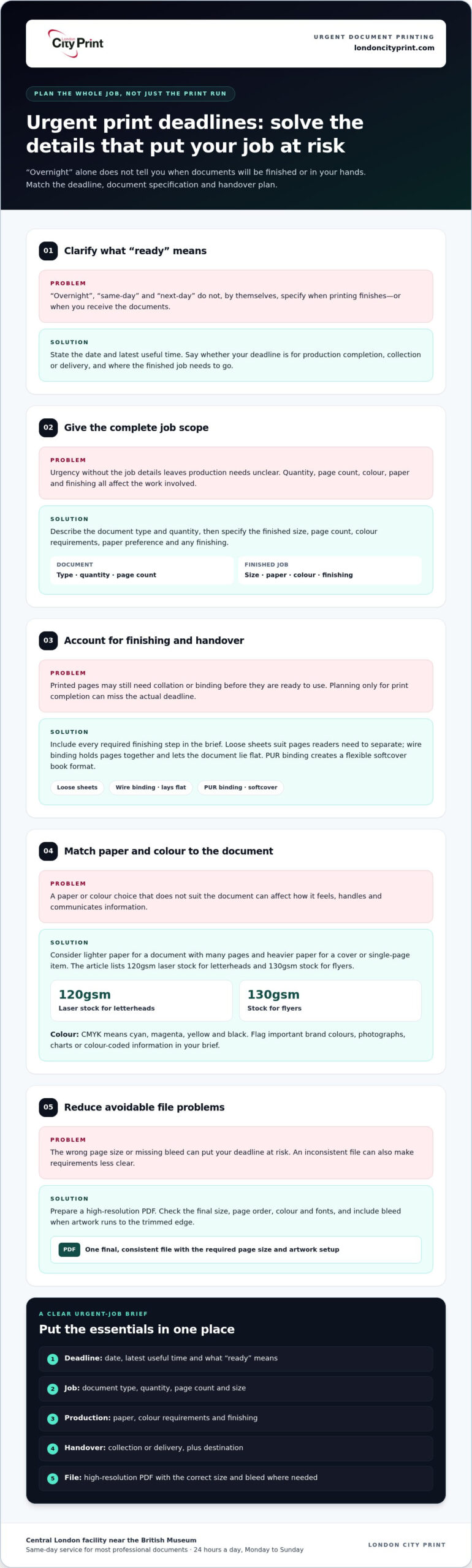
Overnight document printing describes an urgent print requirement planned around a deadline that may fall overnight or the following day. The phrase alone does not specify when production will finish or when you will receive the documents. First, define what “ready” means for your job. You may need production completed by a set time, or the finished documents in hand at that time. Those are different milestones.
Printing involves different processes and production methods. A short introduction to the history and types of printing gives useful context, but an urgent job also needs a practical schedule. State whether your deadline refers to the end of printing, collection, or arrival at the destination. Be specific about the milestone that matters to you.
Overnight, same-day, and next-day printing are not interchangeable
“Overnight” signals an urgent deadline, but doesn’t define the production window. “Same-day” describes a service within the same day, while “next-day” generally refers to the following day. None of these labels says by itself whether the timing covers printing, finishing, collection or delivery. Compare the stated timing with the finished result you need.
For example, a document printed overnight may still need collation or binding before it is ready to use. A next-day service may refer to delivery rather than the time production finishes. If you are preparing materials for a morning appointment, plan for the complete job, including finishing and handover, rather than just the time needed to print the pages.
What to establish before planning an urgent print job
Set out your deadline in practical terms. Note the date, the latest useful time, and whether you need to collect the finished job or have it delivered. Then summarise the work so the print team can understand the requirements. A concise brief should include:
- Deadline: When the documents must be ready for use.
- Job scope: Document type and quantity.
- Finished format: Required size and any finishing.
- Handover: Where and how you need to receive the job.
This information helps define a production window more clearly than the word “overnight” alone. The phrase “overnight document printing UK” can describe a search for urgent print help across the country, but it does not define a provider’s location or delivery arrangements. Include the destination in your brief so the production deadline and handover requirements are clear together.
Which documents suit overnight printing, and what affects production?
Urgent document jobs range from meeting reports and legal bundles to presentation materials and business stationery. Each has different production needs. A report needs clear pagination and may need binding; a bundle may need collation in a specific order; stationery often needs consistent colour and paper across several items. For overnight document printing UK, describe the finished document, not just the urgency, so the print requirements are clear.
Production planning depends on the combination of quantity, page count, colour coverage, paper and finishing. A larger quantity or a longer document means more pages to print and handle. Double-sided printing affects page arrangement, while binding adds a finishing step. Provide the full specification at once so the complete job can be assessed.
Match document format and finishing to the deadline
Choose a format that suits how people will use the document. Loose sheets work for documents readers need to separate. Wire binding holds pages together with a metal wire comb and lets the document lie flat, which can suit reports or presentations used at a desk. PUR binding uses a polyurethane adhesive to form a flexible softcover book. It suits a book-style format but involves a different finishing process.
Keep the finishing brief focused. If you don’t need binding, covers or other additional steps, leave them out. A simpler specification can make the production requirements easier to assess, but the right format depends on how the document will be used. For further detail on binding types and uses, consult this professional document binding guide.
Choose paper and colour specifications with care
Paper weight affects how a printed item feels and handles. A lighter sheet may suit a document with many pages, while a heavier sheet can give a cover or single-page item a firmer feel. Treat these as factors to consider, not fixed recommendations. London City Print lists 120gsm laser stock for letterheads and 130gsm stock for flyers. State your preferred paper or explain the document’s purpose so the specification fits the job.
Colour also shapes the print brief. CMYK, short for cyan, magenta, yellow and black, is the process-colour model used for many print jobs. If your document includes brand colours, photographs, charts or colour-coded information, identify which elements matter most. A text-based report may need a different colour approach from a brochure where imagery and colour carry the message. Supply a final, consistent file and explain any essential colour requirements.
Before sending your request, bring the document type, quantity, page count, paper preference, colour requirements and finishing together in one specification. For an urgent job in Central London, discuss your document printing requirements with London City Print.
How to assess an urgent printing option without risking your deadline
Assess an urgent print option against the job you need completed, not the word “overnight”. A clear specification makes it easier to assess production, finishing and handover requirements. Use these comparison points to separate timing language from the practical details that determine whether the service fits your deadline.
| What to compare | What to establish |
|---|---|
| Deadline language | Does the stated time describe production completion, collection or delivery? |
| Location | Where will the job be produced, and where must you receive or collect it? |
| Document type | Can the service handle your page size, quantity, page count and colour requirements? |
| Finishing | Does the job need loose sheets, binding, collation or another finishing step? |
| File support | Can you supply a print-ready file, and what file details does the service need? |
Check the deadline, location, and handover requirements
Production completion and handover are separate parts of the schedule. If you need printed documents for a meeting, account for getting them from production to the meeting place. State whether you plan to collect the job or need delivery, and include the relevant location. A UK-wide search for overnight document printing doesn’t mean every service covers every destination.
Compare the stated service area with the place where you need the finished documents. Make the deadline specific by giving the date and the latest time the job will still be useful. This distinguishes your production target from the time you need the completed order in hand.
Compare technical capability with the document you need
Match the required format to the production and finishing the job needs. Include the finished size, page count, colour requirements and binding method in your brief. A multi-page booklet needs a different production plan from a set of loose sheets. If your project is a booklet or brochure, the professional booklets and brochures guide can help you consider its format and finish.
For a poster or another large-format item, specify the finished dimensions as well as the file format. London City Print provides large-format printing up to A0 size and beyond. Give precise measurements so the job can be assessed against the intended output, rather than relying on a description such as “large poster”.
Bring the deadline, handover point and full print specification together before proceeding. That gives the print team practical information about the job and helps you avoid planning around an unclear turnaround label. Discuss your printing requirements with London City Print to set out your urgent document job clearly.
Prepare print-ready files to keep an overnight document job on track
A clean, final file gives an urgent print job a clear starting point. Check it in a fixed order: confirm the finished size, review the pages, verify colour and fonts, then export a high-resolution PDF. Don’t rely on the filename or a quick look at the first page. A missing page, substituted font or incorrect page size can mean corrections are needed when time is tight.
- Confirm the finished size. Set the page dimensions to match the final document, including any custom dimensions.
- Review every page. Check page order, orientation, margins, content and blank pages.
- Check colour and fonts. Confirm your colour settings and make sure fonts display as intended.
- Export and inspect. Save a high-resolution PDF, then open and review the exported file.
Check page size, bleed, and crop marks
Match the PDF page dimensions to the intended finished size. Add bleed only when artwork, colour or an image must extend to the trimmed edge. Bleed provides extra artwork beyond that edge, allowing the printer to trim the sheet without leaving a white border. Crop marks show where the sheet should be cut. If no artwork runs to the edge, bleed and crop marks may not be needed.
Export a high-resolution PDF and review it before sending
Run pre-flight file checks before export. These checks review image resolution, colour profile, font embedding and bleed, helping you catch issues that can affect the printed result. Open the exported PDF and inspect every page at a readable scale. Check small text, image sharpness, alignment and page order. For broader context on production choices, see this professional printing services guide.
Pay close attention to technical drawings, plans and any document where scale matters. The “fit to page” option can shrink or enlarge content to suit a printable area, changing its intended dimensions. Check the PDF page size and print at the correct scale instead of relying on automatic fitting. If a drawing must retain exact measurements, state that requirement in the job specification.
Review colour settings, too. A screen preview can differ from a printed result, so confirm that the file uses the intended colour profile and that important elements remain legible. Keep colours consistent across pages, especially in reports that use charts or colour-coded information. For overnight document printing UK, a complete, checked file helps reduce the risk of pauses caused by missing or unclear instructions.
Once the PDF passes your review, send the final version with the finished size and essential print instructions. Avoid sending several files with similar names; identify the version approved for production. Send your print-ready document to London City Print with the job details.
London City Print supports urgent document printing in Central London
Time-sensitive print work needs a clear handover from brief to production. London City Print has operated since 2009 and provides professional document printing, binding, legal bundle printing and large-format work. Each job can involve different production steps, so explain what the finished item needs to do as well as when you need it.
Production machines print at up to 100 pages a minute. This describes machine capability, not the completion time for an individual order. A job may also involve file preparation, printing multiple pages or copies, and finishing. A complete brief helps the team assess those requirements without treating print speed as a promise about the whole job.
Professional printing support for time-sensitive documents
Different urgent documents call for different workflows. Loose documents may need printing and collation, while a bound report needs an extra finishing step. A legal bundle may need its pages arranged and presented in a specified order. Large-format work has its own size and layout requirements. Identify the document type and explain how you plan to use it so the intended result is clear.
For a legal bundle, describe the required set, page order and any binding needs. For a presentation, explain how the finished pages should be handled and whether they need binding. For a large-format item, state its intended dimensions and orientation. These examples help define the work, but each specification has its own production requirements.
Bring the requirements together in one concise brief. Keep the final artwork and instructions aligned, and identify any finishing the completed job must include. This gives the team the information needed to assess the production work and plan around the actual document.
Plan your next step with a clear print specification
Before discussing an urgent job, prepare the approved file and the key details that define its finished form. Include:
- Deadline: The time the completed documents need to be ready for use.
- Format: The document type, finished size, page count and quantity.
- Print choices: Colour requirements and paper preferences.
- Finishing: Binding, collation, trimming or other required steps.
Also state how you need to receive the finished work. This gives the team context for your deadline and keeps production and handover requirements clear. If a detail is essential, such as a fixed page order or exact plan dimensions, include it in the brief.
Bring your final file and specification together, then discuss your urgent document printing requirements with the team. A precise brief is a practical starting point for assessing the job and planning the next step.
Make your next urgent print job easier to manage
Turn the preparation for this deadline into a reusable print brief. Keep a copy of the approved document size, colour settings, paper choice and finishing details alongside the final artwork. For repeat reports, presentations or legal documents, this gives you a clear starting point next time and helps your team share instructions when time is short.
Before submitting an overnight document printing UK request, check that the file and specification describe the same finished result. Include the deadline and handover details, then note any production requirements that affect the job. Clear information helps keep the focus on the work that needs to happen next.
For practical support with a time-sensitive document, discuss your urgent document printing requirements with London City Print. Prepare your final file and job details, then get in touch to plan the next step.
Frequently Asked Questions
What is the difference between overnight and next-day printing?
Overnight printing usually describes production planned around an urgent deadline, while next-day printing refers to a following-day service window. Neither phrase alone tells you when you’ll receive the finished job. Check whether the stated time applies to production completion, collection or delivery. For example, if you need presentation packs ready before a morning meeting, allow for finishing and handover as well as printing. Your file, format and location also affect how the job is planned.
Can I send a PDF for urgent document printing?
Yes. A high-resolution PDF is a practical format for print because it preserves layout, fonts and image quality. Before sending it, open the exported PDF rather than relying only on your source file. Check that page dimensions and order are correct, text appears as intended, and images remain clear when enlarged. If the document includes linked artwork or a cover, inspect those pages closely for missing or misplaced elements.
Does fit to page affect the scale of a printed document?
Yes. Fit to page can resize content to match the printable area, changing its intended dimensions. That can create problems for plans, drawings, forms or diagrams that rely on a specific scale. For example, a plan that must be measured against its printed dimensions shouldn’t be resized automatically. Check the document’s page size and print settings, and state clearly if the artwork must retain exact dimensions.
Can urgent documents be printed in colour and double-sided?
Colour and double-sided printing can form part of a document specification. State both requirements clearly, then review the PDF in reading order to check that front and reverse pages pair correctly. This matters for a report with charts on facing pages or a handout where readers need information in sequence. Consider how paper weight affects opacity and handling, especially if the document has dense colour on both sides.
Can large-format plans be included in an urgent print job?
Yes. London City Print provides large-format printing, including work up to A0 size and beyond. For a plan, check that labels remain readable, line weights are clear and the page orientation suits its intended use. Keep the drawing at its required dimensions if scale matters. Include the format and deadline in the job brief, as large-format requirements differ from those for standard documents.
What information should I include in an urgent print brief?
Give the print team enough detail to understand the finished job without having to infer missing instructions. Alongside your deadline and final file, describe the document’s purpose and any essential requirements, such as keeping a plan to scale or matching a set of presentation copies. For overnight document printing UK, explain the required handover point too. A clear brief helps the team assess the work and identify questions before production begins.
Why do pre-flight file checks matter for urgent printing?
Pre-flight file checks help catch technical problems before they interrupt production. An embedded font may display differently from the version in your working file, or an image may look sharp on screen but print poorly at its actual size. Check that the final PDF contains the intended pages and that essential text and artwork appear correctly. Resolving issues before sending the job can prevent avoidable corrections under deadline pressure.