Confidentiality doesn’t end when a document leaves your screen. Confidential document printing services can include printing, binding and finishing, with the right choices depending on how the documents will be handled and collected. Wire binding, for example, keeps pages together and lets a document lie flat.
You’re right to consider more than print quality: file transfer, collection timing and the handling of proofs and printed copies all matter. This guide explains how to prepare and upload files, which formats to use, what affects pickup timing, and what physical, procedural and technical security measures to discuss. You’ll also learn how binding and finishing can support your documents, from organised multi-page packs to presentation-ready booklets, so you can plan the job with clear requirements and fewer last-minute decisions.
Key Takeaways
- Choose binding and finishing to suit how your document will be read, handled and presented.
- Prepare multi-page files with clear page order and print specifications to help avoid production errors.
- Plan pickup around the job’s scope and the readiness of your print files.
- Use secure file-transfer and collection procedures, and consider how drafts and printed copies will be handled.
- Review the article’s guidance on file preparation and available print options before arranging your job.
Are binding and finishing options available?
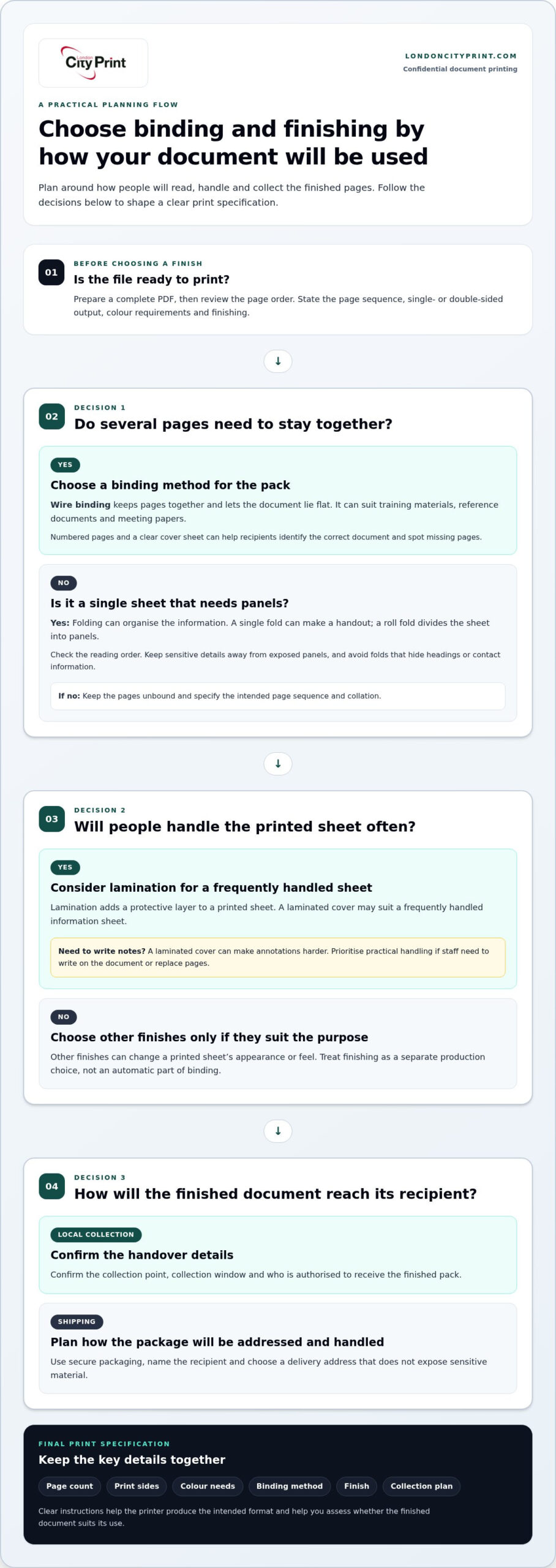
Yes. London City Print provides confidential document printing in London, including printing and binding for multi-page documents. Choose options based on how the document will be read, handled and stored. A reference pack for meetings, for instance, has different needs from a report kept in a folder. Decide how recipients will use the pages before selecting a finish.
Wire binding keeps pages together and lets a document lie flat, making a pack easier to consult on a desk. It can suit training materials, reference documents and meeting papers. For confidential packs, consider how the binding will keep pages together during handling. Numbered pages and a clear cover sheet can also help recipients identify the correct document and spot missing pages.
Lamination adds a protective layer to a printed sheet, while other finishes change its appearance or feel. Treat these as separate production choices, not automatic parts of binding. A laminated cover may suit a frequently handled information sheet, but can make annotations harder. For confidential material, prioritise practical handling over decorative effects, especially if staff need to write notes or replace pages.
Folding organises documents without binding them. A single fold can turn a flat sheet into a handout, while a roll fold divides information into panels. Check the reading order before approving a folded layout. Keep sensitive details away from exposed panels, and avoid folds that hide headings or contact information. For a multi-page pack, choose a binding method rather than relying on folds to hold sheets together.
Printing options include single- or double-sided pages, colour or black-and-white output, and different paper choices. Match the setup to the document’s purpose. Use colour where charts rely on distinct shades, for example, and check that small text remains legible on both sides. A print-ready PDF can preserve page order and layout. Review the file before sending it, especially if a confidential appendix follows a general report.
- Pickup: Local collection can reduce handovers between locations. Confirm the collection point, collection window and who is authorised to receive the finished pack.
- Shipping: Delivery can suit recipients outside the local area. Plan for secure packaging, a named recipient and a delivery address that does not expose sensitive material.
Before placing an order, list the page count, print sides, colour needs, binding method, finish and collection plan. These details give the printer clear instructions and help you assess whether the finished document suits its intended use.
Can I print multi-page documents?
Yes. Multi-page documents can be printed as ordered sets, reports, manuals or meeting packs. Provide a complete file and specify the page sequence, single- or double-sided output, colour requirements and finishing. A membership pack, for instance, may combine an introductory letter, a form and supporting information. Clear instructions help keep each recipient’s pages together and in the intended order.
Choose the document format to suit its purpose. A report needs readable charts and clear section breaks, while a training manual needs consistent headings and an easy-to-follow page order. For confidential material, separate sensitive appendices from general information in the file structure. Mark the intended sequence clearly, then review the final PDF to make sure no page is duplicated or out of place.
Specialist documents need production choices that support their intended use. A legal bundle may contain indexed sections and supporting records, while a technical plan may need a large sheet rather than a standard page. Tell the printer how people will consult the document, whether they need to annotate it, and which pages must be easy to locate. These details help determine the format and finishing.
Commercial print also uses multi-page formats. A company brochure can introduce services across sections, while a product booklet can organise specifications and images. Flyers and posters suit shorter messages, and business cards provide compact contact details. Keep confidential information out of promotional artwork, and review names, figures and image permissions before approving the final file.
- Set the page order: Use clear file names or section dividers for appendices and attachments.
- Choose print sides: Decide whether duplex printing suits the paper and content layout.
- Check colour: Identify charts or diagrams that lose meaning in monochrome.
- Plan collation: State whether each set needs identical pages or recipient-specific inserts.
Commercial printing and in-house printing differ mainly in workflow and control. An office printer may suit a short, straightforward pack that staff can print and collect internally. A specialist print workflow can handle larger sets, finished formats or varied document requirements, while your organisation remains responsible for approving the file and deciding how sensitive content should be handled. Compare the required output and internal handling process before choosing.
For a reliable production brief, group the file, page order, print sides, colour needs and intended format in one set of instructions. If your project includes promotional materials alongside a document pack, professional printing support can help you plan the printed components together.
Same-day and next-day pickup availability
Same-day printing is available for most professional documents, but production completion and collection are separate steps. A job may need file review, printing, collation and finishing before it’s ready. For example, a multi-section report with wire binding involves more handling than a short, unbound document. Set your deadline around the finished item, not only the time printing begins.
Plan same-day collection around a print-ready file and a clear specification. State the page count, number of copies, colour requirements, finishing and required collection time. A complete brief helps the production team assess the work and schedule each stage. If the file needs corrections, colour review or additional finishing, those steps affect when the job will be ready.
Next-day collection gives you more time to prepare files and review instructions, but still requires a clear handover plan. Identify who will collect the order and provide a name for the collection record. For a confidential legal bundle, for example, assign collection to an authorised colleague rather than relying on an informal office handover. Keep the document title discreet on any external label.
Use this sequence to organise submission, production and secure delivery:
- Prepare: Export the final document as a high-resolution PDF, confirm page order, and remove pages that recipients don’t need.
- Submit: Send the file through the printer’s designated upload route. Include the quantity, finishing, deadline and collection instructions in the job details.
- Approve: Review any proof or clarification request promptly. Check names, page sequence, attachments and print settings before production proceeds.
- Collect or receive: Arrange pickup by a named colleague, or specify the delivery recipient and location. Collect the finished pack promptly and keep it with the responsible person.
For local collection, plan the route from the print counter to your office or meeting room. Carry confidential packs in a closed folder or case rather than displaying covers or loose pages in public. If several colleagues need separate copies, count and divide each set before leaving. A collection record or job reference can help your team match each pack to its recipient.
Delivery suits teams working across locations, while collection gives you direct control over the handover. Match the method to the document’s sensitivity, the recipient’s availability and the time needed for transport. A report required for a morning meeting, for example, needs a collection or delivery plan that leaves time for checking and internal distribution. Build those steps into the deadline alongside printing and finishing.
Online file uploads and supported formats
Use a secure upload route and a print-ready file to reduce handling and layout errors. Before choosing confidential document printing services, review the file format, content and transfer method. A clear submission process helps your team maintain control from preparation through production.
Online File Uploads
An online upload transfers your document digitally for print processing. For confidential document printing services, choose an encrypted portal that uses HTTPS or SFTP rather than sending a USB stick. Upload only the final files needed for the job. If a pack contains a sensitive appendix that does not need printing, remove it before submission.
Prepare the file before uploading: give it a clear internal name, check the page order and provide production instructions separately. Note the number of copies, colour requirements and whether pages need duplex printing, for example. Use a one-time access link where available, and avoid putting confidential names or subject details in a public-facing file name.
Check for hidden information before transferring the document. A PDF may contain metadata, comments or layers that do not appear in the normal page view. Remove unnecessary metadata and hidden layers, then inspect every page. A password-protected, single-use PDF can add another safeguard, but share its password through a separate secure channel.
Supported File Formats
High-resolution PDFs are a practical choice for print because they preserve page layout, fonts and image quality. Export the finished document as a PDF, then open it on another device to check that fonts display correctly and pages remain in sequence. A PDF proof also helps you review the exact layout intended for printing.
Editable files can behave differently across software versions. Fonts may be substituted, images may shift and page breaks may change when another application opens the document. If you prepare a source file, export a PDF as a visual reference. Compare both versions, especially where tables, signatures or confidential footnotes sit near page edges.
Check the PDF’s page size and orientation before submission. Incorrect dimensions can cause content to shrink or be cropped during production. Avoid selecting “fit to page” without reviewing the result, since automatic scaling can alter document size. Confirm that every page displays at the intended dimensions and that no text sits outside the printable area.
Separate files only when the job needs distinct sections or versions. Label each file clearly, such as “main report” and “appendix”, then state their intended sequence in the job instructions. For recipient-specific packs, identify which pages belong in each version. Review file names, page count and visible content before sending the files for production.
After uploading, retain the job reference and remove local copies from shared workstations if your organisation’s handling process requires it. These steps help you maintain control of files before and after transfer.
Physical, procedural, and technical security
Protect a confidential job at every stage: file transfer, production, collection and disposal. Review the safeguards for each stage before sending sensitive pages.
Physical Security
Physical controls protect paper copies and the machines that produce them. Ask how access to print areas is restricted, how completed jobs are kept away from public counters and how uncollected pages are managed. A sealed pack handed directly to its named recipient, for example, reduces exposure during collection. Collect the output promptly, check the pages before leaving and carry them in a closed folder.
Printers also need protection. Cybernews cybersecurity experts hacked into 28,000 unsecured printers worldwide, demonstrating the risks of exposed devices. This makes controlled access, secure device settings and careful placement relevant to print security. Ask how the provider handles test pages and discarded proofs; cross-cut shredding can prevent sensitive details from remaining readable.
Procedural Security
Clear procedures define who handles a job and what happens to it afterward. Agree on an authorised collector, a collection reference and a handover method for finished copies. A job log can record its origin, time, user and document details, helping an organisation trace the print process. Print only necessary pages, and redact or summarise sensitive details where practical.
Include drafts, proofs and test sheets in the disposal plan. Request secure shredding for unwanted copies, and keep any retained proof under controlled access. For highly sensitive material, use an approved vendor under an explicit contract or print in-house on a trusted, isolated device. If a provider cannot explain its retention or device-wiping practices, you will have limited visibility into what happens after printing.
Technical Security
Technical safeguards protect files during transfer, storage and release. Use an encrypted upload route, then ask how the system removes job files after production. Secure print release can require a PIN, badge or web-based app before a machine prints. The National Institute of Standards and Technology explains that two-factor authentication requires users to supply two forms of authentication.
Check whether print-management tools restrict access and record job activity. Confirm how long files remain on servers and whether devices retain job data. A one-time access link can limit file access. For collection, a PIN-based release can help prevent someone else from picking up the pages. Keep control of any PIN and share it only with the authorised recipient.
Use a short review before submitting: identify sensitive pages, choose the authorised recipient, define secure disposal, and record the job reference. Then inspect the printed output and collect it immediately. These steps support accountability across the print lifecycle. Arrange your confidential print job with clear handling instructions and collection details.
London City Print: Booklets and Brochures
London City Print produces Booklets and Brochures for organised, multi-page documents and business communications. For a confidential report that needs a polished format, plan its page order, cover content and intended use before preparing the print file. Wire Binding keeps pages together while allowing the document to lie flat, making it practical for reference packs and working documents.
For related visual materials, Posters and Roller Banners can support presentations or events, while keeping sensitive details out of public-facing designs. Match each printed item to its audience, and keep confidential pages separate from promotional content. Clear production instructions help define the format and finishing required for your project.
Contact London City Print to discuss your booklet or brochure printing requirements.
Set up your next print job with confidence
Before sending a sensitive document for production, decide who is responsible for each step: approving the file, authorising the job, receiving the finished copies and storing them afterward. Include those responsibilities in the job instructions so your team can follow the same process, even if deadlines shift or a colleague handles collection.
That preparation also helps you choose the right format. A working report may need practical binding, while a client-facing booklet or poster serves a different purpose. London City Print offers Booklets and Brochures, Posters and Wire Binding for printed materials with distinct uses. Keep confidential pages separate from public-facing artwork.
When you’re ready to plan a job, share its format, handling requirements and intended handover. Contact London City Print to discuss your printing requirements and take the next step with a clear production brief.
Frequently Asked Questions
How quickly can I receive my printed documents?
Same-day printing and same-day binding are available 24 hours a day in London for applicable services. The time your order takes depends on its file readiness, quantity, format and finishing requirements. A simple, print-ready report differs from a job requiring artwork changes or detailed collation. Share your deadline and complete specifications when arranging the job, so production and collection can be planned around the actual work.
Need a custom quote for a high-volume or complex order?
For a tailored quote, provide the document format, quantity, page count, colour, paper, binding and delivery or collection requirements. For example, a large legal pack with section dividers needs a different production plan from a short booklet. London City Print’s quotes cover the full job, with no hidden costs. Any rush pricing is confirmed before you commit, not added as a surprise afterward.
What are confidential printing services?
Confidential printing is the controlled production of documents containing information intended for specific readers. A company might print an internal financial report, a tender response or a pack containing customer records. The work involves more than putting pages on paper: your organisation also needs to decide who approves the file, who receives the output and how copies fit into its information-handling process.
Why use secure printing solutions?
Secure printing helps organisations manage sensitive information through a physical process that starts with a digital file and ends with printed pages. A controlled workflow can clarify responsibility for approval, handling and receipt. For example, a team preparing a board pack can assign one person to approve the final version and another authorised colleague to distribute copies. This helps prevent confusion between drafts and approved documents.
What services do confidential document printing companies offer?
Print providers can produce multi-page documents, reports, booklets and bound materials, as well as display or promotional print. Match the product to its purpose: a board report may need clear sections, while an event poster should contain only information suitable for public viewing. London City Print offers Booklets and Brochures, Legal bundle printing, CAD Plotting, Flyers and Posters, among other print products.
How do secure printing services protect sensitive documents?
Protection depends on controls at several points, including file access, job approval, output handling and disposal. Your organisation can strengthen the process by limiting the material in each job and assigning clear responsibility for printed copies. For example, separate restricted appendices from general meeting materials when they have different recipients. Set an internal retention plan so teams know how to store or dispose of finished packs.
What security certifications should confidential printing providers have?
Assess a provider’s documented security practices rather than relying on a certification label alone. Ask for clear information about file retention, access controls, staff procedures, device data and proof disposal. Your organisation’s sector, contract and internal risk requirements determine which evidence matters most. Record the answers in your procurement process, then compare them with your own policies before sending sensitive material for production.
How much do confidential document printing services cost in the United States?
For a project-specific response, provide the document format, page count, quantity, finishing and handover requirements. Include any unusual collation or recipient-specific versions in your request. A clear specification helps the production team understand the work and respond accurately. If your organisation operates in the United States, include the delivery location and intended use so the request reflects your project’s requirements.