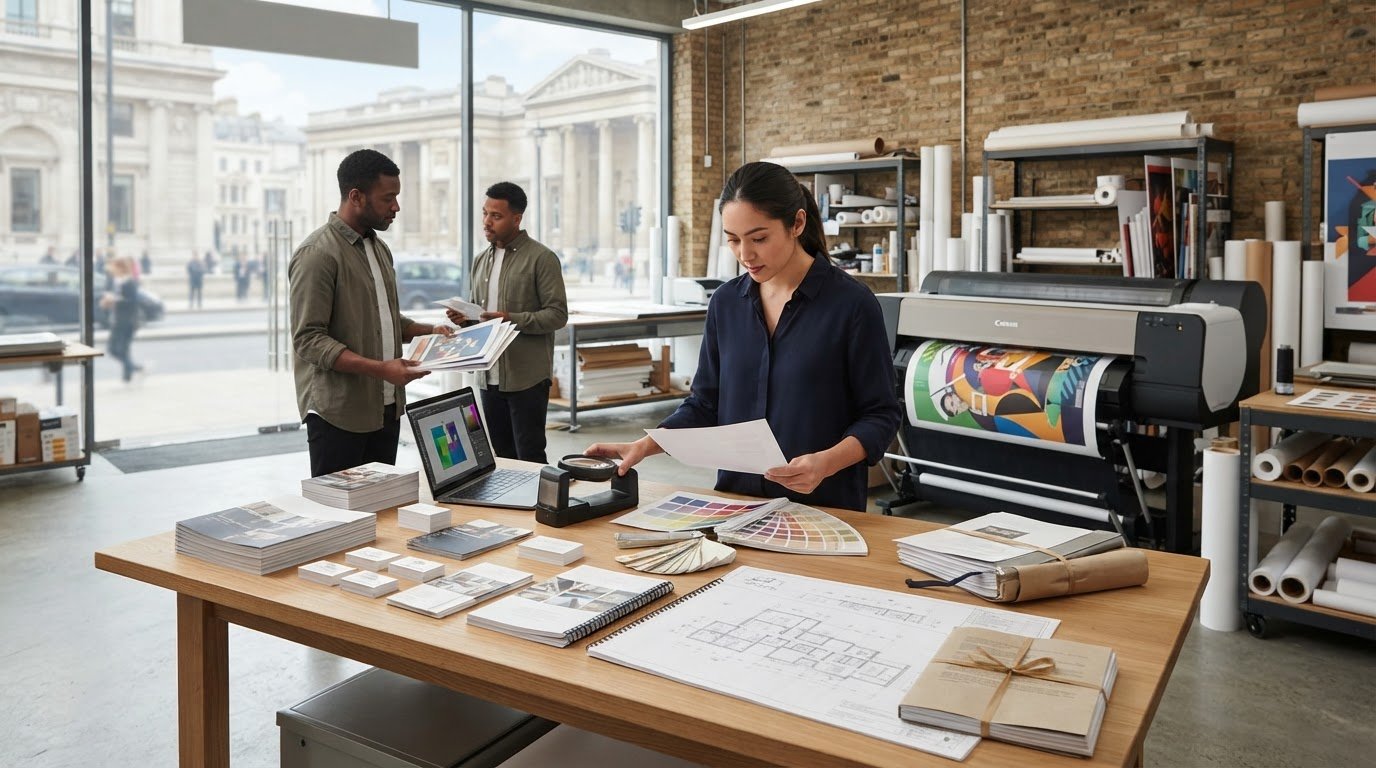
When you search “find a printer near me,” location is only the first check. The closest printer may not be able to produce the format or finish your project needs. Confirm that the provider can handle your job, review your files and meet your deadline before you place an order.
Comparing nearby options is especially useful when time is tight. This checklist helps you match a Central London printer to your print requirements and check the details that can affect production and collection.
Start by checking the provider’s capabilities against your job, whether you need brochures, business cards, posters, legal bundles, CAD plotting or wire binding. Before submitting artwork, confirm the file requirements and review details such as colour mode, image resolution, fonts and bleed. Then ask about the production schedule and collection arrangements, and confirm whether your specific job can be ready when you need it.
London City Print is based near the British Museum and has operated since 2009. Use the checks below to compare a nearby provider’s services, file requirements and turnaround with your project before ordering.
Key Takeaways
- When you search “find a printer near me,” compare providers by whether they can produce your specific format and finish, not by location alone.
- Prepare a clear job brief covering the product, finished dimensions, quantity, stock, colour, finishing and deadline before asking for confirmation.
- Ask what pre-flight file checks cover, including resolution, colour profile, fonts and bleed, so you can address issues before production.
- Confirm the turnaround for your exact job and check collection or delivery arrangements for your location before placing an order.
- Consider London City Print near the British Museum for services including brochures, business cards, posters, legal bundle printing, CAD plotting and wire binding.
Find a printer near me in Central London: start with the job
Need printed materials for a meeting, hearing or event? Start by identifying a printer that can produce your specific job, rather than choosing only by distance. The right nearby provider needs to match your format and finishing requirements, review your files and confirm a realistic turnaround.
A local printer is useful when its location and services suit your project. A nearby production facility may make collection or a direct conversation more practical, while an online ordering service may handle the process remotely. Neither option is automatically better. Check where production takes place, whether collection is possible and how the provider will deal with technical questions. Don’t assume every nearby printer offers the same services or opening arrangements.
Printing methods and production capabilities vary. If you want background on the printing process, use it to understand why different jobs may call for different production approaches. Then confirm directly that the printer can meet your particular requirements.
What does ‘printer near me’ mean for a London project?
For a Central London job, proximity matters if you need to collect materials, discuss a specification or coordinate a handover. But a convenient address won’t help if the printer can’t produce your document or meet your deadline. Check how the location fits your collection plan, and ask about arrangements instead of assuming you can visit or collect at any time.
When you search “find a printer near me,” compare practical fit: location, confirmed capability, file readiness and collection arrangements. A nearby provider might print brochures and posters, for example, but you should still confirm the format, quantity and finishing you need before sending artwork.
Identify the print job before contacting a provider
Give the printer enough information to assess the job accurately. Prepare these details before you call or submit an enquiry:
- Product and intended use: For example, business cards for a meeting, brochures for a product introduction, or legal bundle printing for case documents.
- Finished size and quantity: State the final dimensions and number of copies. Note whether you need a large format or custom dimensions.
- Colour and stock: Specify full colour or black and white, along with the paper or other stock you have in mind, if known.
- Finishing and document needs: Identify any binding, such as wire binding, or other custom finishing requirements. Ask the provider to confirm which options it supports.
- Deadline and collection: Give the date and time you need the job. Ask whether that exact specification can be completed, and when and where you can collect it.
Clear details help the printer identify questions before production begins. If you’re working to a tight deadline, ask for confirmation based on the specific product, quantity, finishing and file, rather than relying on a general turnaround estimate.
Check a Central London printer’s services against your requirements
A printer’s service list is a starting point, not confirmation that it can produce your exact job. Compare providers against the same brief to see which one can handle the product, format, finishing and deadline you need. For broader context on what professional providers may cover, read this professional printing services guide.
Use a simple comparison for each provider:
- Job type: Name the item, such as a brochure, poster, legal bundle or CAD plot.
- Format: State the finished dimensions, orientation and any non-standard size.
- Finishing: Specify what the finished item needs, such as wire binding, and ask the provider to confirm it can supply that option. Don’t assume every job needs extra finishing.
- Deadline: Give the date and time you need the completed work.
- Provider confirmation: Record whether the printer has confirmed the product, format, finishing and schedule for your exact specification.
This side-by-side check can reveal a mismatch early. A printer may list posters, for example, but you still need confirmation of the dimensions you require and the production schedule. London City Print lists brochures, legal bundle printing, CAD plotting and posters among its services. Its large-format printing can handle A0 size and beyond, but confirm that your dimensions and other requirements fit the service.
Which print capabilities should you confirm?
Ask whether the provider can produce your specific product at the finished size you need, with the finishing you’ve requested. For legal documents, clarify the reproduction and binding details your job requires. For technical documents such as CAD plots, state the output dimensions and intended use. A clear brief lets the printer assess your request instead of making assumptions.
File preparation also affects whether a job is ready for production. Check that your artwork has the correct dimensions, colour profile, resolution, fonts and bleed. Crown Connect’s pre-press checklist offers another reference for reviewing print files before you submit them.
How location and collection affect the choice
Compare the printer’s location with your route, deadline and collection plan. London City Print is based in Central London near the British Museum. A convenient location may help with collection, but don’t assume collection or delivery is included, or that a facility is open at a particular time. Confirm the arrangements directly and ask when your finished job will be ready for handover.
If its listed services match your requirements, include London City Print’s Central London print services in your comparison.
Compare nearby printers on file checks, quality and turnaround
A printer can assess your job more accurately when you provide the finished dimensions, quantity, stock, colour requirements and finishing details. These specifications help the team identify file issues or production constraints before work begins. They also make it easier to confirm whether your deadline fits the printer’s current schedule.
Pre-flight file checks are a technical review of resolution, colour profile, fonts and bleed before production. Ask what checks the provider performs and whether it will flag issues for you to correct. A clear process can help identify problems early, but confirm what the check covers and whether it applies to your job.
What to ask about print-ready files
Before sending artwork, confirm the printer’s file requirements for your specific product and finished dimensions. A high-resolution PDF can preserve layout, fonts and image quality, but the printer should confirm that your file is suitable for the job.
- Colour: Ask whether the file should use CMYK, the colour mode commonly used for process printing, or another profile.
- Bleed and crop marks: Confirm whether artwork needs bleed beyond the trim edge and crop marks to show where the page should be cut.
- Fonts: Ask whether fonts should be embedded in the PDF or supplied another way.
- File review: Check whether a file-checking service is available before production and what it reviews.
Don’t rely on assumptions based on a file that printed correctly elsewhere. Requirements can vary by product and printer. For wider context on the UK print trade, you can learn about the British Printing Industries Federation, a trade association for the printing industry.
How to assess deadlines without overpromising
State the exact completion time you need, along with the product, quantity, file status and finishing requirements. Ask the printer to confirm whether that specific job fits its current schedule. A general estimate may not account for a complex file, a finishing step or the requested quantity.
London City Print offers same-day service for most professional documents, but availability depends on the specific job and deadline. Confirm the product, quantity, finishing and file with the provider before relying on a same-day turnaround. When comparing printers, record the confirmed completion time and collection arrangements for each one. That gives you a practical basis for choosing without treating an unverified estimate as a commitment.
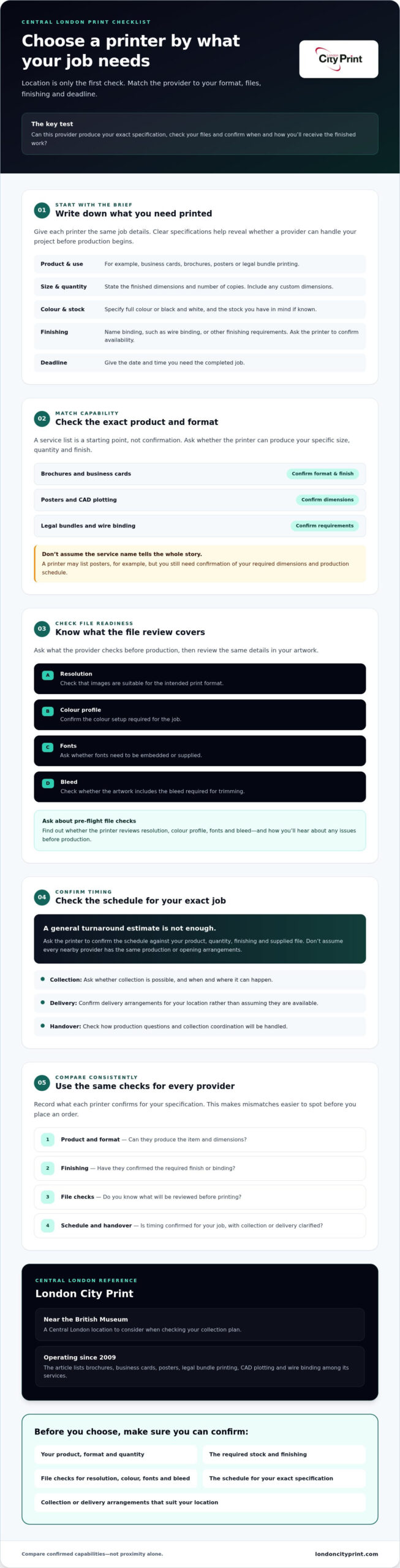
Use this checklist before choosing a printer near you
A complete print brief helps a local printer assess what it can produce, when it can be ready and how you can receive it. If you’re comparing providers, send each the same details so their responses are easier to evaluate.
Prepare the information a printer needs
- 1. Product: Name what you need, such as brochures, business cards, posters or legal documents.
- 2. Finished dimensions: Give the final width and height, including any custom dimensions. For folded or bound items, clarify the finished size and page format.
- 3. Quantity: State the number of copies or sets required.
- 4. Stock: Specify the paper or board you prefer, including the paper weight if you know it. Ask the printer to confirm suitable options if you’re unsure.
- 5. Colour: Confirm whether the job needs full colour or black and white. Include any colour-profile requirements you’ve been given.
- 6. Finishing: Describe binding or custom finishing options precisely. For example, say if a booklet needs wire binding instead of asking for a general “professional finish.”
- 7. Deadline and handover: Give the time and date the work must be ready. State whether you plan to collect it or need delivery, then ask the provider to confirm the arrangements.
- 8. Artwork and concerns: Attach the latest print file and identify any known issues, such as missing fonts, low-resolution images or uncertain bleed. Confirm which file version you want the printer to use.
Review the proof and production details
Before approving a proof, check every detail that could affect the finished item: wording, page order, dimensions, colour and requested finishing. A proof can help you review the layout, but ask the printer what it represents and whether it shows the final stock and finish. Send corrections clearly, then confirm that the updated version is the one approved for production.
If you’re ordering business cards, the business card printing guide can help you consider relevant choices before submitting your brief.
For an assessment of your requirements, contact London City Print about your print requirements and include your latest file, deadline and collection or delivery needs.
Choose a nearby printer that can deliver the right print outcome
The right choice combines four checks: a convenient location, confirmed capability for your specific product, artwork that meets the printer’s file requirements and a turnaround confirmed against your deadline. A nearby address is useful, but it cannot make up for a mismatch in format or finishing. Before you commit, check how the finished job will reach you.
London City Print is an independent commercial printer near the British Museum in Central London. Founded in 2009, it handles a range of commercial and technical print requirements. Consider its services if they match your brief, and confirm the job details and current arrangements directly.
When London City Print may fit your project
Its listed services include booklets and brochures, business cards, posters, legal bundle printing, CAD plotting and wire binding. For large-format printing, the business provides printing up to A0 size and beyond. Confirm your finished dimensions and other project specifications before sending the file. London City Print also states that business cards in one hour is a service, but check current availability and conditions for your order before relying on that timing.
Make your enquiry clear and actionable
Help the printer assess feasibility by sending the latest artwork with the finished size, quantity, stock, colour requirements and any binding or finishing details. State the exact time you need the job ready. If you have concerns about resolution, colour profile, fonts or bleed, mention them in your enquiry rather than waiting for production to begin.
Ask the provider to confirm that it can produce the stated specification and meet your deadline. Confirm collection or delivery arrangements for your location, including when the job will be ready for handover. A clear response gives you the information you need to decide whether the printer fits your schedule.
If you’re ready to find a printer near me for a Central London project, share your requirements with London City Print. Send the file and job details, then ask the team to confirm feasibility, turnaround and collection or delivery arrangements before proceeding.
Make your next print enquiry with confidence
To find a printer near me in Central London, look beyond distance. Confirm that the provider can produce your format and finishing, check what your files need, and get a clear answer on timing and collection or delivery before placing the order.
London City Print is an independent printer near the British Museum. Founded in 2009, its services cover commercial and technical print requirements, including brochures, posters, legal bundle printing and CAD plotting. Same-day service is available for most professional documents, but confirm availability for your specific job, quantity, finishing and deadline.
For a useful assessment, share your latest artwork, finished dimensions, quantity, stock and colour requirements. State when you need the work ready, then confirm the production schedule and handover arrangements directly. Clear specifications help you move forward with fewer unanswered questions.
Contact London City Print to discuss your print requirements. Share your project details and ask the team to confirm what’s feasible.
Frequently Asked Questions
How do I find a reliable printer near me in Central London?
To find a printer near me in Central London, first define your product, finished size, quantity, finishing requirements and deadline. Check that a nearby provider handles that exact job, then ask it to confirm current availability. Review its file requirements before sending artwork, including dimensions, colour and bleed. If collection or delivery affects your schedule, confirm the arrangements directly rather than assuming they’re included.
Can a local printer produce same-day printing?
Some print providers offer same-day service for certain jobs, but availability depends on the product, file readiness, quantity, finishing and current production schedule. Give the printer your exact requirements and ask it to confirm your deadline before placing an order. London City Print states that it offers same-day service for most professional documents. Confirm whether your particular job can be completed in time.
What should I send a printer for an accurate print quote?
Provide the product type, finished dimensions, quantity, colour requirements, preferred stock, finishing and required completion time. Attach the latest print-ready file and include special instructions, such as binding or a non-standard size. Ask whether the file meets the printer’s requirements for image resolution, CMYK colour, fonts, bleed and crop marks. These details help the provider assess your job and confirm next steps.
How can I tell whether my PDF is ready for printing?
Check that your PDF uses the correct finished dimensions, has suitable image resolution, includes any required bleed and crop marks, and handles fonts correctly. Confirm the required colour profile with your printer, including whether it needs CMYK. Specifications can vary by product and production method, so don’t assume a file is ready just because it looks correct on screen. If you’re unsure, ask the provider to review it before production.
Is a nearby print shop better than ordering online?
A nearby provider may suit you if you need to discuss technical details, arrange collection or clarify a deadline directly. An online service may work well for a standard job that you can specify clearly without local coordination. Compare each option against your project’s requirements: confirm product and finishing capabilities, find out what file checks the provider performs, and verify the turnaround and collection or delivery arrangements.
Can I get business cards printed in one hour in London?
London City Print lists business cards in one hour as a service, but confirm current availability before relying on that timing. Provide the finished size, quantity, stock, artwork and any finishing requirements, then ask whether your file is ready for production. Confirm collection arrangements as well. Don’t assume every card specification or order can meet the same turnaround.
What file details should I check before sending artwork to a printer?
Check the finished dimensions, image resolution, colour profile, fonts, bleed and crop marks against the printer’s specifications. Use a high-resolution PDF when it suits the job, and make sure it contains the final approved design. Ask whether the provider performs pre-flight file checks and what they cover. This review can help identify file issues before production, but confirm any changes with the printer before approving the artwork.
Ready to compare your options? Send London City Print your artwork and job specifications and ask the team to confirm feasibility, turnaround and handover arrangements.