Before you compare cad plotting services london, check that your drawing’s scale and output settings match the printed copy you need. A printer can only produce the result your file and instructions specify, so confirm the dimensions, page setup and key details before sending your work.
You may be unsure whether your file is ready, which formats a print service accepts, or whether the job can meet your deadline. This guide explains how to check drawing scale, dimensions, line weights and page setup, and what to confirm about file formats and plotted output before you submit your drawings.
London City Print provides CAD plotting from its Central London facility near the British Museum, with large-format printing up to A0 and beyond. Same-day service is available for most professional documents, but CAD-specific availability and timing need confirmation. Use the checks below to prepare your files, avoid preventable production issues and see whether the service suits your schedule.
Key Takeaways
- Check your drawing’s dimensions, intended scale, orientation and page setup before exporting it for print.
- Review output settings carefully. “Fit to page” can shrink a drawing and change its intended scale.
- When comparing cad plotting services london, confirm accepted file formats, available dimensions, colour handling and deadlines before submitting your job.
- Use a pre-submission check to catch scale, layout and file issues that could affect legibility or delay production.
- London City Print has provided printing services since 2009, with a Central London facility near the British Museum and large-format printing up to A0 and beyond.
What CAD Plotting Services in London Provide for Your Project
CAD plotting turns computer-aided design files into physical technical drawings. Printed plans can help you review a drawing on paper, share project information with colleagues or refer to details during project work. When comparing cad plotting services london, check whether the provider can produce the dimensions and output your drawing requires. A technical plan has different needs from a standard poster.
Technical drawings use precise linework, dimensions, symbols and annotations to communicate information clearly. A poster may prioritise visual impact, but a plotted plan must keep details legible and retain its intended scale. The conventions of technical drawing help explain how these drawings convey information consistently. Before sending a file, identify how people will use the printed copy and which details they need to read.
Which projects commonly need plotted CAD drawings?
Architectural, engineering and construction teams may need physical copies of plans and other project drawings for review, coordination or site work. For example, a team might refer to a building plan during a discussion or check drawing notes while coordinating project tasks. These are common uses, not claims about London City Print’s specialisms.
Start by identifying the drawing’s purpose. A plan for close review may need a different output size from one intended for a broader coordination discussion. Consider who will read it, where they will use it and which annotations or dimensions must remain clear. Use those requirements to choose the output size and orientation.
What does large-format plotting mean in London?
A0 is a recognised paper-size reference, not the only possible output dimension. London City Print offers large-format printing up to A0 and beyond. Ask the team which dimensions it can produce for your drawing, and confirm the required output before preparing the final file.
Tell the print provider the finished dimensions and intended use. If you have a specific colour or monochrome requirement, ask whether it can be met rather than assuming a particular option is available. London City Print provides CAD plotting as part of its technical and large-format printing services. Confirm the output dimensions and requirements before submitting, especially if the plan must match a defined scale or project specification.
Prepare CAD Files for Accurate Plotting in London
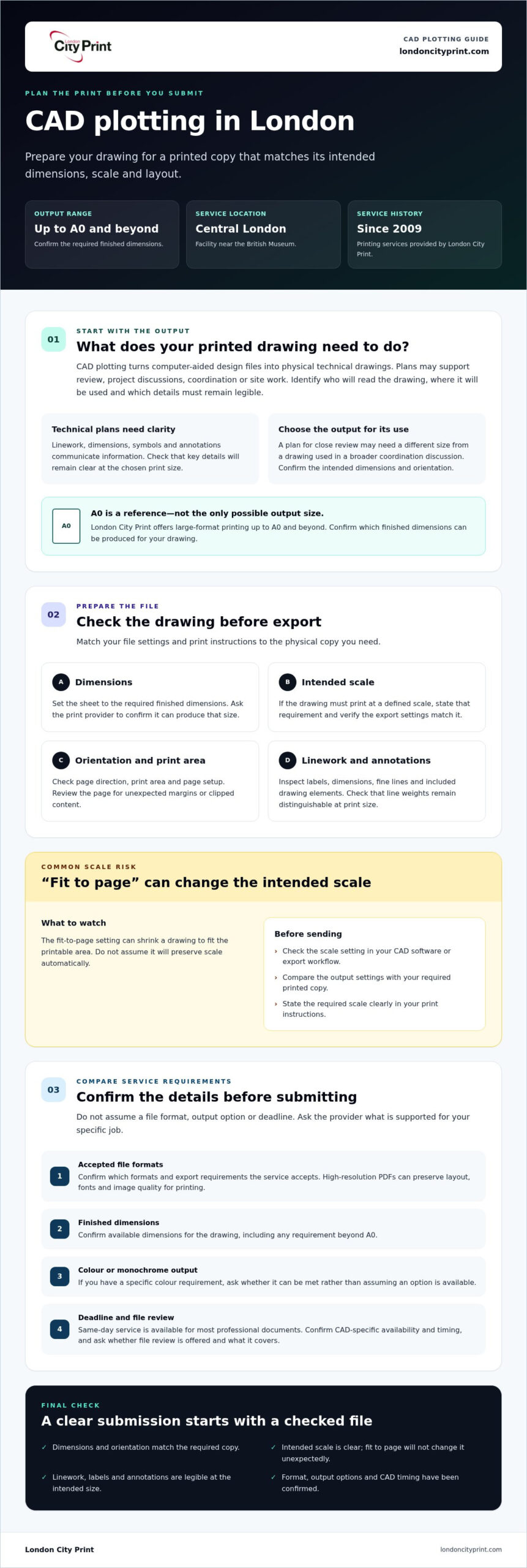
A carefully prepared drawing helps prevent avoidable print issues and keeps key details clear on the page. Before exporting, check the drawing dimensions, intended scale, orientation and page setup. Then compare the export settings with the requirements for the printed copy. When arranging cad plotting services london, state the required dimensions and scale clearly in your instructions.
Check dimensions, scale, and page setup before sending
Confirm that the plotted sheet dimensions suit the drawing and its intended use. Check the page orientation, print area and scale settings in your CAD software or export workflow. The fit to page option can shrink a drawing to fit the printable area, changing its intended scale. Don’t assume this setting will preserve scale automatically.
If the drawing must print at a defined scale, state that requirement clearly and verify that your output settings match it. For planning work, review the relevant planning application requirements alongside any instructions for your project. Requirements can vary, so check the applicable guidance rather than assuming one print setup suits every submission.
Review drawing detail and exported files
Inspect the exported file before sending it. Zoom in on labels, dimensions and fine linework, then review the full page for unexpected margins or clipped content. Check that the layers and drawing elements you need appear in the export, and that line weights remain distinguishable at the intended print size. A line that looks clear on screen may be hard to read on paper if its weight or contrast is too low.
Where your workflow supports them, high-resolution PDFs can preserve layout, fonts and image quality for printing. Still, don’t assume a particular format or export setting is accepted. Confirm the supported formats and export requirements with London City Print before sending the job. Ask whether the team offers a file review for your order and what that review covers.
- Dimensions: Match the output sheet to the drawing requirement.
- Scale: Check that fit to page won’t change the intended scale.
- Orientation: Verify the page direction and print area.
- Legibility: Review line weights, labels, layers and margins at print size.
- File setup: Confirm the accepted format and export settings before submission.
These checks help you approach cad plotting services london with clear requirements and fewer preventable file issues. For details about London City Print CAD plotting, confirm the file and output requirements for your drawing before sending it.
Compare CAD Plotting Options and Confirm Your London Print Requirements
The right output depends on what your drawing needs to communicate and how you’ll use the printed copy. Before choosing a provider, list the requirements for each drawing set and ask which ones it can meet. Autodesk’s overview of Computer-Aided Design (CAD) explains its use in creating technical designs. Your print brief should specify how those designs need to appear on paper.
Which print requirements should you compare?
Use a short specification to compare options and avoid assumptions about dimensions, colour or schedule. Write down one clear requirement for each drawing set, then confirm the provider can meet it. Treat media choices and colour handling as questions to ask, not standard features.
| Requirement | Specify for your drawing | Confirm with the provider |
|---|---|---|
| Dimensions and orientation | Required sheet size and portrait or landscape layout | Whether the requested dimensions and orientation are available |
| Colour output | Colour or monochrome, based on how the drawing uses colour | How colour handling works and whether the requested output is supported |
| Intended scale | The scale the printed drawing must retain | How the output settings will preserve that scale |
| Media and handling | Any project-specific media, collation or finishing needs | Which options are available for this job |
| Deadline | When you need the completed drawings | Whether the schedule is achievable and how collection will work |
Technical plans and posters serve different purposes. Plans prioritise accurate drawing detail and specified dimensions, while posters usually communicate visually. If you’re deciding which type of print suits your project, see the London large-format poster printing guide.
How should you assess a London plotting provider?
First, check that the provider offers CAD plotting. Then ask it to confirm the requested dimensions, scale and output. When comparing cad plotting services london, look for clear answers about how to flag file issues, when the job schedule can be confirmed and what collection arrangements apply. Don’t assume a provider accepts your file format, offers a particular media or colour option, or can meet your deadline until it confirms those details.
Send one concise specification with each drawing set. Include the output requirements and deadline, and ask about any handling needs rather than assuming a finishing option is available. This gives the provider a clear basis to assess the job and helps you compare options without relying on unverified claims about equipment, quality or turnaround.
Avoid Scale and File Errors Before Your CAD Plotting Deadline
A final review can catch issues that affect scale, legibility or production timing. This is especially useful when you’re preparing several drawing files or working to a fixed project deadline. Complete these checks before submission, then confirm the job details with the print team.
A practical pre-submission checklist for CAD drawings
- Confirm dimensions and scale. Check the required sheet size and intended drawing scale against your project requirements. State both clearly when you submit the files.
- Check orientation and colour. Verify whether each drawing should print in portrait or landscape, and whether you need colour or monochrome output. Confirm that the requested colour handling is available.
- Review the exported file. Open it and inspect the full page, then zoom in to check labels, dimensions, line weights and other key details. Make sure the drawing isn’t clipped and remains readable at the intended print size.
- Verify output settings. The fit to page option can shrink a drawing to fit the printable area, which may change its intended scale. Check the export and print settings rather than assuming the original scale will carry through.
- Confirm file requirements. Ask the printer which formats and export settings it accepts, and whether it offers a file review for your job. Don’t assume a particular checking process is included.
Plan around a project deadline in Central London
Contact the print team early if your job includes multiple files or a fixed deadline. Share the number of drawings, their dimensions, your required output and when you need them. Be clear about whether the files are final or still need review. This gives the team the information it needs to confirm the schedule and raise any questions before production.
London City Print offers same-day service for most professional documents, but CAD-specific availability and timing need confirmation. Ask how collection will work, and clarify any delivery arrangements instead of assuming they’re available. For wider context on print support, read about professional printing services in London.
For cad plotting services london, confirm the file requirements, output details and deadline directly with the print team. Review your printing options with those job details ready.
Arrange CAD Plotting Services with London City Print
Once you’ve settled your drawing requirements, include them with your enquiry so the team can assess the specific job. London City Print provides CAD plotting and large-format printing up to A0 and beyond. Its Central London facility is near the British Museum, and the business has operated since 2009.
What to include in a CAD plotting enquiry
Give the team a clear outline of the files and finished drawings you need. Include:
- Quantity: The number of drawings or copies required.
- Dimensions and scale: The required output size and intended scale for each drawing set.
- Colour requirements: Whether you need colour or monochrome output.
- File details: The file format you plan to send and any uncertainty about export or print settings.
- Deadline: When you need the drawings, especially if the job includes multiple files or a fixed project date.
These details help the team assess what the job requires, but they don’t confirm that a particular format, dimension or schedule is available. Ask the team to confirm what it can produce for your files and deadline.
Confirm the next steps before production
Before authorising production, ask the team to confirm that it can open the submitted files and produce the requested output dimensions. Clarify whether you need to correct or re-export anything. Agree the schedule, then check whether collection or delivery arrangements suit your plans. Don’t assume a file review, turnaround or delivery option is available until the team confirms it.
If you need cad plotting services london, send your requirements early, particularly when several drawings need consistent output. London City Print offers same-day service for most professional documents, but confirm availability and timing for your CAD job directly.
Move Your CAD Plotting Job Forward
Reliable cad plotting services london start with clear requirements and confirmed output. Before sending your drawings, check that the intended dimensions, scale and orientation match your project needs. Then confirm accepted file formats, colour handling and the schedule with the print team, especially if your deadline is fixed.
London City Print provides CAD plotting and large-format printing up to A0 and beyond. The company has operated since 2009, with a Central London facility near the British Museum. Share your drawing quantity, dimensions, file details and required deadline so the team can confirm whether the specific job and arrangements are suitable.
Frequently Asked Questions
What are CAD plotting services?
CAD plotting services produce physical technical drawings from computer-aided design files. Professionals may use printed architectural, engineering or construction drawings to review plans, coordinate project work or refer to details on site. Unlike an ordinary poster, a plotted drawing needs to preserve technical information such as dimensions, labels and linework. When comparing cad plotting services london, confirm the required size, scale and output with the print provider.
Can I get CAD drawings printed in London on the same day?
Same-day CAD plotting may be possible, but confirm availability and timing for your specific job. London City Print offers same-day service for most professional documents, but that doesn’t confirm same-day production for every CAD order. Contact the team with your file status, drawing quantity, dimensions and deadline, and ask it to confirm the schedule before relying on it for a project date.
What file format should I send for CAD plotting?
Ask the print provider which file formats and export settings it accepts before sending your drawing. Requirements can depend on the file and the output you need, so don’t assume that a format used within your design team will suit the plotting workflow. If you’re unsure, tell the team what software or export method you used and confirm whether it needs a different version or any corrections before production.
How do I make sure my CAD drawing prints to scale?
Set and check the intended scale in your drawing and export settings, then state it clearly in your print instructions. Check the required sheet dimensions and orientation too. Avoid selecting fit to page without verifying the result, because this setting can shrink a drawing and alter its scale. Review the exported file before sending it, and ask the printer to confirm the output settings for your job.
What size can London City Print plot?
London City Print offers large-format printing up to A0 and beyond. Confirm the specific dimensions available for your CAD drawing with the team before submitting the job. Share the required finished size and intended scale, and ask whether the requested output suits your file. Don’t treat A0 as the maximum size or assume every dimension is available for every order.
Where is London City Print located?
London City Print has a Central London facility near the British Museum. If you plan to collect CAD drawings, confirm collection arrangements and timing with the team when you enquire. Share your required deadline and ask about the next steps for your order. The location information doesn’t confirm delivery availability, so clarify any delivery needs directly rather than assuming the service covers your destination.
Contact London City Print about CAD plotting with your drawing dimensions, file details and required deadline to confirm the next steps for your job.