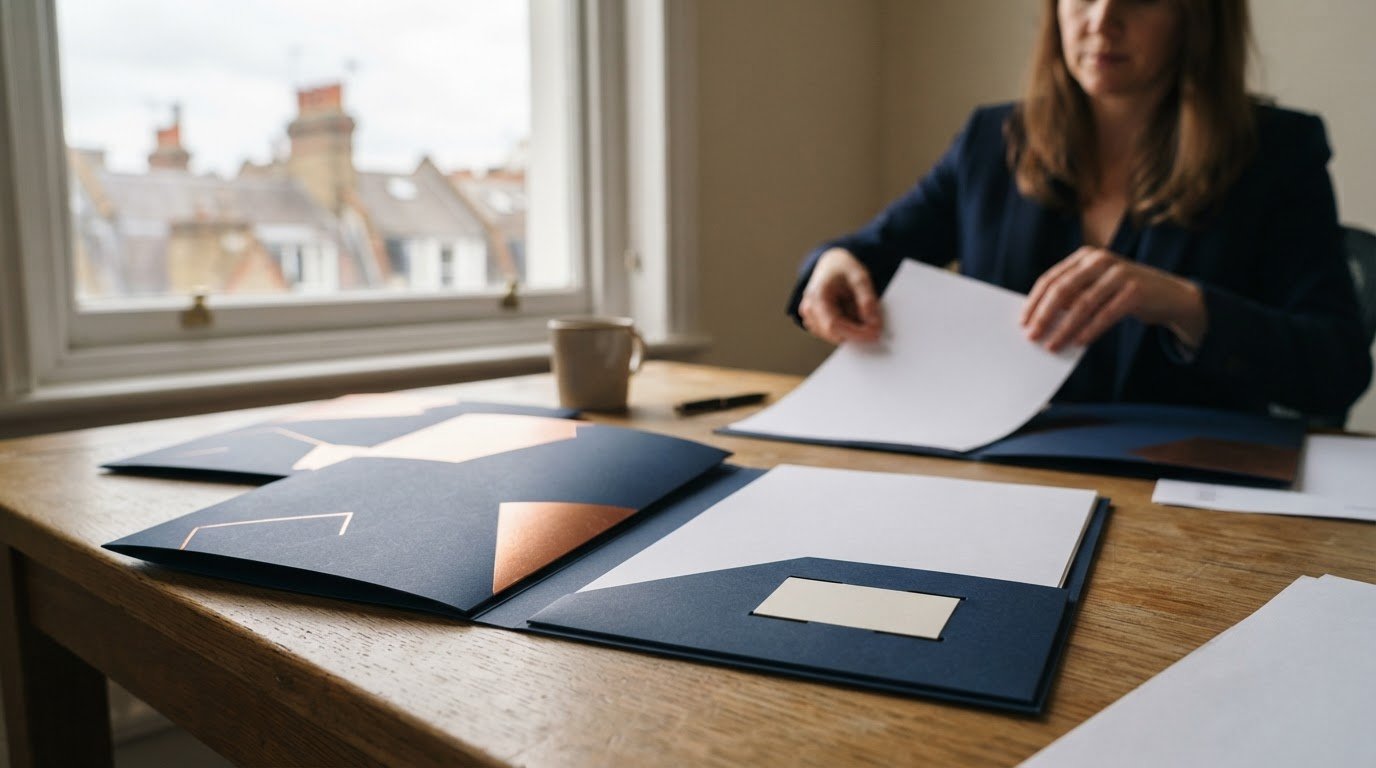
A branded presentation folder does more than carry documents. Its size, pocket layout, finish and artwork all shape how your materials come across. The logo matters, but the details around it determine whether the folder suits your documents and the impression you want to make.
You may already know the look you want, but practical choices matter too. This guide explains which folder details you can customize, what sizes and styles are available, and how to compare minimum order quantities and product tiers before you commit.
You’ll also see how to weigh paper, print finishes, pocket capacity and business card slots against the contents you plan to include. With those choices clear, you can brief a professional printer confidently and keep the folder aligned with its purpose.
Key Takeaways
- Choose artwork, pocket layout and business card slots to match how you’ll present your materials.
- Match folder dimensions and pocket capacity to the documents and inserts you plan to include.
- Compare minimum order quantities across folder types before settling on a specification.
- Consider how stock, print method and finish affect the look and feel of your folders.
- Use product tiers to balance design flexibility with the practical needs of your order.
What Can You Customize on Your Folders?
You can tailor the logo, contact details, artwork, stock and coating to the folder’s purpose. Prioritize the changes that help clients identify your business and organize the contents.
Logo and Contact Information
Place your logo where it stays visible when the folder is closed, such as on the front cover. Add only the contact details recipients need, such as your company name, phone number or email address. A sales folder, for example, might show the logo outside and a sales contact inside. Keep text clear of folds and pocket edges.
Artwork and Print Customization
Custom-printed folders can carry full artwork, a logo, brand colours and supporting text. Supply a high-resolution PDF with fonts embedded, and keep important text inside the safe area. Before approval, a print provider should run pre-flight file checks for resolution, colour profile, fonts and bleed. Review the proof for logo placement, spelling, colour consistency and alignment across folds.
To order online or locally, choose a commercial print provider that accepts your artwork and supplies a proof for approval. Working with an experienced print specialist like ideasfactory makes it easier to verify technical requirements before production begins. Confirm the selected design, quantity and delivery arrangements in the order details. A clear brief helps the provider prepare custom folders that match your brand without adding unnecessary design elements.
Paper Stock and Coatings
For durability, choose stock and finish to suit how often people will handle the folder and what it needs to hold. A finish can protect printed surfaces from handling, while heavier stock can give the folder a firmer feel. Review a sample or proof before approving the specification. Make sure the finish keeps small text legible and avoids unwanted glare.
Eco-Friendly Folder Options
Recycled paper and FSC-certified paper are eco-conscious stock options to consider for custom folders. Check that the chosen stock suits the printed colours, folds and intended use. A lighter-weight option, such as 100 lb Gloss Text, is listed for lighter-weight, high-volume orders. Match the material to the folder’s job rather than adding features that won’t support its use.
Focus the artwork on essential brand elements, then select stock and coating based on handling needs. Share the finished folder size, insert list and brand assets in your brief. These details help the printer assess layout, proofing and production requirements before you approve the job.
Folder sizes for letter- and legal-size documents
Match the folder’s closed dimensions to the paper it must hold. A standard 9 × 12-inch folder suits letter-size documents, while legal-size paper needs a larger format. Also account for inserts, such as a business card or a real estate fact sheet, before choosing pocket depth.
Choose a folder that accommodates legal-size documents without folding them. That extra space allows the folder to contain the full sheet without folding it. Use this format for contracts, agreements or other documents prepared at legal size.
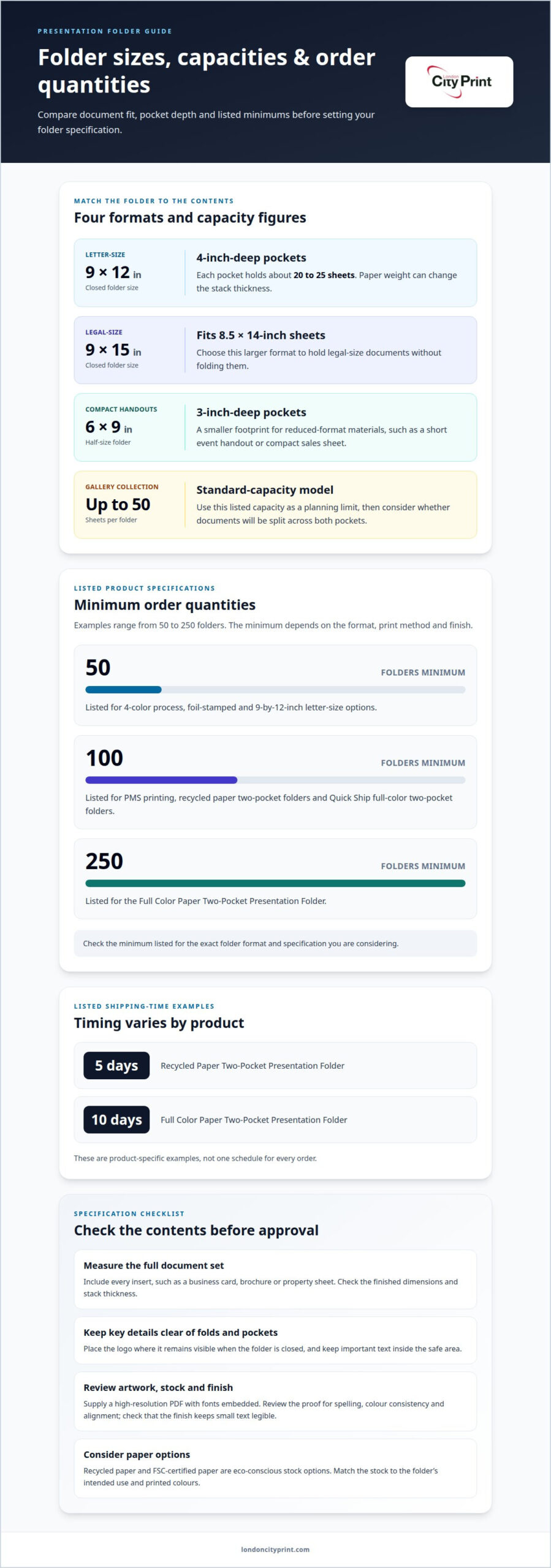
A standard 9 × 12-inch folder is designed around letter-size materials. Its pockets are 4 inches deep, and each pocket holds about 20 to 25 sheets. The actual stack thickness can vary with paper weight, so consider the full set of documents rather than counting pages alone.
Capacity differs between folder formats and product types. Gallery Collection standard-capacity presentation folders hold up to 50 sheets. Treat that figure as a useful limit for planning, then consider whether your documents will be split across both pockets or placed together on one side.
Smaller formats suit compact handouts rather than full-size proposals. A 6 × 9-inch half-size pocket folder has pockets that are 3 inches deep. It can organize reduced-format materials, such as a short event handout or a compact sales sheet, without the footprint of a letter-size folder.
Before selecting a size, group the materials you plan to include and check their finished dimensions. Account for every insert, such as a business card, brochure or property sheet. This gives the printer a clear specification and helps prevent important text from sitting too close to folds or pocket edges.
- Letter-size pack: Choose a 9 × 12-inch folder for standard letter documents.
- Legal-size pack: Allow for 8.5 × 14-inch sheets in a folder measuring 9 × 15 inches closed.
- Compact handouts: Consider a 6 × 9-inch format with 3-inch-deep pockets.
Review the flat artwork against the folder template before approval. Confirm that the cover, panels and pockets align with the finished format. Check the document stack against the stated capacity, especially if the folder must hold a proposal and a business card. Accurate dimensions help the printed design and final contents work together.
What is the minimum order quantity?
Minimum order quantities vary by folder type: listed examples start at 50 and reach 250 folders. Listed shipping times include 5 days for a recycled paper two-pocket folder and 10 days for a full-color paper two-pocket folder. These are product-specific examples, not a single schedule for every order.
Check the minimum for the exact format, print method and finish you’re considering. A 4-color process folder has a listed minimum of 50 folders, while a PMS-printed version has a listed minimum of 100. Foil-stamped folders also have a listed minimum of 50.
Product specifications can change the threshold. A 9-by-12-inch letter-size presentation folder has a listed minimum of 50 folders. The Recycled Paper Two-Pocket Presentation Folder and Quick Ship Full Color Two-Pocket Presentation Folder each have listed minimums of 100. The Full Color Paper Two-Pocket Presentation Folder has a listed minimum of 250.
- 50 folders: Listed for 4-color process, foil-stamped and 9-by-12-inch letter-size options.
- 100 folders: Listed for recycled paper and Quick Ship full-color two-pocket options.
- 250 folders: Listed for the Full Color Paper Two-Pocket Presentation Folder.
Use those tiers to narrow the specification before preparing your order. For example, a team needing fewer than 100 folders could compare options with a listed minimum of 50. A larger distribution may suit a tier with a higher minimum. Confirm the folder format and print method match your artwork, pocket layout and quantity needs.
Quantity also shapes production planning. Work out how many folders you need for each recipient, event or sales team, then account for distribution across locations or departments. For an everyday handout, a standard two-pocket layout may be enough. Different specifications, such as additional finishing or a particular colour process, can affect production requirements.
Turnaround depends on the selected product and its production schedule. The listed 5-day shipping time applies to the Recycled Paper Two-Pocket Presentation Folder; the listed 10-day shipping time applies to the Full Color Paper Two-Pocket Presentation Folder. Treat these as product-specific shipping details, not universal delivery times. Check how production and shipping fit your event date.
Before placing an order, align the folder type, quantity and required arrival date. Then confirm the colours, pocket configuration and artwork in the order details. This helps prevent a mismatch between the quantity you need and the specification you choose.
Folder styles and product tiers
Folder tiers range from simple stock designs to tailored print and pocket configurations. Choose by weighing artwork flexibility, business card placement and how you’ll use each folder. A folder for property meetings may need different inserts from one used for an estate agency’s sales pack.
Stock folders use existing designs, while custom-printed formats let your artwork shape the finished look. Gallery Collection stock presentation folders have pre-designed artwork that cannot be changed. They can include a business card slot in the left pocket, right pocket or both. This option suits teams that need a consistent layout with a defined card position.
Compare print and finish options against the information your folder needs to carry. Four-colour process printing can reproduce detailed artwork and brand colours, while foil stamping gives a specific area a metallic effect. Keep the logo, contact details and key message prominent. Use supporting panels for secondary information, such as property details or a meeting agenda.
Pocket count also separates product tiers. The Master Presentation Folder has 10 pockets, making it suited to organizing several document groups. A standard two-pocket design offers a simpler structure for a meeting pack with a brochure, proposal and business cards. Choose the layout around the inserts, rather than selecting extra pockets without a clear filing purpose.
Stock weight affects the folder’s feel and structure. The S-01E Economy folder uses 14pt C2S stock. The S-01 Standard folder can use 14pt stock or an upgrade to 16pt stock. Compare the stock choice with the amount of material the folder will carry and how often recipients will handle it.
- Stock design: Consider Gallery Collection when its fixed artwork and card-slot options suit your needs.
- Economy tier: The S-01E uses 14pt C2S stock.
- Standard tier: The S-01 offers 14pt stock or a 16pt upgrade.
- Multi-section format: The Master Presentation Folder has 10 pockets.
Before choosing a folder, list the documents, business cards and other inserts for a typical meeting. Match the pocket configuration and stock to that pack. Decide whether you need fixed stock artwork or customized branding, and confirm the card slot’s position. These criteria make comparisons practical and keep the finished folder suited to its use.
What materials and sizes are available for custom presentation folders?
Folder specifications vary by material, finished format and capacity. Options can include recycled paper, linen paper, full-colour paper and poly folders. Choose a material that suits the impression you want to create, then consider how much content the folder must hold. A pack with contracts and inserts needs a different capacity from a light handout set.
Capacity folders provide a useful alternative when standard pockets may not fit a thicker document pack. Large Capacity Presentation Folder options include 1/4-inch and 1/2-inch capacities. Match the capacity to the assembled contents, including any brochures or loose sheets. This helps avoid choosing a folder that cannot accommodate the complete pack.
Material and capacity work together. Linen paper may suit a presentation where surface appearance matters, while recycled paper offers a different material choice. Poly folders provide another option. Compare materials with how the folder will be used and what it needs to carry.
Finished size also affects how the artwork sits across the cover and interior panels. Use the selected product’s dieline or template to position logos, headings and background colours. Keep key design elements clear of folds, pocket edges and trim areas. A property proposal, for example, may place its title on the cover and supporting details inside.
Prepare the specification around the complete pack rather than a single sheet. Group the documents, brochures and inserts in their intended order, then assess the required folder capacity. If the pack contains a thick report, compare the 1/4-inch and 1/2-inch capacity choices against its assembled thickness. That makes the format decision more practical.
- Material choices: Consider recycled paper, linen paper, full-color paper or poly formats.
- Thicker packs: Compare 1/4-inch and 1/2-inch capacity folders.
- Artwork setup: Use the product template to position design elements around folds and pockets.
Before production, review the artwork against the selected folder template and check the finished layout. Make sure the cover design reads clearly and important information avoids folds and pocket edges. This can catch layout issues that are not obvious in a flat digital file.
Give the printer the chosen material, capacity and complete insert list together. For example, specify a linen paper folder with enough capacity for your report and brochure pack. A complete specification helps prepare artwork for the right product and assess whether the finished folder suits its intended use.
London City Print
London City Print helps you prepare coordinated printed materials to accompany your presentation folders. If your pack needs supporting product information, Booklets and Brochures can carry detailed content, while wire binding keeps multi-page documents together. Posters and Roller Banners can extend the same campaign message into event or meeting spaces.
Plan the folder contents as one set: align artwork, colours and messaging across supporting pieces, then choose formats that suit how recipients will use them. For a document-heavy pack, consider whether a booklet or wire-bound piece will make information easier to handle. Keep the approved artwork and specifications consistent across each item.
For help planning related printed materials, contact London City Print.
Put Your Presentation Pack Into Production
Your folder is one part of a wider client experience. Keep the same visual direction across its contents and supporting materials, so each piece feels connected from the first meeting onward. Branded presentation folders can anchor that system, while carefully matched print pieces make the information easier to present and follow. For broader promotional campaigns or corporate events, businesses often coordinate physical folders with branded merchandise, such as sourcing custom t-shirt printing Dallas for business to reinforce company identity across every touchpoint.
London City Print offers Booklets and Brochures for in-depth product information, Posters for campaign messaging, and wire binding for documents that need to stay together. Choose the materials that support your presentation, then prepare the artwork and specifications as one coordinated brief.
With the format and design decisions in place, you can move from planning to a print-ready order. Discuss your folder project with London City Print and take the next step with a clear direction for your presentation materials.
Frequently Asked Questions
Why Do Presentation Folders Matter So Much?
Presentation folders help you deliver information as a deliberate, organized package. They work well for client onboarding, sales appointments and event handouts, where recipients may need to keep materials for later reference. A folder can also make the next action clear: include a contact person, meeting agenda or follow-up document so recipients know what to do after reviewing the contents.
Do folders include business card slots?
Some folder designs include a business card slot, giving recipients a convenient way to keep your contact details with the materials. Consider whether they will use the card during a meeting or keep it for follow-up. That intended use helps you decide whether a slot adds practical value to your design.
How long does production take?
Timing depends on the production schedule and how quickly the job moves through artwork preparation, approval and printing. Your required arrival date, delivery arrangements and any artwork changes also affect planning. Share your deadline and the status of your files when requesting a quote. This gives the production team the information needed to plan and coordinate the order.
What folder sizes are available?
Folder options include standard formats for letter- and legal-size documents, as well as compact and higher-capacity designs. Consider how recipients will use the pack, including whether they need to carry it or file it after a meeting. If your materials include different document formats, prepare a contents list so the folder suits the complete pack, not just its largest sheet.
What are branded presentation folders?
Branded presentation folders are customized to carry a business’s identity and support its communications. Companies use them to assemble information for sales meetings, proposals, events and client handovers. A folder keeps related materials together and gives recipients a clear point of reference when they revisit the pack. Its design should suit both the brand and the purpose of the documents inside.
What printing and finishing options can be used for branded folders?
Your options depend on the folder specification and the artwork you want to reproduce. Provide your brand assets, approved wording and any guidelines for using logos or colours. Explain how recipients will handle the folder, whether at a formal presentation or as a frequently used reference pack. This context helps the print team recommend a suitable production approach without unnecessary design elements.
What should I check before approving folder artwork?
Check that the artwork matches the folder format and that logos, colours and wording follow your brand guidelines. Confirm that the layout leaves space for the contents and any business card slot. Review the final design carefully, including text placement and any finishing details, before approving it for printing. This helps the production team prepare the folder as you intended.
How does a print provider prepare a branded presentation folder for printing?
Start by gathering your brand assets, final wording and project requirements. London City Print’s in-house graphic design team can create or fix artwork for a print job. The team can prepare the design around your chosen folder format and coordinate production. Approve the final content and branding carefully so the finished order reflects the presentation you intend.