A larger online catalogue doesn’t always mean a better fit for your next print job. If you’re looking for a vistaprint alternative for business printing, start with the item, its finished size and binding or other finishing needs, then set the deadline.
Online ordering can suit standard materials when your artwork is ready and the product fits a set specification. Technical files, custom dimensions and deadline-sensitive work can need a more tailored production process. Compare providers by the job they can produce, not just by the number of products in their catalogue.
This guide explains how to compare print service models and choose support for business cards, brochures, posters, bound documents and technical materials. You’ll find practical checks for file dimensions, colour, bleed and finishing, so you can give the production team a clear brief. London City Print offers same-day service for most professional documents and business cards in one hour. These turnaround details apply to the stated services, not every print product.
Key Takeaways
- Choose a vistaprint alternative for business printing by matching the provider’s production model to your job, not just its product catalogue.
- Define the item, quantity, dimensions, finish and deadline before comparing print options.
- Separate marketing materials, bound documents and technical print jobs to identify the production support each needs.
- Prepare approved artwork with the correct dimensions, colour setup and bleed to help keep production on track.
- London City Print produces business cards, brochures, posters, wire-bound documents and legal bundles.
What Makes a VistaPrint Alternative Right for Your Business?
Start by deciding what kind of production process your job needs. You might need a self-service order for familiar materials, fulfilment for individual ecommerce orders, or professional print production for a specific business project. The right option depends on the item, artwork, finish and deadline. A broad online catalogue is useful for comparing standard products, but it doesn’t tell you whether a service suits a technical document or a tightly scheduled order.
A vistaprint alternative for business is a provider whose formats, finishing options, production support or timing better match your requirements. Choose according to the work in front of you, not the size of the product catalogue. This keeps your comparison focused on what the finished job needs.
Which business print jobs need more than a basic online order?
Business cards, flyers and brochures are common commercial materials. A repeat order with approved artwork and standard dimensions may suit a straightforward online workflow. You still need to specify the quantity, stock and finish accurately, but the job can be described using familiar product details.
Other projects need closer attention to layout and production. Legal bundles require the pages to be in the intended order and assembled as specified. CAD plotting depends on preserving the drawing’s dimensions and scale. Bound documents need a suitable binding method and a clear page sequence. These requirements affect how you prepare the file and how the finished item should be produced.
Before submitting artwork, confirm the final size, page orientation and bleed. Bleed is the extra artwork beyond the trim edge that prevents unprinted slivers when a design runs to the edge of the page. Set up colour for the intended print process, such as CMYK for full-colour print, and check that the file reflects the approved design. As the History of Printing illustrates, printing involves distinct methods and processes. For your order, focus on the process that suits the finished item.
When does an online print platform still make sense?
Self-service platforms can be convenient for familiar, repeatable orders when your artwork is ready and the product fits a standard specification. You select the format, enter the order details and submit the file through an online process. This works well when you can prepare the artwork yourself and don’t need unusual handling or detailed production guidance.
Print-on-demand services often support ecommerce businesses that need individual orders fulfilled as customers buy. That workflow differs from producing a set of business documents, technical drawings or bound corporate material for a particular deadline.
Neither model suits every job. For ecommerce orders, consider how the fulfilment process fits your sales operation. For professional print production, focus on the document’s format, file preparation and finishing requirements. This gives you a practical basis for comparing alternatives.
Compare VistaPrint Alternatives by Business Print Requirements
Compare providers by the work they produce, not only by the labels they use. “Online printer” and “commercial printer” describe broad service models. For your order, the important details are the available formats, file requirements and production options. A vistaprint alternative for business should suit the job, whether you’re ordering everyday stationery or technical documents.
Ecommerce fulfilment serves customer orders; commercial print production serves the specifications of a business print job. Keep this distinction in mind so you don’t compare services built for different workflows.
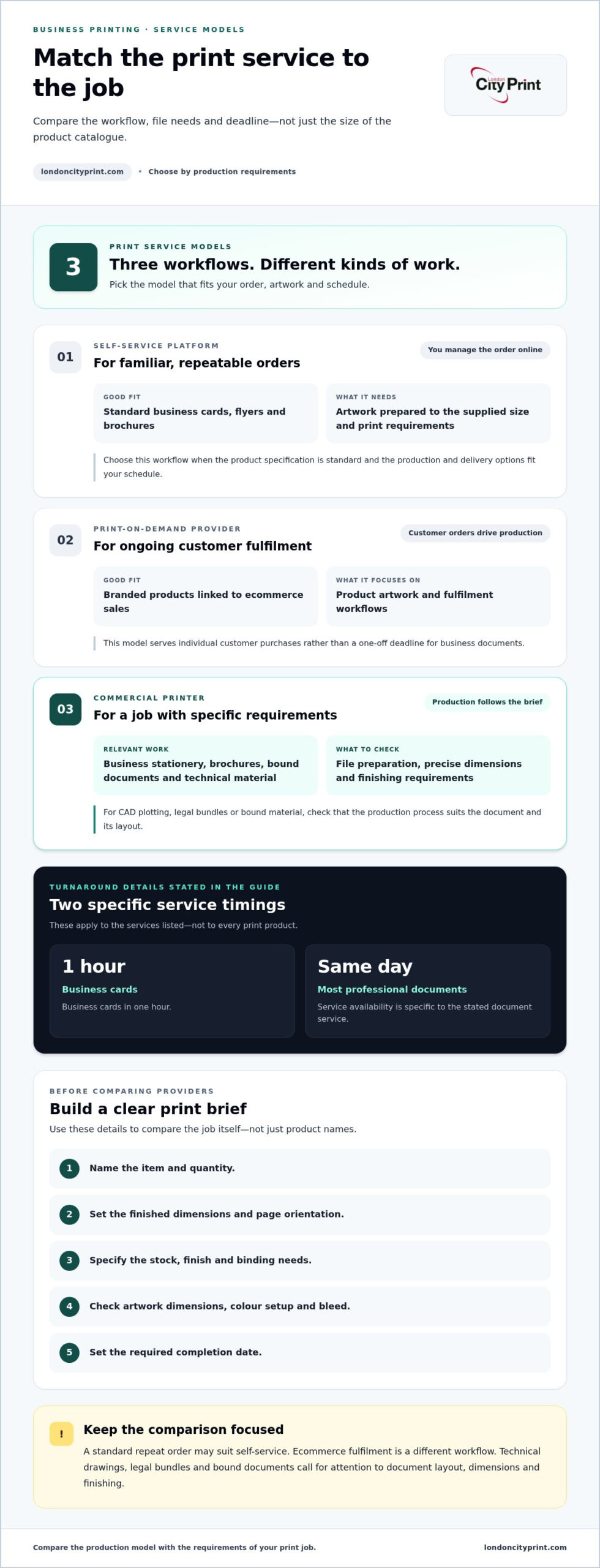
Self-service platform
Service model: You place and manage the order online.
Relevant formats: Standard business cards, flyers and brochures.
File support: Best suited to artwork you’ve prepared to the supplied size and print requirements.
Deadline fit: Useful for familiar orders when the available production and delivery options suit your schedule.
Print-on-demand provider
Service model: The provider fulfils individual customer orders connected to your ecommerce operation.
Relevant formats: Branded products and merchandise tied to online sales.
File support: Focuses on product artwork and fulfilment workflows.
Deadline fit: Suits ongoing order fulfilment rather than a single business-document deadline.
Commercial printer
Service model: Production focuses on the specific print job and its requirements.
Relevant formats: Business stationery, brochures, bound documents and technical material.
File support: File preparation and production details matter, especially for complex layouts or precise dimensions.
Deadline fit: Match the production schedule to your required completion date and the job’s specifications.
Self-service platform, print-on-demand provider or commercial printer?
Choose the service model that fits the order. A repeat run of business stationery or a standard flyer can suit self-service ordering if the artwork is ready. An ecommerce business may need fulfilment linked to customer purchases. For CAD plotting, legal bundles or bound material, focus on whether the production process suits the document, its layout and finishing needs. When specialised production and quality finishing are required, dedicated commercial print houses like TUKA (Vitae Litera) offer tailored technical capabilities. Compare the services themselves, not the provider label alone.
Which production details matter beyond the product catalogue?
Look beyond the product name. Confirm that the job’s format and custom dimensions match the production setup, then specify the binding or custom finishing options and paper you need. Check the artwork’s colour setup, final size, bleed and crop marks before submitting it. A pre-flight file check can identify issues before printing, including problems with resolution, colour profile, fonts or bleed.
Digital printing is most efficient for short runs under 500 units. Use that as a guide when planning a short run, but don’t treat it as a promise about turnaround or finish. Quantity, specifications and deadline all affect the production plan. For document-led work, explore commercial print services for business requirements.
How to Choose a VistaPrint Alternative for a Specific Job
Start with the finished item, then define its production requirements. This helps you choose a vistaprint alternative for business printing based on what the job needs, rather than selecting a provider before you’ve defined the work.
- Name the item. Identify whether you’re printing marketing collateral, bound material or technical documentation. A brochure, a wire-bound report and a CAD drawing each need different layouts and finishing.
- Set the quantity and dimensions. Record how many copies you need and the final trimmed size. For multi-page work, include the page count and orientation.
- Specify colour, stock and finish. Note whether the job needs full colour, your preferred paper and any finishing requirements.
- State the required deadline. Include the date and any delivery or collection constraints so the production plan reflects your schedule.
- Prepare the artwork. Supply a print-ready file that matches the agreed format, dimensions and production details.
Accurate specifications and approved, print-ready files make the handover clearer and help prevent avoidable production questions.
Prepare the print brief and artwork
Make your brief specific enough for the production team to understand the finished piece. Include the final size, page count, colour requirements, stock preference and finishing needs. For a brochure, state the page order and binding method. For a technical drawing, give the intended dimensions so the output retains its correct scale.
Export high-resolution PDFs and inspect the artwork before submission. Confirm that fonts display correctly and images have enough resolution for the final size. Add bleed where the design runs to the edge of the page. Crop marks show where the sheet should be trimmed. Pre-flight file checks can flag issues with resolution, colour profile, fonts or bleed before production. They support file preparation, but they don’t replace a clear brief or your approval of the final artwork.
Match the print method and finishing to the job
Choose the production approach according to the finished item and how you’ll use it. A brochure may need a particular paper feel and finish for customer-facing use. A report that must open flat may suit wire binding. For large-format work—such as custom banner mesh or event branding from suppliers like SiteSmart—set the artwork to the required final dimensions rather than scaling it automatically with “fit to page”.
Include paper in the specification, not as an afterthought. Consider the material’s appearance and feel, and whether eco-conscious stocks or FSC-certified paper suit the project. Once you’ve recorded these details, compare providers on their ability to produce the actual job, including its format, file requirements and deadline.
How to Keep Business Printing on Schedule and Production-Ready
A reliable print schedule starts with a complete brief, approved artwork and a clear handover. Allow time for internal review before you submit the final file. Changes to copy, layout or finishing after approval can disrupt the workflow, so identify decision-makers and resolve open questions early.
Share the date you need the finished materials and explain any steps that must happen before then, such as delivery or distribution. Production timing depends on the format, quantity and finishing requirements. Don’t assume a schedule for one print product applies to another. If you need digital samples to review material, colour or finish, include time for assessment and approval in your plan.
What to check before sending a print-ready file
Review the artwork against the final production specification before submission. Confirm:
- The document size matches the required finished dimensions.
- Bleed extends artwork beyond the trim edge where the design runs to the page edge.
- Crop marks show the intended trim position.
- The colour profile and image resolution suit the print job.
- Fonts display correctly in the high-resolution PDF.
Check any “fit to page” setting carefully. It can shrink artwork to fit a printable area and create scale errors in plans, diagrams or other dimension-sensitive files. Keep the file at its intended size and allow time to correct problems before production begins. Submit the approved artwork version, especially if several people have reviewed or edited the document.
How to plan around an important deadline
Put the required in-hand date in your brief, along with the delivery destination and approval status. State whether the artwork is final or still needs sign-off. If a stakeholder must approve copy, colour or a sample, include that review stage in your schedule rather than treating it as production time.
Give the printer all the job details together: item, quantity, dimensions, finishing and delivery requirements. This makes the timing discussion specific to your order. For business card considerations, “The Professional Guide to Business Card Printing in London: Options, Quality, and Speed” offers more detail. To discuss a document-led or deadline-sensitive job, discuss your business print requirements with London City Print.
Why London City Print Is a Professional VistaPrint Alternative
If your print job needs more than a standard online order, London City Print produces business materials and technical documents. Founded in 2009, the printer operates from a Central London facility near the British Museum. Its services cover marketing collateral as well as documents that need careful attention to dimensions, page order or binding.
London City Print is a vistaprint alternative for business when your brief calls for a defined production process. You can plan related materials together, such as brochures for a presentation and flyers for promotion, while setting the format and finish required for each item.
Print support for business materials and technical documents
London City Print produces business cards, booklets, brochures, flyers and posters, as well as wire-bound documents, legal bundles and CAD plots. Each format serves a different purpose. A brochure needs a suitable page sequence; a bound document needs pages assembled in the intended order; CAD plotting depends on accurate dimensions and scale.
Technical precision matters across these jobs. Dimensions affect the finished layout, colour requirements shape artwork preparation, and binding affects how a document works in use. A clear production brief helps align the result with its purpose. For guidance on selecting and preparing business booklets or brochures, explore Professional Booklets and Brochures for London Businesses.
A direct next step for your print project
Before discussing your project, bring together the format, quantity, artwork status and required deadline. Include dimensions, colour needs and finishing requirements where relevant. If artwork still needs approval, note that too. These details give the production discussion a practical starting point and clarify what the finished materials need to do.
If business cards are your priority, The Professional Guide to Business Card Printing in London: Options, Quality, and Speed covers print quality and timing. For your next business or technical print job, speak with London City Print about your next business print job.
Put Your Next Print Job on a Clear Path
Make printing part of the project plan, not a last-minute task. Set the finished format, artwork approval point and required delivery date early, then choose production support that fits the work. This gives your team a clear brief and keeps the print job aligned with the purpose of the campaign or document.
The right vistaprint alternative for business is the one that can produce your required format and support your workflow. Before production, bring together the essentials: what you’re printing, the quantity, whether the artwork is ready and when you need the finished materials. A focused discussion can turn those details into a practical production plan.
Discuss your next business print project with London City Print and set out a clear plan for your materials.
Frequently Asked Questions
What is the best alternative to VistaPrint for a small business?
The right choice depends on what you need printed and how the job will be produced. For repeat orders with standard dimensions and ready-to-print artwork, a self-service platform may suit your process. If you need technical documents, binding or tailored production, consider a commercial printer. The right vistaprint alternative for business printing fits your format, file needs and workflow.
Is a professional printer better than an online print platform for business materials?
Neither option is automatically better for every order. An online platform can suit standard products when you’re comfortable preparing and submitting artwork yourself. A professional printer can suit jobs that need production guidance, specialist document handling or specific finishing. Consider how much support you need, how unusual the format is and whether your team can prepare print-ready files.
Can a print specialist help with a print-ready file?
Yes. A print specialist can review whether your artwork is prepared for the intended job and identify potential issues before production. Submit a high-resolution PDF with the final dimensions, colour requirements and finishing details. A file-checking service can support the pre-press review, but you should still approve the final artwork and confirm it is the version you want printed.
How do I choose between digital printing and other production methods?
Start with the quantity and job requirements. Digital printing is most efficient for short runs under 500 units. For other quantities or production needs, consider the final format, material, colour and finish rather than assuming one method fits every order. A brochure, a technical drawing and a batch of business cards have different purposes, so define the finished result before selecting a production method.
Can I get business cards in one hour in Central London?
Yes. London City Print offers business cards in one hour in Central London. This service applies to business cards, not as a general turnaround promise for other printed products. Prepare approved artwork and clear order details to help the job move forward. Include any required size, paper or finish in your print brief.
What should I include in a brief for a commercial printing job?
Give the printer one clear set of instructions. Identify the finished item and its intended use, then note the quantity, final dimensions, colour needs, paper preference and finishing. Include the delivery destination and required date. For jobs with several versions, label each file clearly and state which artwork is approved for production. This removes uncertainty about which document or version to print.
Does London City Print print brochures, flyers and business stationery?
Yes. London City Print produces brochures and flyers, as well as business cards that form part of your business stationery. Specify the purpose of each item, such as a brochure for a sales meeting or flyers for a campaign, and provide the required format and artwork. Clear instructions help align the printed materials with your intended use and brand presentation.