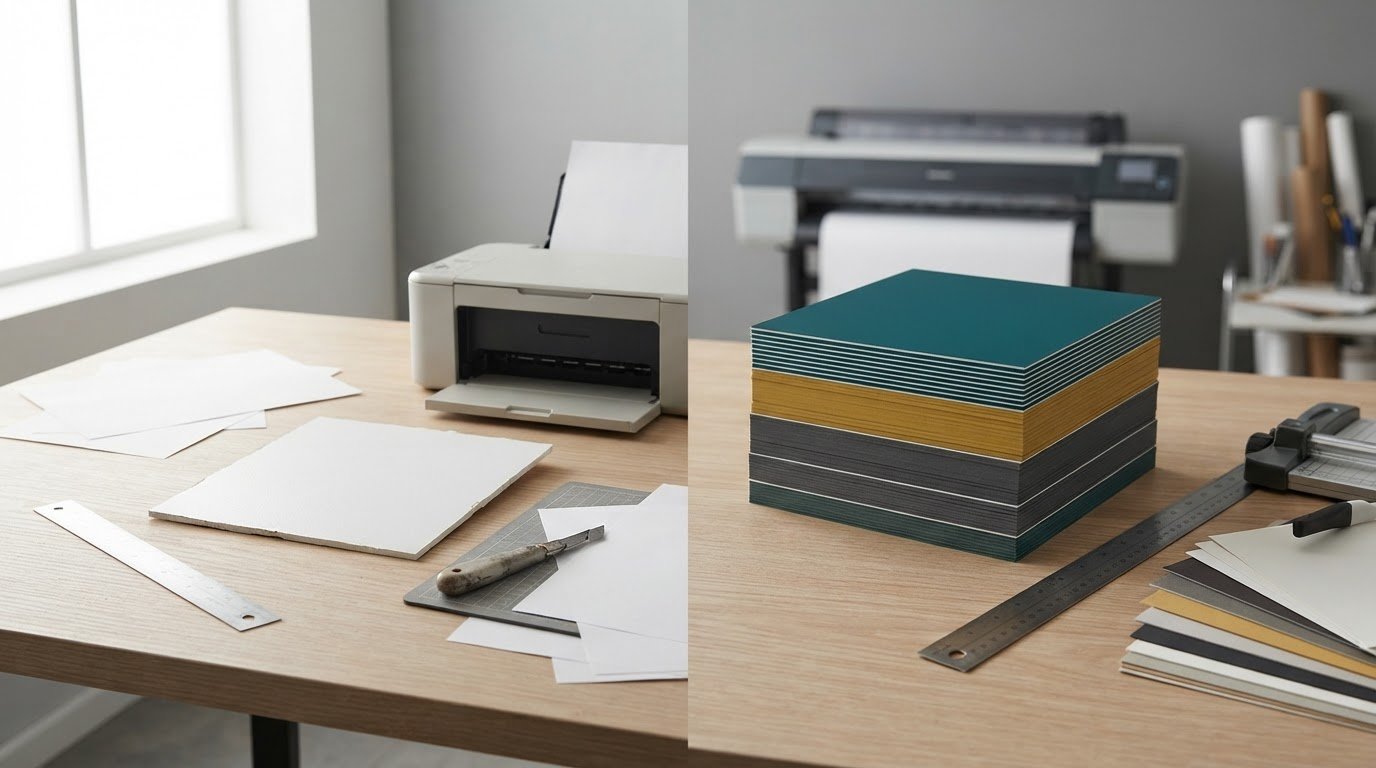
DIY can be the right choice for 1-2 temporary indoor signs, but it isn’t automatically the most efficient option. Professional printing is a better fit when you need consistent colour, accurate finishing, larger quantities or a polished result under deadline. The benefits of professional printing vs DIY depend on your sign’s purpose, the equipment available and the time your team can dedicate to production.
In-house printing gives you control over simple jobs and quick edits. But correcting files, managing colour differences, trimming and maintaining equipment can take time away from other priorities. Professional production is useful when accurate dimensions, CMYK colour, bleed and a consistent finish matter.
This comparison will help you decide which approach fits your business. We’ll look at customization, print quality, equipment limits and staff time, then consider how to match the method to the job, from a temporary indoor sign to materials that need a polished presentation.
Key Takeaways
- Choose DIY for simple, temporary indoor signs when your equipment and available staff time can handle the job.
- Compare the full effort of in-house printing, including materials, maintenance, troubleshooting and quality checks.
- Plan for CMYK colour, bleed and accurate trimming when consistent results and precise layouts matter.
- Consider professional production when equipment limits, larger quantities or finishing requirements make in-house work difficult.
- Match the printing method to the sign’s purpose, quantity, deadline and the time your team can spare.
The Branding Dilemma: DIY or Professional?
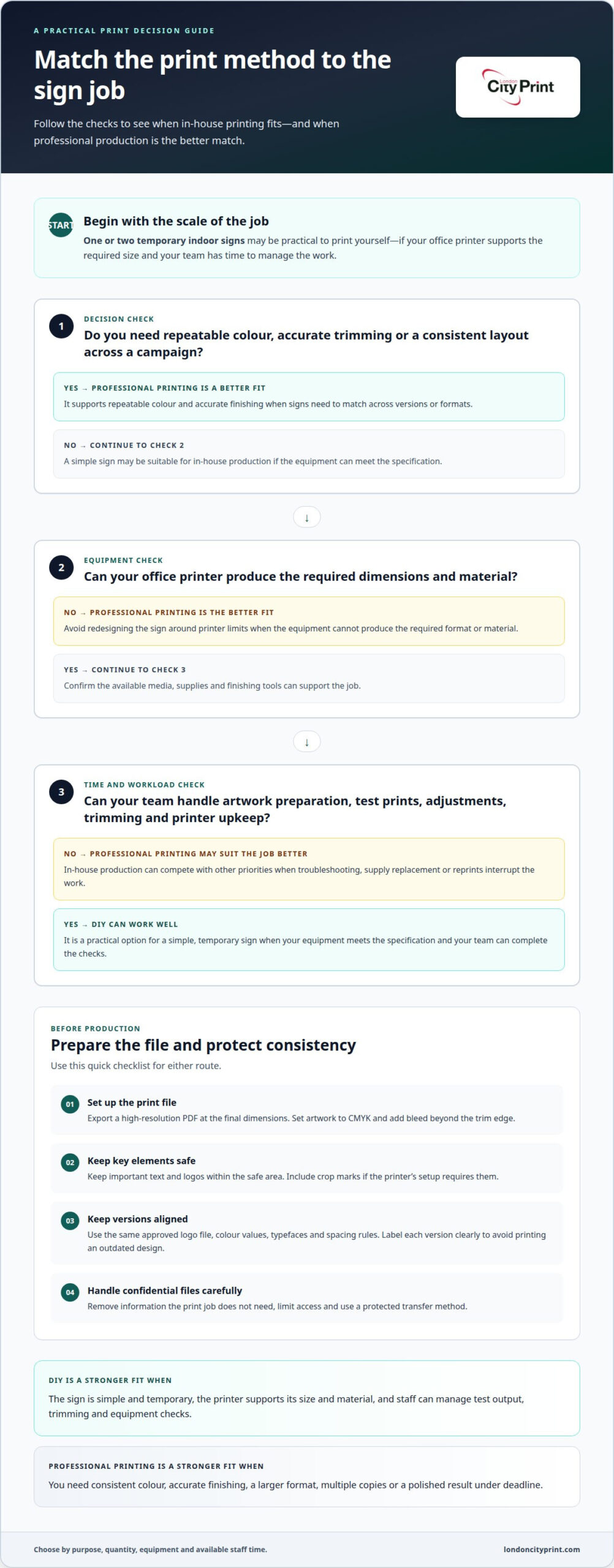
For one or two temporary indoor signs, DIY may be practical if your office printer supports the required size. For customer-facing signs used across a campaign, professional printing can help maintain consistent colour, trimming and layout. The benefits of professional printing vs DIY depend on what the sign needs to communicate, how often you’ll reproduce it and whether your team can manage production.
Print quality affects more than appearance. Small text, logos and precise alignment can expose the limits of an office printer. If the same promotion appears on a reception sign, a poster and a window graphic, differences in colour or cropping can make the campaign feel inconsistent. A professional workflow can help keep files and production aligned across formats.
Consider quantity as well as design. Printing a hundred flyers on an office printer can lead to colour variations or uneven cuts. A single draft may be manageable, but repeat runs take time for test prints, adjustments and trimming. For a set of signs, consider the effort needed to reproduce every version accurately, not just the time it takes to create the first.
Confidential content needs careful handling. Sharing a file with a printer can expose sensitive details if the transfer method is unsecured or access is too broad. Before sending it, remove information the print job does not need, limit access and use a protected transfer method for confidential material.
Prepare a print-ready file by exporting a high-resolution PDF at the final dimensions, setting artwork to CMYK and adding bleed beyond the trim edge. Keep important text and logos within the safe area, and include crop marks if the printer’s setup requires them. Reviewing the file can catch missing fonts, low-resolution images and layout errors before production.
Brand consistency starts with controlled design choices. Use the same approved logo file, colour values, typefaces and spacing rules on every sign. A seasonal promotion, for instance, can retain core brand elements while changing its headline or image. Keep a master file and label each version clearly to avoid printing an outdated design.
DIY gives you direct control over design edits and print timing, but your equipment can limit the result. Professional production can suit signs that need a larger format, multiple copies or a finish beyond what a standard office printer can produce. Before deciding, identify the sign’s viewing distance, installation setting and required dimensions. These details guide legibility and material choices.
| Option | Quality and consistency | Control | Best fit |
|---|---|---|---|
| DIY | Depends on printer, materials and staff checks | Direct control of small edits | One or two temporary indoor signs |
| Professional printing | Supports repeatable colour and accurate finishing | Production follows prepared specifications | Campaigns, larger formats or repeated signs |
Choose DIY when simplicity and immediate edits matter most. Choose professional production when repeatability, format or finish matters more.
DIY sign-printing equipment and material costs
A DIY sign setup takes more than a printer. You also need compatible ink, suitable media, finishing tools and a reliable way to prepare artwork. A desktop printer may work for a paper notice, while a rigid display may need another production method. Before starting, list the sign’s dimensions, quantity, material and finish. This reveals equipment limits and missing supplies before work begins.
Materials shape the workflow. Paper, foam board and corrugated plastic suit different display needs, so match the material to the location and installation method. A staff-area notice may need only a simple format; an event display may require a rigid surface. Allow time for test output, trimming and assembly. Each step takes supplies and attention, even when you use the same artwork throughout.
Equipment upkeep takes time too. Staff may need to clean or troubleshoot a printer, clear jams, replace supplies and inspect output. If these tasks interrupt campaign or event preparation, printing can compete with other priorities. Decide who will operate the equipment and manage reprints before assigning the job. This helps you judge whether in-house printing fits your team’s workload.
Replacement needs can disrupt production. If a printer fails or runs out of a required supply during a deadline-driven job, the team may need to pause, source a replacement or change the plan. For a rigid sign, compare the steps involved in producing it in-house with professional foam board printing, including artwork preparation and handling the finished piece.
Local print shops and online services offer different workflows. A local shop may suit projects where direct communication or collection nearby matters. Online ordering can work well for standardized files and remote teams. Compare how each route handles file submission, proof approval, production updates and delivery, then choose the process that fits your deadline and working arrangements.
Before choosing, list the equipment available, materials required, staff responsible and production steps. Include routine upkeep and the time needed for test output, trimming and assembly. Then compare that complete workflow with outsourcing the same sign specification. If your equipment cannot produce the required format or material, outsourcing avoids redesigning the job around the printer’s limits.
Choose in-house production when your setup can meet the specification and your team can manage the work. For other jobs, a clear brief covering dimensions, material and intended use helps production move forward efficiently.
Customization, colors, and finishes
Start customization with the sign’s purpose. A directional sign needs clear wording and a layout people can scan quickly; a product display may need imagery and a distinctive surface. Decide what viewers should notice first, then set the dimensions, content hierarchy and finish to support that purpose. This keeps decoration from competing with the message.
Colour choices can give an identity a precise role in the design. Professional printing can use spot colours, textured finishes and special coatings. A campaign, for example, might reserve a spot colour for the logo while keeping supporting details understated. Plan the role of each colour across the layout rather than adding shades simply to make the design more elaborate.
Finishes change how a sign looks and feels. A high-gloss finish can make colours appear more saturated, but reflections may make text harder to read under bright lights. A textured finish adds a tactile element and may suit a display viewed at close range. Consider the setting, lighting and viewing distance before selecting a surface treatment.
DIY equipment may not support these choices. Office printers often lack gloss coatings, specialty folds and professional binding. If your design depends on a coated surface or a fold that organizes information, a standard printer may require you to simplify it. Before adapting the artwork to available equipment, decide which features carry the message and which are optional.
Customization includes format, too. A poster needs a layout for a flat display, while a folded piece can divide information into panels. Plan the reading order before placing headlines, images and supporting copy. For example, put the event name on the front-facing panel and reserve the remaining space for schedule details. A clear hierarchy keeps the format useful without crowding its content.
Use this brief to define the finish and design requirements:
- State the sign’s purpose and the first message viewers should notice.
- Record the dimensions, display setting and expected viewing distance.
- Choose any spot colour, texture or coating for a specific design purpose.
- Identify folds or binding only when the format requires them.
Keep the brand’s core identity recognizable while adapting each piece to its role. A seasonal promotion can change its headline and imagery while retaining the established logo placement and typography. This gives the campaign a distinct message without making each sign feel unrelated.
Choose finishes for their function, not decoration alone. A sign near bright lighting may need a surface that limits glare; texture may be more noticeable on a close-view display. Match the production method to the design features that matter most, and simplify anything the available equipment cannot reproduce well.
DIY design and equipment limitations
DIY limits can begin with the tools used to manage a job, not just the printer. A spreadsheet and shared folder may work for one sign, but become harder to coordinate across a campaign. A marketing team handling separate product launches, for example, must track artwork versions, quantities and approvals. Manual updates can leave staff unsure which file belongs to each order.
Many DIY printing setups do not connect easily with e-commerce platforms or customer relationship management tools. When an online order creates a need for printed materials, staff may have to transfer details manually or manage the request in a separate system. Each handoff adds a task. A clear process for recording the customer, item, artwork and delivery details can help prevent omissions.
Scale also changes the design workflow. Producing thousands of flyers or catalogue pages involves more than preparing one layout. You need to organize versions, ensure each file matches the right campaign and track which materials have completed production. Teams working from separate local files may spend time reconciling edits before production can proceed.
Software skills can affect how smoothly a design moves from concept to finished format. A staff member may create an attractive screen design but struggle to adapt it for a folded brochure, poster or display board. A headline that fits a single-page layout, for example, may crowd a multi-panel design. Plan the format at the start, and have someone review each version for its intended use.
Professional print workflows can support larger or more complex jobs with specialized production equipment and digital systems for organizing, ordering and tracking materials. This can help a company coordinate requests from several teams. For an event campaign, staff can manage posters, handouts and display materials through one defined process instead of treating each file as an unrelated task.
Before choosing a workflow, map the steps from request to finished materials:
- Record the item, campaign, quantity and person responsible.
- Store approved artwork in a shared, clearly labelled location.
- Track revisions and approvals before sending files into production.
- Log completed orders and delivery details in the same workflow.
This process gives a small team a clearer view of outstanding work and helps identify where manual order management creates extra coordination. If an online storefront or CRM already holds customer and campaign details, consider how staff will transfer them accurately into a print request.
Choose a DIY workflow when your team can manage design, approvals and order records without disrupting other work. If several departments need coordinated print materials, or thousands of pieces need organized tracking, a professional print workflow may better fit the project’s scale.
Who benefits from outsourcing printing
Outsourcing suits teams that print infrequently and do not have dedicated production staff. A seasonal retailer, for example, may need campaign signs for a short promotion but have no reason to maintain printing equipment year-round. A specialist handles production while employees focus on sales, customer service and campaign planning. This can be especially useful when print work competes with core business deadlines.
Outsourcing can also help when a job has several specifications. An event team may need matching signs in different sizes, quantities and formats. A professional printer can manage requirements across the set, reducing the coordination involved in producing each item separately. Share the approved artwork, dimensions and finish requirements together to keep the order aligned with the campaign.
Businesses with repeat or bulk requirements can benefit from production capacity. Professional print shops use high-volume machinery that can lower the per-page cost of bulk runs. They can also reduce waste and reprints over time by producing work through a consistent process. For a company repeating the same campaign across locations, compare the total workload and rejected output, not only the initial print task.
Deadline-driven projects may also suit outsourcing. Professional printers can often complete complex jobs on the same day. This can matter when an event team needs materials for an imminent launch or presentation. Include the required date, final quantity and approved artwork in the brief. A clear specification helps the production team plan the job and avoid preventable revisions.
Distributed teams may benefit from organized ordering systems. Professional print shops can provide online storefronts and digital tools to organize, order and track marketing materials. A company with several departments, for example, can use a shared process to manage campaign versions and requests. This can replace scattered email approvals and manual tracking with a more structured workflow.
Outsourcing is not automatically right for every job. A single, simple sign for temporary indoor use may be easier to produce in-house. Consider outsourcing when your team faces one or more of these conditions:
- Print jobs interrupt core work or require equipment upkeep.
- A campaign needs coordinated materials across locations or formats.
- Bulk production, finishing or repeatability exceeds your office setup.
- A fixed event or launch deadline leaves little room for reprints.
Use those criteria to decide where external production can save staff time and simplify delivery. Discuss your print requirements when your next project needs professional production support.
London City Print: Booklets and Brochures
London City Print can help when your project needs professionally printed materials rather than a basic in-house printout. Choose Booklets and Brochures to present detailed product or company information, or Posters and Pull-Up Banners for visual messaging at events and business locations. Wire Binding can suit documents that need to stay together while lying flat.
Share the purpose, artwork, dimensions and intended use of your materials to clarify production requirements. Professional printing is a practical option when your team needs coordinated materials or a finished format that office equipment cannot handle. For your next print project, contact London City Print to discuss the right format for your needs.
Make Your Next Print Decision With Confidence
Choose the production route that helps your team deliver what the project needs. A small, temporary sign may suit an in-house workflow; a coordinated campaign may call for professional production. The benefits of professional printing vs DIY depend on fit: your design, required finish, deadline and available staff time.
For materials that need a considered presentation, London City Print offers Booklets and Brochures, Posters and Wire Binding. These options can support product information, event communications and documents with bound pages. Bring your artwork and requirements together before production so the finished materials support a consistent business message.
Give your next project a clear starting point. Contact London City Print about your signs to discuss the print format that suits your needs. With the right production plan, you can move forward with clarity and confidence.
Frequently Asked Questions
What if You Need Rapid Turnarounds for Tight Deadlines?
Set the delivery deadline first, then share the approved artwork, quantity and finished format with the printer. London City Print offers same-day printing and same-day binding 24 hours a day. For a time-sensitive job, allow time for file preparation and final approval as well as production. A complete brief helps the print team plan the work and reduces delays caused by missing details or last-minute revisions.
What are the benefits of professional printing compared with DIY printing?
The benefits of professional printing vs DIY include access to production equipment and finishing options that office printers may not handle. Professional production can be useful when a business needs consistent materials for a product launch, event or customer-facing campaign. DIY remains practical for simple, temporary jobs. Decide based on the required format, finish, quantity and staff time available for printing and quality checks.
How does professional print quality compare with home or office printers?
Professional printing can deliver more consistent output across a batch, while home and office printers depend on their equipment, supplies and settings. Small logos or fine text may reproduce differently on a desktop printer than on a large display. For customer-facing materials, inspect a sample at its intended size and viewing distance. This helps you assess legibility, colour and layout before approving the full job.
How much does professional printing cost compared with DIY printing?
There is no single cost comparison because each route involves different inputs. DIY uses materials, equipment and staff time; professional print pricing depends on the job and is provided in a quote. Format, quantity, stock, finishing and delivery can affect the quote, which covers the full job. Compare the same specification for both options, including preparation and unusable output, to make a fair decision without overlooking indirect work.
What is the cost per page for DIY printing, including ink, paper, and maintenance?
Calculate your per-page figure by adding ink, paper and maintenance costs, then dividing by the number of usable pages. Include test prints, misprints and time spent clearing jams or servicing equipment. If a batch needs several colour tests before approval, include those sheets in the calculation. Review actual supply use over a typical print job rather than relying on the printer’s advertised capacity.
When is professional printing more cost-effective for large print runs?
Professional printing can become more cost-effective for bulk runs because high-volume machinery can lower the per-page cost. It can also reduce waste and reprints over time. Compare the full cost of producing the same quantity in-house, including staff hours, machine upkeep and failed sheets. For a large campaign across several departments, account for coordination and consistent output, not just paper and ink.
How long do professional print shops take compared with printing at home?
Timing depends on the quantity and complexity of the job. Work that takes several days on an office printer may take a professional print shop a few hours. In-house production also requires setup, troubleshooting and finishing time. When planning, separate artwork approval, production and collection or delivery in your schedule. This makes it easier to spot which stage needs attention before a launch or event deadline.
What are common DIY printing problems, such as color mismatch, jams, and wasted prints?
Common problems include colour shifts, crooked trimming, paper jams and misprints caused by incorrect settings. A file set to “fit to page,” for example, can shrink the artwork and change sign dimensions. Check paper size, scaling and colour settings before printing a test sheet. Inspect the result for alignment and readability, then adjust the settings before running the rest of the batch. This helps reduce wasted materials and repeated work.