
A document set can lose value when pages are missing, formats vary or copies arrive out of order. For legal teams handling high volumes, legal document production services can coordinate formatting, quality checks, copying, collation and document handling in a managed workflow. Ongoing support can also scale with workload while following established templates and processes.
Tight deadlines and sensitive material make accuracy and consistency as important as speed. Files need careful checking, sets must be assembled correctly, and production should fit the team’s workflow. This guide explains what document production can include, how to control quality and what to consider when planning recurring or high-volume work.
You’ll see how documents move from intake through formatting and review to copying and collation, where production support fits, and how physical sets are assembled. This practical overview helps you decide which tasks to keep in-house and which may benefit from dedicated production support.
Key Takeaways
- Plan high-volume work around clear priorities, established templates and a defined production workflow.
- Use consistent quality checks to catch formatting issues and keep documents organized before they move to production.
- Set out copying, collation and assembly requirements clearly so each finished set follows the intended order.
- Scale ongoing support to match workload changes while keeping production aligned with your team’s processes.
- Decide which document tasks to outsource by weighing deadline pressure, formatting complexity and the capacity available in-house.
High-volume document production
High-volume legal production turns scattered records into organised, reviewable sets through defined intake, formatting, checking and assembly steps. A clear workflow helps legal teams track deadlines, document order and output requirements.
Requirements depend on where a matter is filed: courts and jurisdictions may set different filing rules and document formats. Identify the relevant court and filing purpose at intake, then apply the requirements for that matter to the final documents.
In litigation discovery, production can involve identifying and assembling documents that support a claim or defence. For a large record set, first define the scope, naming conventions and required output format. Group records by matter, date, document type or another agreed category. A stored index helps the team track folder contents and flag gaps before assembly.
Volume alone does not define the workload. Page count, file condition, formatting complexity, number of output sets and delivery format all affect the steps involved. For example, editable documents may need consistent pagination, while scanned records may need sorting and conversion. Keep source files separate from working copies so revisions do not overwrite the originals.
Pricing Models
Fees may be structured hourly, per page or per project. Hourly billing can suit work whose scope may change during formatting or repair; per-page billing links the charge to document volume; project billing groups agreed tasks into a defined scope.
Compare what each model includes, such as file preparation, revisions, quality checks, copying and collation. A project with mixed formats or extensive repair may take more work than a clean, uniform file set, even when the page counts are similar.
Software and File Format Support
Supported software and formats depend on the production workflow. Specify the source application, editable document types and final output format in the intake instructions. For example, a team may need editable word-processing files for revisions and PDFs for fixed-layout review or distribution.
Document production can include word processing, formatting, repair and PDF conversion. Agree how conversion should handle layout, pagination, tables and embedded images. Reviewing a sample file can reveal format issues early, before they affect a larger batch.
Confidentiality starts with a documented handling process. Define who can access files, how they are transferred, where working copies are stored and when they should be removed. Limit access to people assigned to the matter, and use your organisation’s approved secure transfer and storage methods for sensitive records.
For e-discovery, production work can organise and assemble relevant records for review and later use. Trial exhibits and large-scale copying require clear labels, page order, set counts and instructions for separating sections. A final collation check against the index can catch missing or misplaced pages before delivery.
Use a written production brief to connect scope, formats, review steps and output requirements. This gives legal document production services a clear basis for handling high-volume work while protecting document integrity and the intended use of each set.
Quality control and document organization
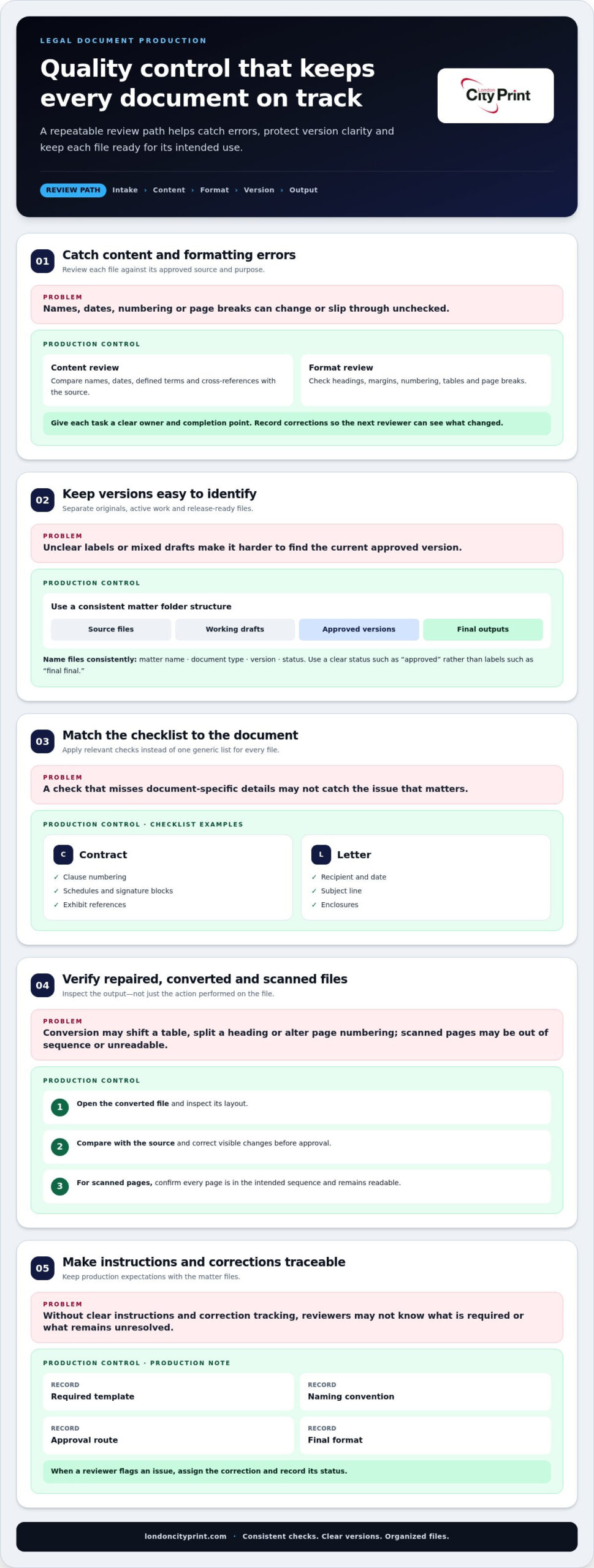
Quality control works best when every file follows the same review path. Start at intake, then check content, format, version and destination before release. For example, a revised witness statement should carry the correct matter label and version date, with the earlier draft kept separate. This helps the legal team catch errors before files enter a final bundle.
Document production can include creating, formatting, editing, repairing, converting and checking business documents for quality and consistency. Assign each task a clear owner and completion point. A formatting reviewer can check headings and page breaks, while a separate content review checks names, dates and defined terms against the approved source. Record corrections so the next reviewer can see what changed.
Use a consistent folder structure to make documents easier to find and compare. A matter folder might separate source files, working drafts, approved versions and final outputs. Apply one naming pattern, such as matter name, document type, version and status. Avoid labels such as “final final”; use a clear status such as “approved” to distinguish release-ready material from drafts.
- Content: Compare names, dates, defined terms and cross-references with the source.
- Format: Review headings, margins, numbering, tables and page breaks.
- Version: Confirm the current draft and retain a clear change record.
- Output: Open the converted file and inspect its layout before distribution.
A checklist makes review repeatable across document types. For a contract, include clause numbering, schedules, signature blocks and exhibit references. For a letter, check the recipient, date, subject line and enclosures. Match the checklist to the document’s purpose rather than applying irrelevant checks to every file.
When a file needs repair or conversion, review both its content and appearance. Conversion may shift a table, split a heading from its paragraph or alter page numbering. Compare the output with the source and correct visible changes before marking the file approved. For scanned pages, check that every page is in the intended sequence and remains readable.
Keep client instructions with the relevant matter files. A short production note can record the required template, naming convention, approval route and final format. When a reviewer flags an issue, assign the correction and record its status. This creates a traceable path from the original document to the approved version without relying on memory or informal messages.
Before release, check the request against the output: correct version, complete attachments, consistent formatting and intended destination. For a set containing a main document and exhibits, compare exhibit references with the actual attachments. Checks at intake, revision and release help teams organise complex work and catch discrepancies before distribution.
Document production teams can work within an organisation’s established workflows, templates and business processes. Ongoing support through a scalable delivery model gives organisations additional capacity and specialist expertise.
Copying and collating
Copying turns approved source files into usable sets; collation puts each set in the required order. Before production begins, a written workflow should define page sequence, copy count, section breaks and final format. For example, a hearing set may contain a cover, index, main document and exhibits. Clear instructions help prevent missing pages and inconsistent sets.
Begin with a controlled master file and production brief. Identify the correct version, required number of sets, single- or double-sided output, colour pages and any blank pages to retain. Specify whether sections start separately and how dividers or tabs should appear. These choices affect copying and assembly, so resolve them before releasing files.
- Prepare: Confirm the approved source, page order and copy instructions.
- Copy: Apply the agreed settings, including colour use and page sides.
- Collate: Assemble pages into complete sets, keeping sections in sequence.
- Inspect: Compare finished sets with the index and production brief.
Copy settings should reflect how readers will use the documents. A working set intended for frequent annotation may need a different layout from a compact reference copy. Colour can distinguish a chart or marked-up page, while monochrome output may suit text-only sections. Specify choices for particular pages or sections instead of leaving the production team to infer them.
Collation involves more than putting pages together. Check that each set starts with the correct cover, follows the specified sequence and includes every listed attachment. If a section has its own pagination, preserve it rather than mixing it with another section. A clear index gives reviewers a practical reference for spotting omissions and misplaced pages.
Manage revisions through the master file, rather than replacing isolated pages without recording the change. If an updated exhibit arrives, note its location in the index and identify which sets need the revised page. Remove superseded copies from the active assembly area to reduce the risk of combining current pages with an earlier version.
Before dispatch, inspect a complete set from cover to final page, then compare the remaining sets against it. Look for skipped or duplicate pages, upside-down sheets and incorrect section order. Record corrections and repeat the check on affected sets. For a complex matter, include the production brief and index with the work instructions rather than relying on informal handover messages.
A defined copying and collation workflow gives legal teams a repeatable way to turn approved documents into consistent sets. Keep instructions specific, retain one controlled source and make final inspection part of the process.
Ongoing and scalable production support
Legal teams can use ongoing production support to add capacity when document work increases or specialist tasks need focused attention. A scalable delivery model adjusts support to the current workload instead of treating every request as a disconnected job. For example, a team handling routine formatting can bring in extra production help when a large matter creates a short-term backlog.
Start by mapping recurring work. List the document types, usual intake routes, templates and approval steps already in use. A recurring monthly report, litigation documents and urgent correspondence each follow different paths. This map helps production staff fit established processes and shows where added capacity could make the greatest difference.
- Routine work: Assign repeatable tasks such as template-based formatting through a consistent intake route.
- Surges: Identify tasks that can move to additional production capacity during busy periods.
- Specialist work: Route complex formatting or document repair to staff with relevant expertise.
- Priorities: Record the deadline, approval owner and delivery format for each request.
A shared request queue can help manage changing priorities. Give each item a matter reference, task description, due date and status. If a filing deadline changes, update the request and flag dependent work. This helps the team identify urgent tasks without losing track of other active matters.
Set a clear handoff between your legal team and production support. One contact can submit source files and instructions; an assigned reviewer can approve the finished work. For example, a template update should identify the approved master and the person authorised to approve changes. This avoids parallel edits and keeps production aligned with internal decisions.
Track turnaround through agreed workflow stages rather than a vague completion label. Statuses such as received, in progress, awaiting review and released show where work stands. If a document is waiting for legal approval, make that dependency visible in the queue. Teams can then distinguish production time from review time when planning upcoming work.
Review the arrangement at regular planning points. Compare incoming work with available capacity, note recurring bottlenecks and adjust task routing. If formatting requests repeatedly delay document review, moving that defined task to production support may free legal staff for substantive review. Tie the change to a specific process and assess its effect using queue statuses and completion records.
Scalable support works best when instructions, templates and approval roles stay clear as volume changes. Define what your legal team retains, what production staff handle and who resolves exceptions. With those boundaries in place, you can add capacity during a busy period while keeping daily work connected to the same established workflow.
Outsourcing document work
Outsourcing can move defined document tasks outside a legal team’s daily workload. These may include document creation, word processing, formatting, repair, PDF conversion, template-based production and quality checks. A firm might retain legal review while assigning template formatting and document repair to external production support.
Law firms should choose a provider by matching its workflow to the work, not by volume alone. Assess experience with the required tasks, ability to follow established templates, accuracy checks, communication, confidentiality practices and capacity to handle changing workloads. A clear service scope helps you compare these points with your team’s needs.
Begin with a task inventory. Separate work requiring legal judgment from production tasks with clear instructions. For example, lawyers may approve a clause while production staff apply the approved wording across template documents. This keeps legal decisions with the firm and gives production staff a defined brief.
Next, document how outsourced work fits existing processes. Provide the current template, naming rules, review route and final file format. If the firm uses an approval system before release, include that step in the handoff. A short test batch can reveal whether page numbering, styles and comments transfer correctly before broader work begins.
Outsourcing risks include inaccurate formatting, missed instructions, inconsistent versions, delays and mishandling sensitive information. Reduce these risks with a written scope, controlled source files, named reviewers and a defined escalation route. For example, ask a reviewer to compare converted documents with approved source files before circulation.
Use staged delivery for complex work. Request an initial sample or batch, review it against the brief, then release the remaining files after corrections. This can reveal a misapplied template or numbering issue before it affects a larger set. Keep one approved template and record revisions in the firm’s usual workflow.
Set measurable quality checks without inventing targets. A review sheet can list required fields, formatting rules, file types and approval status. For a batch of witness statements, checks might cover headings, paragraph numbering, signature areas and consistent file names. The firm can record a pass or correction status for each file.
Communication matters when a deadline or instruction changes. Name one contact for new requests and one person to approve completed work. If a revised source file arrives, the contact should identify the new version and affected tasks. This helps prevent production staff from using an outdated document or conflicting instructions.
Outsourcing legal document production services can add specialist capacity, but it does not transfer a firm’s responsibility for its work product. Keep legal decisions, final approval and matter-specific instructions under clear internal ownership. Written handoffs and review checkpoints make each task traceable from request through release.
London City Print: Booklets and Brochures
London City Print supports legal teams that need professionally printed materials alongside their document workflows. Its legal bundle printing service produces physical legal sets, while wire binding keeps multi-page documents together and easy to handle. Booklets and brochures suit concise reference materials, and posters can display information clearly.
Choose a format based on how people will use the material: a bound document for desk reference, a booklet for structured content or a poster for display. Clear, print-ready files and specific finishing instructions help align production with the intended use.
For printed materials that support your legal work, contact London City Print or visit londoncityprint.com.
Put your next document workflow into action
Choose an upcoming document task and define the result your team needs. Note who will use the finished material, what decisions it must support and who will approve the final version. This gives your next production brief a practical starting point without adding unnecessary steps to your workflow.
As you plan, consider whether physical copies would help people review or use the material. The right production route depends on the document’s purpose and the handoff your team needs. Clear priorities make it easier to use legal document production services in a way that fits the matter.
Start planning your next legal print project with a focused brief and a clear intended use. Your team can move forward with a defined next step.
Frequently Asked Questions
What services do legal document production companies provide?
Legal document production companies can prepare documents for practical use, from refining a working file to producing a physical bundle. The key distinction is the intended deliverable: an editable document for continued drafting, a fixed-format file for circulation or an assembled paper set for a hearing. Define the outcome first, then specify any template, approval and delivery requirements that shape the work.
What is the difference between in-house document production and outsourcing?
The key difference is where production capacity sits and how your firm manages handoffs. In-house teams draw on internal matter knowledge, while an external arrangement can add capacity for work with clear instructions. For tasks requiring close context, keep decisions and sign-off with the people responsible for the matter. For repeatable work, document the process so another team can follow it accurately.
What quality-control standards and turnaround times should clients expect?
Agree on acceptance criteria and a delivery plan before work begins. Set the required completion point, identify who approves the output and allow time for that review. Turnaround depends on the completeness of supplied files, the complexity of requested changes and the time needed for approvals. For a fixed hearing date, submit complete instructions together and allow for expected revisions in the schedule.
How much do legal document production services cost in the United States?
Providers may bill hourly, per page or per project. The total depends on the scope and what is included, such as file preparation, revisions, quality checks, copying and collation.