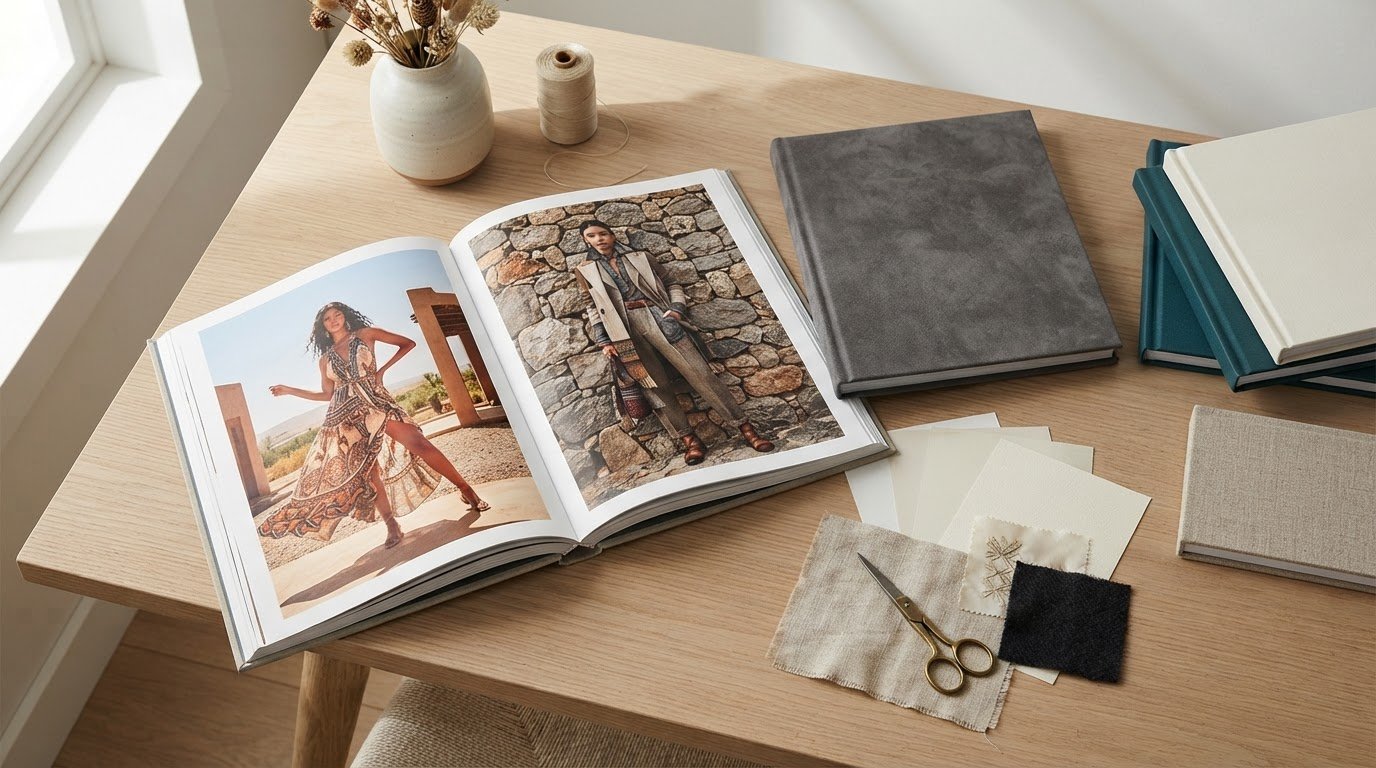
A strong lookbook makes a collection easy to understand and memorable to the people who matter. High quality lookbook printing helps carry your visual identity from the first page to the final impression, but the result depends on more than attractive photography. Your concept, artwork and production choices need to work together.
You may be preparing for buyer conversations, a seasonal launch or a presentation for your wider team. In each case, the lookbook should give readers a clear sense of the collection and guide their attention through it. Decide what readers need to notice, then shape the design around that purpose. A focused brief helps your creative and production teams make consistent decisions.
This guide covers paper and cover finishes, format, artwork preparation and production planning. It also explains how printed and digital versions can serve different parts of a campaign. Set priorities early to reduce avoidable revisions and create a lookbook that supports your next presentation.
Key Takeaways
- Match cover finishes to the look and handling you want, balancing colour impact with glare and surface feel.
- Build production time around the binding and finishing steps your design requires, then coordinate shipping with your launch schedule.
- Choose a format that gives your photography room to read clearly while remaining practical to distribute.
- Use print for a tangible presentation and digital for convenient sharing; a paired approach can serve both needs.
- Prepare print-ready artwork with clear colour, resolution and bleed settings to reduce avoidable production issues.
How can I ensure my lookbook printing project achieves a professional look?
Pair high-resolution fashion photography with paper that suits the images and the way readers will handle your portfolio. Check stock, colour, binding and artwork before production, since each choice affects the finished lookbook.
Paper Stock and Production Quality
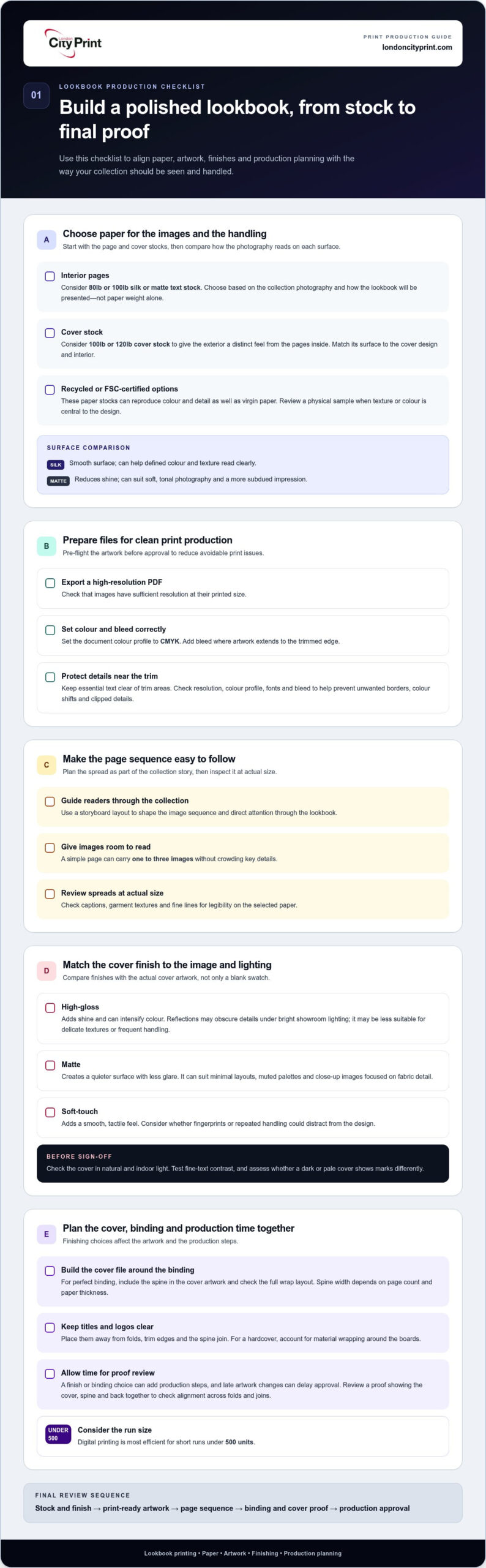
For interior pages, 80lb or 100lb silk or matte text stock is a common recommendation. Covers often use 100lb or 120lb cover stock, which gives the exterior a distinct feel from the pages inside. Choose based on the collection’s photography and how the lookbook will be presented, rather than selecting paper by weight alone.
Professional production starts with print-ready artwork. Use a high-resolution PDF, check that images have sufficient resolution at their printed size, and set the document’s colour profile to CMYK. Add bleed where artwork extends to the trimmed edge, and keep essential text clear of trim areas. These checks help prevent unwanted borders, colour shifts and clipped details.
Interior Finishes and Paper Options
Silk stock gives photographs a smooth surface, while matte stock reduces shine for a more subdued impression. Compare both with the lighting and images in your fashion portfolio. Matte can suit soft, tonal photography; silk can help defined colour and texture read clearly. Recycled and FSC-certified paper stocks can reproduce colour and detail as well as virgin paper.
Consider the image sequence when choosing interior stock. A storyboard layout can guide readers through the collection, while a simple page can carry one to three images without crowding key details. Review spreads at actual size before production, checking that captions, garment textures and fine lines remain legible on the selected paper.
Cover Paper Selection
The cover introduces the collection, so choose stock that complements the interior without competing with its photography. Heavier cover stock separates the cover from the text pages; matching a matte or silk surface to the interior can make the book feel consistent. For perfect binding, include the spine in the cover artwork and check the full wrap layout before approving files.
For a sustainable option, consider recycled or FSC-certified cover and interior stocks. Review a physical sample if paper texture or colour is central to the design. This lets you assess how the cover and pages work together, rather than judging each stock separately.
Best paper stocks and finishes: Choose 80lb or 100lb silk or matte text stock for interiors, and 100lb or 120lb cover stock for the exterior. Recycled and FSC-certified options can reproduce colour and detail as well as virgin paper.
Minimum order quantities: The practical run depends on the print method and production setup. Digital printing is most efficient for short runs under 500 units.
Common mistakes and prevention: Low-resolution images, incorrect colour settings, missing bleed and artwork too close to the trim can undermine a polished result. Pre-flight files for resolution, colour profile, fonts and bleed, then inspect the page sequence before approving production.
Gloss, matte, and soft-touch cover finishes
A cover finish affects how fashion photography reads and how a lookbook feels in hand. Choose it alongside the cover design, binding and page count so the finished piece supports your collection rather than competing with it.
Choose a finish for the image and lighting
A high-gloss finish adds shine and can intensify colour, making saturated campaign photography more pronounced. Reflections may obscure details under bright showroom lighting, so review the cover in similar conditions. Gloss suits strong colour and sharp contrast, but may be less suitable for delicate textures or frequent handling.
Matte creates a quieter surface with less glare. It can suit minimal layouts, muted palettes and close-up images that focus attention on fabric detail. Soft-touch finishes add a smooth, tactile feel. Consider them when touch is part of the presentation, and whether fingerprints or repeated handling could distract from the design.
Compare finish samples with the actual cover artwork, not just a blank swatch. A dark cover may show marks differently from a pale one, while fine text needs enough contrast against the surface. Check the result in natural and indoor light before approving production.
Plan cover, spine and page design together
Build the cover file around the selected binding and final page count. A perfect-bound book needs spine artwork sized to the finished book block; spine width depends on the page count and paper thickness. Keep titles and logos clear of folds, trim edges and the spine join. A hardcover design also needs to account for material wrapping around its boards.
Keep the front cover focused. One campaign image, a concise collection title and restrained branding can create a clear visual hierarchy. Put secondary details on the back cover, where they remain accessible without crowding the main image. Check that the spine title is readable from the intended viewing distance.
Check the finish before production
Prepare separate artwork layers for printed elements and finishing instructions, and label each clearly. Set images and colours according to the printer’s specifications, with bleed on artwork that reaches the trim. A final proof should show the cover, spine and back together so you can check alignment across folds and joins.
Allow time for proof review when planning turnaround. A finish or binding choice can affect production steps, while late artwork changes can delay approval. If a lay-flat format suits your presentation, wire binding lets pages open flat for easy viewing.
Production and shipping timelines
Plan production and delivery as separate stages. A print schedule covers file approval, printing, binding, finishing and packing; shipping adds transit and final delivery. For a launch display, work backwards from the date the lookbooks must arrive and set approval deadlines for each stage. Allow a buffer for proof changes and transit disruption, and distinguish production time from delivery time.
Use production time as a planning benchmark
Production depends on binding and finishing. Standard saddle-stitched lookbooks in New York City can often be produced within 2 to 3 business days. Projects requiring perfect binding, custom die-cuts or foil stamping generally take 5 to 7 business days. These are production benchmarks, not delivery estimates, and apply to the stated market context.
For your schedule, confirm when production begins. Approved artwork and final specifications are needed before printing can proceed. Page count, quantity, paper choice, finishing steps and proof revisions can affect the schedule. A clean, approved file avoids delays caused by missing fonts, incorrect bleed or late image changes.
Build a practical schedule
Map the work in sequence, and assign an owner to each approval:
- Approve page order, page count, binding and finish.
- Supply final print files and confirm colours, trim size and bleed.
- Review the proof, then return one consolidated set of corrections.
- Allow for printing, stitching or binding, finishing and packing.
- Schedule shipping so the delivery date precedes the event or launch.
This sequence helps identify decisions that could hold up production. Changing the cover after approving the interior, for example, may require another proof review. An extra finish adds a production step, so finalise specifications before the deadline becomes critical.
Account for location and shipping
If you’re considering print production in China, plan around the full route, not just press time. Confirm the production location, proof approval process, packing plan and shipping method before setting the arrival date. International transit and local delivery follow production, so allow time for both when planning a campaign launch. A print completion date is not the date the cartons will arrive.
Check that the delivery address can receive and store the finished quantity. For a fashion launch, confirm the venue’s delivery window and identify who will receive the boxes. Keep a digital proof and final specifications accessible to the production and event teams so they can resolve questions about colours, stitch placement or display copies quickly.
Before approving production, put the final artwork, finish, quantity, delivery address and required arrival date into one written schedule. Clear handoffs between stages make timing conflicts easier to spot early.
Common and custom lookbook sizes
The right format gives fashion photography room to read while keeping the lookbook practical to hold, present and ship. Common options include a compact 5.5″ x 8.5″ format and an oversized 9″ x 12″ format. Custom square formats such as 8″ x 8″ and 10″ x 10″ offer another way to shape the visual presentation.
Match the trim size to the content
A 5.5″ x 8.5″ fashion lookbook suits a concise edit, a handout or a portfolio designed for easy carrying. Its smaller page area calls for deliberate image selection and clear typography. Use full-page photography selectively, and keep garment details large enough to read at the finished trim size.
A 9″ x 12″ format gives larger images more space and can support broad campaign photography or multi-image layouts. It also creates a larger object to handle and distribute. Consider where readers will view it, such as a showroom table or a buyer meeting, before choosing an oversized format.
Consider square and custom formats
Square sizes such as 8″ x 8″ and 10″ x 10″ can suit a collection built around balanced, square imagery. The smaller option keeps the format compact; the larger gives each spread more room. Compare both against the source image proportions. Cropping a portrait photograph into a square layout may remove important styling details.
Custom dimensions can align a book’s proportions with a campaign concept, but they affect every spread and the cover file. Set the trim size before designing pages. Build the layout to that canvas instead of resizing completed artwork and risking shifted text or unwanted image crops.
Prepare artwork for the chosen size
Check image resolution at the final printed dimensions. A photograph that looks sharp on a laptop may lose detail when enlarged across a 9″ x 12″ page. Review key images at their intended placement, especially close-ups of fabric, seams and accessories. Keep captions and essential details clear of trim edges.
For each spread, plan the image hierarchy around the available page area. A single hero image can anchor an oversized format, while a compact page may suit one focused image and concise supporting text. Keep the visual rhythm consistent across the collection, varying layouts where the photography needs different treatment.
Before sending files, compare the exported PDF with the selected trim size and page order. Check that cover artwork matches the book’s dimensions and that edge-to-edge images include the printer’s required bleed. A correctly sized file helps preserve layout and image placement in production.
Digital versus printed lookbooks
Digital lookbooks can be shared as PDFs or interactive flipbooks, while printed copies give buyers a physical reference. Brands often use digital versions for convenient distribution and print for meetings, appointments or launch displays. Choose the format according to how your audience will view the images and what action you want them to take.
Digital printing is most efficient for short runs under 500 units. Offset printing is another production method to consider; its plate-based setup makes quantity and repeat production relevant planning factors. Compare run size, approval schedule, colour needs and likely revisions before selecting a method. A final artwork change can affect a print run, while a digital file can be updated and shared again.
A digital version works well when you need to send a collection to buyers in different locations. A PDF preserves a set page sequence, while an interactive flipbook can add navigation between sections. Prepare the file for screens, check that text remains legible on mobile devices, and compress images carefully. Excessive compression can soften fabric texture, embroidery and other details that help readers assess a garment.
Printed copies create a tactile presentation, with paper, binding and finish shaping the experience. They suit in-person appointments where a buyer can turn pages, compare looks and make notes. Large, bulky lookbooks can be difficult to mail, so consider format and page count alongside the shipping plan, especially when sending copies to buyers in different locations.
Use this decision guide when planning your printing project:
- Choose digital when fast sharing, easy updates and broad distribution matter most.
- Choose print when readers need a physical portfolio for meetings or display.
- Produce both when one version must travel digitally and another supports face-to-face presentations.
- Review image quality, page order and links in the digital file before sharing.
- Confirm the print quantity against the people and events that need physical copies.
Keep both versions visually consistent. Use the same image sequence, collection names and colour references, then adapt layouts for each format. A full-bleed photograph that works on a printed spread may need a different crop for a phone screen. Check the digital file on common screen sizes and review a printed proof before approving production.
For a launch, printed lookbooks can sit alongside campaign display materials. Arrange foam board printing for an in-person display that supports the collection presentation.
London City Print: Booklets and Brochures
London City Print produces Booklets and Brochures for printed fashion lookbooks, giving your collection a physical format for buyer meetings, appointments or launch presentations. Choose a format to suit your page sequence and how readers will handle the finished piece. Wire Binding lets pages open flat for easy viewing. Posters and Pull-Up Banners can support your lookbook at an event or display.
Prepare your artwork, page order and preferred format before production. Clear specifications help organise the project and support a smooth handoff from approved files to print. Contact London City Print to discuss your lookbook booklet or brochure project.
Set your next lookbook project in motion
Think beyond the moment your lookbook is printed. Decide what you want the collection presentation to achieve, then consider how you’ll assess its impact. After buyer meetings or a launch, note which pages prompted questions, which products readers returned to, and what information they wanted sooner. These observations can guide the next edition and help refine your storytelling.
For high quality lookbook printing, treat the finished piece as part of an ongoing conversation with your audience. The design should express your brand, while the content gives readers a practical reason to engage with the collection. Share feedback across your creative, sales and product teams so future presentations reflect what they learn from real conversations.
When you’re ready to move from planning to production, contact London City Print about your lookbook. Bring your project brief and creative direction to the discussion, then take the next step toward presenting your collection with clarity and purpose.
Frequently Asked Questions
Who Needs a Lookbook?
Fashion brands, independent designers and retail teams use lookbooks to support collection presentations and sales conversations. A showroom team might use one to keep product details consistent across buyer appointments, while a stylist could use it to align a creative team around a campaign direction. Consider who will rely on the document, what decisions they need to make, and whether they’ll use it before, during or after a presentation.
How do I choose the right cover paper and materials for my brand?
Start with your brand’s existing touchpoints, such as packaging, labels and invitations, then choose a cover material that feels consistent with them. A heritage label may favour a restrained, natural look; a campaign with bold graphics may suit a smoother, more reflective surface. Consider how often readers will handle the book, and choose an option that suits your visual identity and the setting.
How do I design my files?
For high quality lookbook printing, give each spread a clear purpose before adding decorative elements. Use a consistent hierarchy for product names, descriptions and collection categories so buyers can find key information quickly. Keep copy concise, follow the same naming conventions throughout, and proofread garment details against approved product information. Ask someone outside the design team to locate a specific item using the pages alone.
What makes a high-quality printed lookbook?
High quality lookbook printing turns a brand’s creative direction into a coherent reader experience. Check that product descriptions match the collection, brand colours remain intentional, and every spread feels part of the same publication. Assign one person to approve the final version and record their sign-off. This gives your team a clear reference during handover or when preparing a later edition.
Standard lookbook sizes, page counts, and binding options
Set the page count according to the information buyers need, not an arbitrary target. A focused capsule collection may need only a concise edit, while a broader range may require product categories or an index. Leave room for useful details such as style names and colour variants. Before design begins, list the content and remove duplicate descriptions or images that add no information.
How to prepare print-ready lookbook files and set up bleeds
Use the production template for your specific project rather than copying settings from an older file. Bleed requirements can differ by trim and production setup, so build the document to the supplied dimensions. Keep a clean master file, label revisions clearly, and export only the approved version. A simple version log can record changes and help prevent an outdated cover or spread reaching production.
Best color profiles and image resolution for lookbook printing
Coordinate image editing before layout, especially when several photographers contribute to one collection. Agree on consistent white balance, exposure and retouching so a white garment doesn’t appear cream in one image and blue in the next. Preserve accurate fabric and product colour instead of applying one filter across every photograph. Review colour-critical items against approved product references before signing off the final artwork.
How long does lookbook printing and shipping take in the United States?
For a United States project, the arrival schedule depends on where production takes place, the finishing steps and the delivery destination. Treat printing, packing and transit as separate milestones in your launch plan. Work back from when your team needs the copies, allowing time for approvals before production and distribution after arrival. A nationwide delivery plan should account for the final destination, not just the print location.
How to choose a reliable lookbook printing company in the US
Choose a printer like London City Print that can produce your required binding and finishes, review print-ready files, and provide a proof for approval. Confirm production and shipping schedules separately, since production benchmarks are not delivery estimates.