The longest list of booklet options won’t necessarily lead to the most reliable print job. When comparing custom booklet makers, look for a partner who understands your brief, checks what your files need and explains how production choices affect your deadline.
You may know what your booklet is for but still need to decide on its size, paper, page count and binding. Finishing options and file requirements can vary between printers, so confirm the details before sending artwork. A print-ready PDF prepared to the printer’s specifications for colour, bleed and page order can help prevent avoidable production issues.
This guide covers how to compare formats, finishes, artwork requirements and supplier capabilities. It also suggests practical questions to ask about file checks, binding and timing. London City Print prints booklets and brochures and offers wire binding. Use those capabilities as a starting point, then confirm that the specific options you need fit your project.
Key Takeaways
- Match your booklet’s size, page count and paper to its purpose, audience and how readers will use it.
- Compare custom booklet makers on communication, file handling, proofing and confirmed schedules, not just stated speed.
- Prepare a print-ready PDF using the printer’s requirements for colour, bleed, crop marks, image resolution and fonts.
- Confirm which binding and finishing options suit your project before approving the specification.
- Check how a printer’s stated capabilities fit your brief, and ask directly about any requirements that need confirmation.
How to choose custom booklet makers for your project
Start by finding a printer who can interpret your brief, identify production requirements and communicate clearly before work begins. The right choice depends on how well a supplier fits your project, not on a claim that one booklet maker suits every job.
Begin with the booklet’s purpose. A product guide, event handout and internal document may need different formats, paper and binding to suit how readers will use them. Consider who will read it, how they’ll receive it and whether they’ll handle it briefly or refer to it repeatedly. These details help you set practical requirements before choosing specifications.
Binding affects how pages are held together and how a finished booklet opens and handles. For an overview of the bookbinding process, review the different ways books and booklets are constructed. Then ask prospective printers which methods suit your project and confirm what they currently offer.
What information should you prepare before contacting a booklet maker?
Give each supplier the same clear brief so you can compare their responses. Include:
- Purpose and audience: Explain what the booklet needs to communicate and who will read it.
- Use and distribution: Say how people will receive it and whether they’ll read it briefly or refer to it repeatedly.
- Quantity, size and page count: Share your estimated quantity, intended finished dimensions and planned page count. If any detail is undecided, say so.
- Deadline and artwork status: State when you need the finished booklets and whether your artwork is ready, in progress or still being developed.
- Finishing preferences: Note any preferences, but treat them as requests to confirm rather than assumed options.
A complete brief helps the printer identify questions early and assess whether your requested format and schedule work together.
Which questions help you compare custom booklet makers?
Look beyond a list of products. Ask each supplier specific questions and compare how clearly they answer:
- Experience: Do they print booklets with a similar purpose or level of complexity?
- Production fit: Which binding and finishing options suit your page count, paper choice and intended use? Ask them to confirm availability.
- Artwork support: What file requirements should you follow, and how do they handle artwork questions and proofing?
- Communication: Who will respond to production questions, and what information do they need from you?
- Schedule: Can they confirm a production schedule for your exact brief, including steps that depend on artwork approval?
A specific schedule and clear file requirements are more useful than a broad speed claim. Choose a print partner whose capabilities, communication and confirmed timing match your needs.
Which booklet specifications affect the finished result?
A booklet’s specifications shape how it looks, feels and works in use. Size affects how easily readers can hold, store or distribute it. Page count influences the layout and which binding methods may suit the job. Paper affects the feel of each page and how much content shows through from the other side. Discuss these choices together with your printer before finalising artwork.
How do size, page count and paper affect a booklet?
Choose finished dimensions to suit the booklet’s purpose. A handout for an event may need different dimensions from a reference booklet readers will keep. Ask your printer to confirm page-count requirements for your proposed format and binding before finalising the layout. This gives you time to check pagination and adjust the artwork before production.
Describe what you want from the paper rather than relying on a weight alone. Ask how available stocks compare in feel and opacity, and whether they suit the booklet’s intended use. If samples or digital samples are available, use them to assess the options before approving the specification. The Occupational Safety and Health Administration’s overview of the commercial printing industry provides broader context on printing processes. Your printer can confirm what applies to your job.
Specification question | Why it matters
Finished size: How will readers hold, store or receive the booklet? | Helps match the format to its use and distribution.
Page count: Does the pagination work with the selected format and binding? | Helps avoid layout changes late in production.
Paper: What feel and opacity do you need? | Helps you assess readability and the booklet’s physical impression.
Binding: Which method is suitable and available? | Affects how pages connect and how the booklet opens.
Which booklet binding should you ask about?
Think of binding as a practical choice, not just a finish. Wire binding uses a metal wire comb to hold pages together and allows the booklet to lie flat. PUR binding uses polyurethane adhesive, but don’t assume a printer offers it. Confirm which methods are available and suitable for your page count and paper. For a closer comparison, read the professional document binding guide.
London City Print lists wire binding among its services. If you’re considering it for your booklet, use the guide to explore the method and confirm project-specific requirements with the printer before you commit.
How to compare custom booklet makers beyond the specification sheet
A specification sheet tells you what a printer proposes to produce. The conversation around it shows how clearly the supplier can manage your project. Compare how each printer handles technical questions, artwork queries, approvals and schedule updates. A precise response can help you identify missing details before they cause production delays.
Use the same brief with each supplier, then assess their answers against practical criteria:
Capability: Do they confirm that they can produce the requested format and finishing?
Communication: Do they answer your project-specific questions directly and explain what they need from you?
File handling: Do they state the artwork requirements and explain how they’ll flag technical problems?
Proofing: Do they clarify which approval steps are available and when you need to complete them?
Schedule: Do they set out the expected production stages and confirm timing for your brief?
This comparison helps distinguish clear production planning from broad claims about speed. A printer may describe a service as fast, but that doesn’t confirm the schedule for your format, quantity, artwork or finishing. Ask for the production plan that applies to your project.
What should a booklet printing proposal clarify?
Check that the proposal reflects your brief, including the finished format, pagination, paper description and agreed finishing. Ask which artwork files the printer needs and how they’ll raise file issues. Confirm any proofing or approval steps, who needs to sign them off and how those steps affect the schedule. Get the agreed specification and timing in writing before approving production. This gives both sides a clear reference if a detail needs checking.
How can you assess reliability before placing an order?
Share your actual deadline early, especially if you’re working towards an event or distribution date. Ask the printer to confirm whether the schedule fits your specific brief, and raise any uncertainty about artwork or approvals at the same time. A general service statement is not a substitute for confirming the timing of your job.
Notice whether the supplier gives direct answers or leaves key points open. Find out who will handle questions if the file or specification needs clarification, and how you’ll receive updates. Clear responsibility can make it easier to resolve issues promptly.
If you’re coordinating a London project, consider whether working with a Central London printer suits your workflow. London City Print is based in Central London. Confirm production details and any practical arrangements directly with the printer.
How to prepare booklet artwork for reliable print production
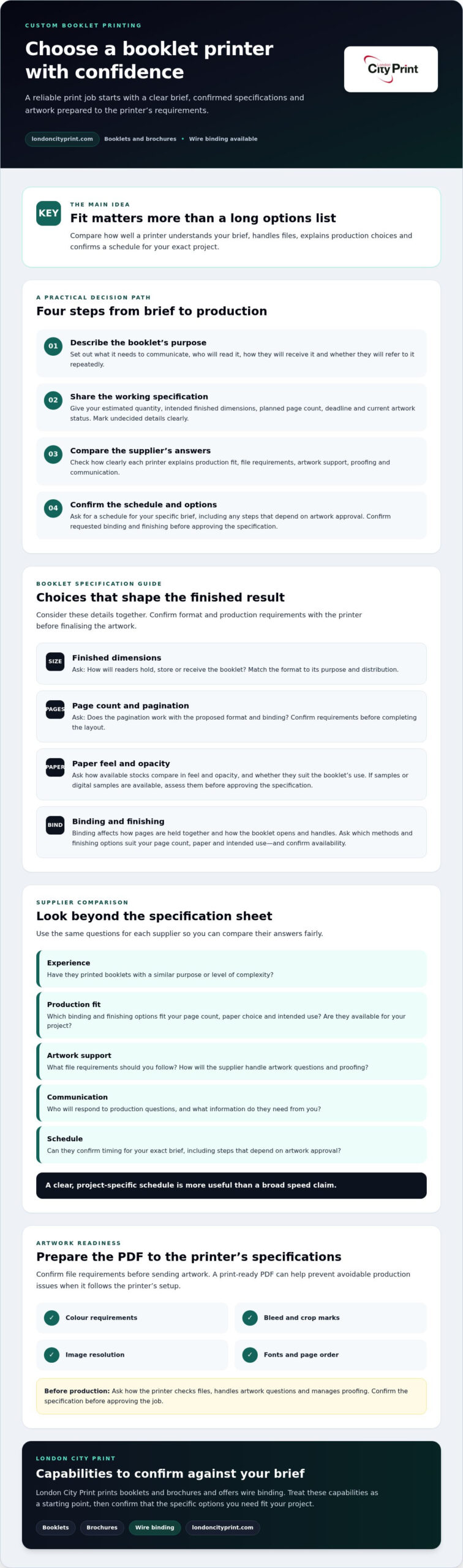
Correct artwork setup helps prevent avoidable questions and production delays. Requirements can vary by printer, format and binding, so use the specifications supplied by your chosen printer rather than relying on a generic template. Confirm the setup before exporting your final file.
What should a print-ready booklet PDF include?
Follow this pre-flight sequence before submitting your artwork:
- 1. Confirm the document setup. Use the printer’s template and instructions for finished size, page order and pagination. Don’t guess whether the printer wants single pages or spreads.
- 2. Set bleed and crop marks. Add bleed where artwork extends to the trimmed edge, and include crop marks if the printer requests them.
- 3. Check image resolution. Review images at their placed size and follow the printer’s resolution requirements. Low-resolution images may appear soft or pixelated in print.
- 4. Confirm colour and fonts. Ask which colour profile to use. Commercial print files commonly use CMYK, but follow the printer’s instructions. Embed fonts or convert them to outlines if the printer specifies this.
- 5. Export and inspect the PDF. Create a high-resolution PDF using the requested settings. Review every page at a readable scale for missing content, layout issues and correct sequence.
Pre-flight checks can identify issues such as missing bleed, font problems or unsuitable image resolution. Don’t assume every supplier includes this review. Ask whether they provide a file-checking service, what it covers and whether they’ll contact you if they find a problem.
How can you reduce avoidable artwork delays?
Send final artwork as early as your schedule allows. That gives you time to respond if the printer raises a technical query or requests a revised PDF. Before submitting, confirm the file format, colour settings, bleed, crop marks and page-order requirements with the production team. These checks are especially useful when comparing custom booklet makers, since file support can differ between suppliers.
Ask whether you can review a proof or digital samples before approving the full print run. Confirm what kind of proof is available and what you’ll be able to check, such as layout, colour or paper appearance. Approval steps may affect production timing, so include them in your schedule.
For related format guidance, read the guide to professional booklets and brochures. You can also contact London City Print about booklet printing to ask which file checks are available for your project.
Choosing London City Print for your custom booklet project
London City Print is an independent commercial printer based in Central London. It prints booklets and brochures and lists wire binding among its services. These capabilities may suit projects that need booklet printing or a binding method that lets pages lie flat. Confirm that the specific format, paper and binding you need are available before finalising your brief.
Production timing depends on the project. If you’re working to a fixed date, share it early and ask whether the schedule is achievable for your booklet. Confirm the timing for your specific requirements rather than assuming a general service statement applies.
What can you discuss with London City Print?
A focused brief helps the print team assess your requirements and identify questions before production. Be ready to share:
- Purpose and audience: What the booklet needs to communicate and who will read it.
- Specification: Your intended finished size, page count and quantity.
- Paper and binding: Your preferences, and which options the printer can provide for this project.
- Schedule: Your required date and any key approval milestones.
- Artwork: Whether the files are ready, and what format you plan to supply.
Ask which paper and binding options suit the brief, and confirm file requirements before sending artwork. Check directly whether pre-production file checks or samples are available for your order.
How do you move from brief to print?
Prepare your project details, then submit artwork in the format the printer requests. Review the confirmed specification carefully, including pagination, paper, binding and any agreed finishing. Check that the schedule accounts for file queries and approval steps. Approve production only once you’re clear on what the printer will produce and when.
If you’re comparing custom booklet makers, use direct answers about your actual brief to judge fit. You can discuss a booklet printing brief with the print team and share your artwork status and deadline so they can confirm the relevant options and timing.
Set your booklet project up for a reliable print run
The right print partner should understand your brief and confirm production details before you approve the job. Compare custom booklet makers on more than their service lists: check that the finished size, page count, paper and binding suit your booklet, and ask how they’ll handle artwork questions and schedule approvals.
Prepare your files using the printer’s specifications, including its requirements for colour, bleed, crop marks, image resolution and font embedding. Confirm any proofing or file-checking options rather than assuming they’re included. Agreeing on these details early can help you avoid preventable hold-ups.
London City Print is an independent commercial printer based in Central London. Its listed services include booklet and brochure printing and wire binding. Share your intended use, specification, artwork status and required deadline so the team can clarify which options suit your project and confirm booklet-specific timing.
Discuss your booklet brief with London City Print and take the next step with a clear plan for your print project.
Frequently Asked Questions
How do I choose a custom booklet maker?
Choose a printer that can meet your booklet requirements and clearly explain how it will handle your files, approvals and schedule. Compare custom booklet makers using the same brief, including purpose, audience, finished size, page count, paper preferences, quantity and deadline. Ask which binding and finishing options are available, how the printer will flag artwork issues, and which steps you must approve before production. Confirm the final specification and timing in writing.
What information should I provide to a booklet printer?
Provide the booklet’s purpose, intended readers and how you’ll distribute or use it. Include your preferred finished size, page count, estimated quantity and paper or binding preferences. Share the deadline and explain whether your artwork is ready, in progress or still being prepared. If you have a sample or reference, describe what you want to match. Clear details help the printer assess your requirements and identify questions before production starts.
Which file format is best for printing a booklet?
A print-ready PDF is generally suitable because it preserves page layout, fonts and images. Ask your printer which PDF standard and export settings it accepts. PDF/X-1a and PDF/X-4 are common print-focused options, but the right choice depends on the printer’s workflow. Follow its page-order and template instructions, and check that the PDF includes the requested colour profile, bleed, crop marks, image resolution and embedded fonts before sending it.
Do custom booklets need bleed and crop marks?
Include bleed when images or colour extend to the edge of the finished page. Bleed provides extra artwork beyond the trim area, helping avoid unprinted edges after trimming. Crop marks show where the sheet should be cut to the final size. Requirements can vary, so use the printer’s supplied template and instructions. Don’t add or omit marks based on guesswork; confirm the file setup before exporting your final PDF.
Which binding is best for a custom booklet?
The best binding depends on the booklet’s page count, use and how you want it to open. Wire binding uses a metal wire comb and allows pages to lie flat, which can suit documents readers need to keep open. Other methods may suit different formats, but availability varies by printer. Describe how the booklet will be handled, then ask which binding options fit the specification and are currently offered for your job.
Can a print-ready booklet be produced on a same-day service?
Possibly, but a print-ready file alone doesn’t confirm that a booklet can be completed the same day. Timing depends on the specific format, quantity, binding, finishing and approval requirements. Share your full brief and required deadline early, then ask the printer to confirm the production schedule for your exact project.
What should I check before approving a booklet proof?
Check the proof against your approved specification before authorising production. Review page order, pagination, spelling, image placement, margins, colours and any content near the trim edge. Confirm that the finished size and agreed paper and binding are represented correctly, where the proof allows. A proof may not show every print characteristic, so ask what it can verify. Raise corrections clearly and approve only after the printer has addressed them.