Your presentation is ready, but the meeting is close and you still need printed copies. Searching for “copy and print near me” should help you find more than a convenient location: you need a service that suits the job, clear file requirements and dependable production support. London City Print is near the British Museum in Central London and offers same-day service for most professional documents.
A missing specification or file issue can slow production. To keep your job moving, prepare a high-resolution PDF where possible and state the finished size, quantity, colour requirements and finishing. If artwork runs to the edge of the page, include bleed and crop marks. Share your deadline with the print team as well.
This guide explains how to choose a format for business cards, stationery, brochures, flyers, posters and large-format work. You’ll also find practical file checks and advice on briefing your print specialist, so the requirements are clear before production starts.
Key Takeaways
- Match the format to its use, from business cards and brochures to posters, flyers and vinyl graphics.
- Digital printing is most efficient for short runs under 500 units, which can help you choose a suitable production route.
- For copy and print near me in Central London, share the item, quantity, finished size and deadline.
- Set your artwork to CMYK for print. RGB is designed for screens, so colours may look different in print.
- London City Print offers same-day service for most professional documents. Include your deadline with the job details.
Need copy and print near you? Find professional print support in Central London
A print job can mean reproducing a few pages or producing a finished item for a specific audience. If you need copy and print near me, first decide whether you need straightforward copies or a finished product with a chosen format, material or binding. That distinction helps define the job and gives your enquiry a clear starting point.
London City Print produces commercial, technical and large-format print for businesses, professionals and personal projects. Share what the print needs to do, who will use it and where it will appear. Those details help match the purpose to a suitable format, whether you’re preparing internal documents or material for customers. For background on how printing has developed from early methods to modern techniques, see The History of Printing.
What can a Central London print specialist produce?
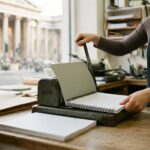
For reading and reference, document printing, booklets and brochures present information in different formats. Business cards support professional introductions, while flyers and posters carry messages for distribution or display. Specialist print work includes legal bundles and CAD plotting. Wire binding uses a metal wire comb to hold pages together and lets a document lie flat.
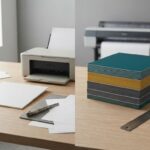
Display options include roller banners, foam board printing and vinyl window graphics. London City Print produces large-format work up to A0 size and beyond. Consider where the finished item will be used: a hand-held document, wall display and window graphic each need a format suited to their setting. Include the intended use in your brief to help define the result.
When is a local print service useful?
A print specialist is useful when the result needs more than a direct page-for-page copy. You might need a bound report for reference, a brochure that organises product information or display material for a customer-facing area. Describe how the item should work, what it needs to communicate and which details matter to the finished result.
Routine copying reproduces existing pages. Commercial print can involve designed artwork, a selected format, a specific finished size or binding. Copying a report, for example, is different from producing a bound document intended for repeated handling. Explain the distinction so the production requirements are clear.
Before you make an enquiry, note the item, its audience and how people will use it. Add any format or finishing preferences. These details turn a broad request into a defined print job, whether it’s for personal, technical or business use.
Choose the right copy and print service for your job
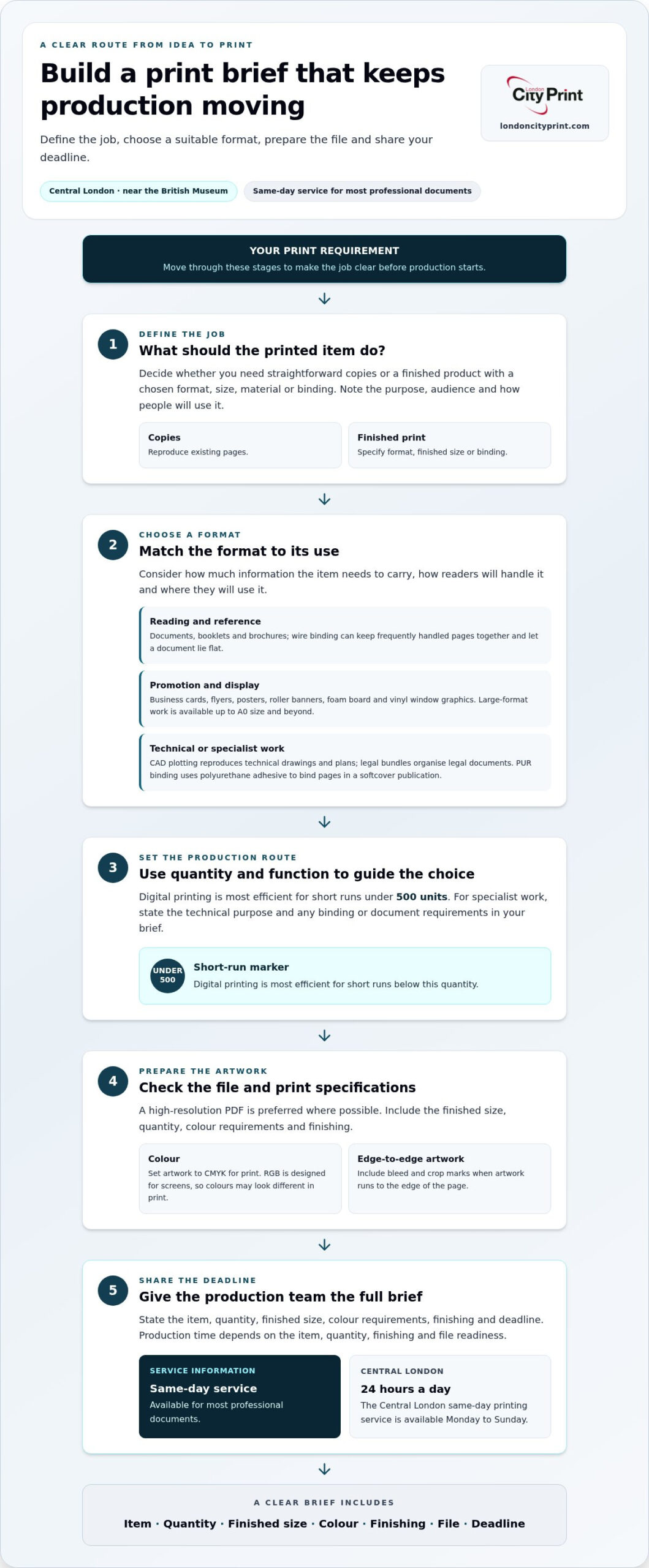
Choose a format by considering how much information it needs to carry, how readers will handle it and where they’ll use it. A concise message for a broad audience needs a different layout from a detailed report people will consult repeatedly. Digital printing is most efficient for short runs under 500 units, making it suitable for many limited-quantity projects.
For business communication, plan the information and level of detail before settling on a format. A multi-page publication can guide readers through a company or product story, while a shorter promotional piece can focus attention on one message. Read the professional booklets and brochures guide for advice on organising longer-form business content. For professional contact materials, use the business card printing guide to review print choices, quality and speed.
Which print format suits documents, marketing and events?
Start with how your audience will use the material. For reports and reference documents, consider whether pages need to stay together and remain easy to consult. Wire binding can suit documents that readers handle often. For marketing, decide whether people need a quick takeaway or a more detailed, ordered presentation. For an event display, consider the viewing distance, available space and whether people need to read the message at a glance.
Define the main purpose: inform, promote, guide or attract attention. Then tell the production team about the setting and audience. This gives layout and finishing decisions a practical basis, rather than relying on appearance alone.
When do technical print services make sense?
Technical projects need a production route suited to their function. CAD plotting reproduces technical drawings and plans for clear review. London City Print provides legal bundle printing for organised legal documents. For a softcover publication that needs a durable finish, PUR binding uses polyurethane adhesive to bind the pages.
State how the document will be used and handled, along with its layout and finishing requirements. This helps define whether the job needs technical reproduction, organised document production or a specific binding method. Include the relevant details in your brief so the requested outcome is clear from the start.
To begin, identify the purpose, audience and quantity, then provide the artwork and finishing requirements. A clear brief helps London City Print match your project to a suitable production route, whether you’re preparing a short run or a specialist technical document.
Need printing quickly? Understand local turnaround and production
A tight deadline calls for a clear production plan. The time needed depends on the item, quantity, finishing and file readiness. London City Print offers same-day service for most professional documents. Its Central London same-day printing service is available 24 hours a day, Monday to Sunday.
Same-day service applies to most professional documents, not necessarily every product or specification. For a finished item such as a display piece or bound publication, provide the full brief and deadline. Clear details help the production team understand the job and plan the work.
What affects a print deadline?
A straightforward document has different production requirements from a job that needs a particular size, specialist material or binding. Quantity and finishing also affect the work involved. If a file needs corrections, it may need additional preparation before production can begin.
Help the team understand the required result by sharing these details together:
- Item and format: State whether you need documents, business cards or another print product.
- Quantity and finished size: Give the number of copies and the dimensions you need.
- Finishing: Specify binding and any other finishing requirements.
- File status and deadline: Provide your artwork and the time you need the finished job.
Send final artwork where possible and make the deadline explicit. If the file still needs work, explain what remains. This gives the production team a clear view of the complete requirement and reduces avoidable back-and-forth.
How does urgent business card printing work?
London City Print offers business cards in one hour. Prepare your final artwork before submitting the job, and include the quantity and finish you need. A complete specification helps production proceed without unanswered questions.
For guidance on choosing business card options and assessing quality, see the business card printing guide. Use it to settle your requirements before a deadline becomes urgent.
When comparing options for copy and print near me, treat the deadline as one part of the brief, not the only detail. State the product, quantity, size, finish and file status together. Contact London City Print about your job with those details ready.
Prepare your files for accurate copy and print production
A well-prepared file helps reproduce the intended size, colour and layout. Before sending artwork for copy and print near me, confirm the finished dimensions, review the design, then export and inspect the PDF. These checks catch common issues before production and make the file easier to work with.
- Confirm the finished size. Set the page to the dimensions you need, including any custom dimensions.
- Review the artwork. Check that text, images and important design elements sit correctly on the page.
- Export and inspect the PDF. Open the exported file and check every page, not just the original design document.
Check dimensions, bleed and crop marks
Set your document to the intended finished format instead of relying on automatic scaling. If colour or images extend to the page edge, add bleed. Bleed extends artwork beyond the trim edge and helps prevent an unprinted border if the sheet shifts during trimming. Include crop marks, which show where the sheet should be cut. Together, these settings help the finished piece match its intended size.
For example, a full-page background that stops exactly at the trim edge can leave a narrow white line if the sheet shifts slightly during trimming. Extending the background into the bleed area helps prevent this. Keep essential text and logos inside the finished page area so trimming doesn’t cut them off.
Review colour, resolution and PDF output
Check your colour profile before exporting. CMYK is used for print production; RGB is designed for screens. Colours may look different when converted from RGB to CMYK, so prepare the artwork in CMYK where possible. Review image resolution and font embedding too. Embedded fonts help keep text appearance consistent when the file opens on another system.
High-resolution PDFs preserve layout, fonts and image quality from the design file through to print. Inspect the PDF at full size. Confirm that text is clear, images look as intended and no content has shifted. Avoid “fit to page” unless you want the printer to scale the document. This setting can shrink artwork and create scale errors, especially when exact dimensions matter.
Run pre-flight file checks before submitting the artwork. Review page size, colour profile, bleed, crop marks, image resolution and embedded fonts. For a professional print job, send your print-ready file to London City Print with the finished size and any finishing requirements.
Get your print job moving with London City Print
Turn your requirement into a clear brief with three steps:
- Identify the item. State what you need printed and how you’ll use it.
- Prepare the artwork. Attach a high-resolution PDF and note any finishing instructions.
- Set out the specification. Include the quantity, finished dimensions and required deadline.
Say whether your project needs paper, board or vinyl-based work. Clear details help the production team understand the intended result and plan the job accurately.
What information should you provide with a print enquiry?
Describe the product, dimensions and quantity, then explain its intended use and deadline. For example, say whether it’s for customer distribution, an internal presentation or a display. Attach the relevant artwork and label finishing instructions clearly. A complete brief gives the team the context to discuss your requirements and move the job forward.
How can you choose the next step?
For a multi-page business publication, use the London booklet and brochure guide to plan how to organise your content. If you’re planning a display, the large-format poster printing guide offers relevant format guidance. When your brief is ready, discuss your print requirements with London City Print.
Turn your print brief into a clear next step
Your next print project is easier to manage when you plan the finished piece before production. Consider what it needs to communicate, who will use it and where it will appear. Include those priorities in your enquiry. This gives the production conversation a practical focus, whether you’re preparing one document or materials for a wider campaign.
If you’re searching for copy and print near me, prepare a concise brief and your artwork. Then discuss the format, intended use and requirements directly with London City Print.
Discuss your print requirements with London City Print and move your project towards production with a clear brief.
Frequently Asked Questions
Where can I get copy and print services near the British Museum?
London City Print provides professional printing from its Central London facility near the British Museum. If you need copy and print near me for a work document, presentation or personal project, describe the item and how you’ll use it. Include the finished size and quantity. This helps define whether you need document reproduction or a finished print product in a specific format.
Can I get same-day printing in Central London?
Yes. London City Print offers same-day service for most professional documents in Central London. The service is available 24 hours a day, Monday to Sunday. State your deadline and provide the document or final artwork with your brief. Include finishing requirements, such as binding, so the production team can account for the full job. Turnaround depends on the product and specification.
What file should I send to a professional printer?
Send a high-resolution PDF when you can. It preserves the page layout, fonts and image quality across systems. Before submitting, open the exported file and check every page. Confirm that the dimensions match the finished item, and include bleed or crop marks where the artwork requires them. For a multi-page document, review the page order and orientation too.
Is digital printing suitable for a small print run?
Yes. Digital printing is most efficient for short runs under 500 units, so it can suit projects that need a limited quantity rather than a large production run. This may include business cards, flyers or booklets for a specific meeting or event. Decide how many finished copies you need, then state the quantity and item type in your brief.
What can a local print shop produce besides copies?
A professional print specialist can produce finished items for business, technical and personal use, not just duplicate pages. London City Print produces booklets, brochures, business cards, flyers, posters, legal bundles and CAD plots. Display projects can include roller banners, foam board printing and vinyl window graphics. Choose a format by its purpose: a brochure presents detailed information, while a poster or banner is designed for display.
What should I check before sending a document to print?
Check the final page size, page order, orientation and finishing instructions before sending the file. Review the PDF at full size to catch missing text, misplaced images or unexpected blank pages. For edge-to-edge artwork, confirm that bleed and crop marks are present. Check that “fit to page” hasn’t scaled the file if the document must retain exact dimensions.
Does London City Print produce large-format print?
Yes. London City Print produces large-format work up to A0 size and beyond. Options include posters, roller banners, foam board printing and vinyl window graphics. Consider where the finished piece will be displayed and how far away people will view it from. Include the intended use, dimensions and artwork in your brief to define the format and display requirements.