A single campaign print run can speak to each recipient by name, interest or buying history. Variable data printing services make that possible by changing text, images or graphics from one piece to the next while keeping a consistent design. You can produce personalized brochures, business cards, flyers and other campaign materials without creating a separate file for every recipient.
Personalization works best when each message feels relevant and the underlying data is accurate. A well-prepared spreadsheet or database helps match recipients with the right content, while a clear template keeps every piece consistent and ready for print.
This article explains what variable data printing can produce, how to prepare data and design files, and when personalized campaigns suit smaller print runs. It also covers how tailored messages and recipient-specific imagery can support direct marketing, helping you plan a campaign with clear production requirements.
Key Takeaways
- Personalize printed pieces with recipient-specific text, images and addresses while keeping a consistent campaign design.
- Organize campaign details in a clear spreadsheet and clean records so each recipient receives the intended content.
- Match the print method to your campaign: digital printing can suit smaller personalized runs, while the right choice depends on the job.
- Use tailored brochures, mailers and other printed materials to make campaign messages more relevant to each audience.
- Plan your format and artwork around the purpose of the campaign, whether you need brochures, posters, wire binding or roller banners.
What Can I Make With Variable Data Printing?
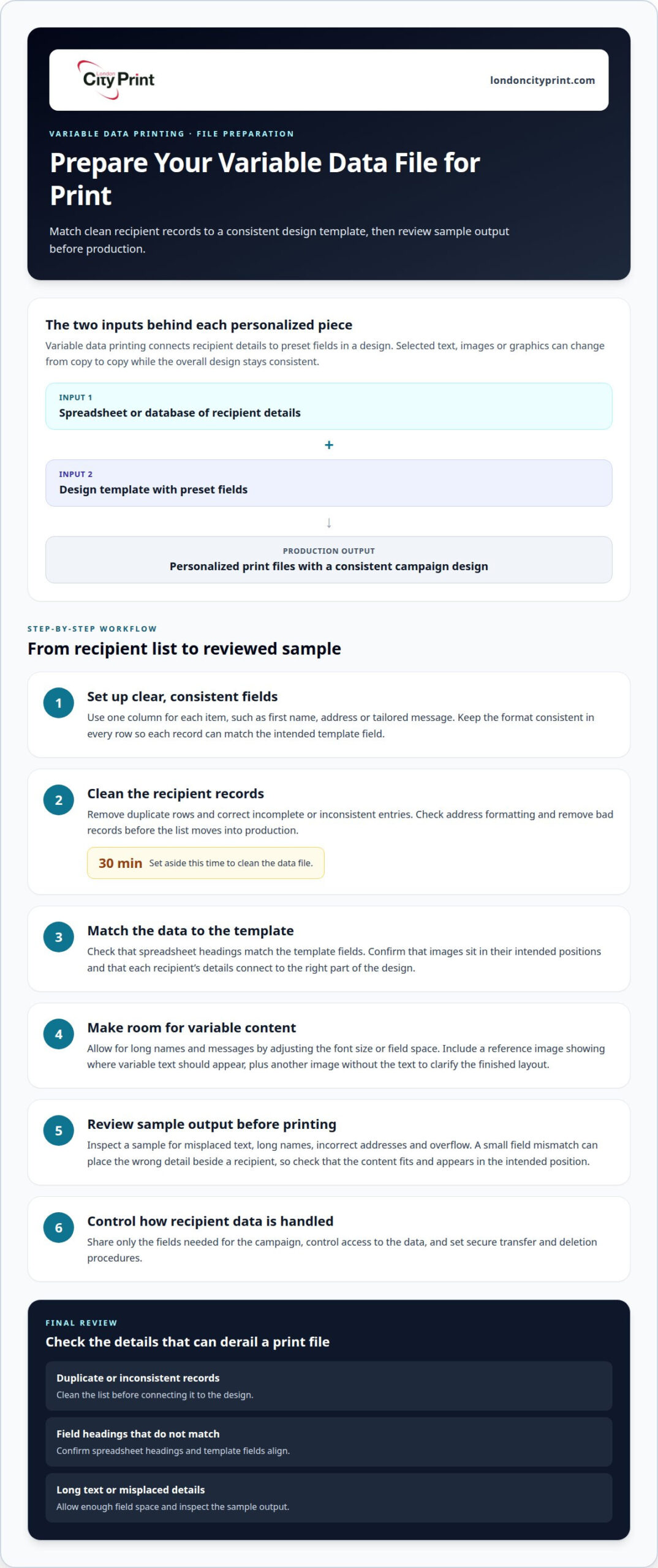
Variable data printing starts with a fixed design and a spreadsheet or database of recipient details. Software matches each record to preset fields, then inserts names, addresses, messages, images or graphics. For example, a campaign can greet each recipient by name and display a product suited to their interests. One production run can create 10,000 different documents for 10,000 customers. Digital printing changes each piece without stopping or slowing the run.
The workflow is straightforward: prepare the template, map the data fields, connect the records, then produce the personalized files. Preview samples to catch misplaced text, long names or incorrect addresses before printing. Variable data printing services can produce targeted direct mail, personalized brochures, invitations and business cards. A tailored URL or QR code can also connect a printed message with an online response path.
Standard digital printing typically repeats the same content across a run, while variable data printing changes selected fields from copy to copy. Offset printing suits repeatable artwork; digital printing supports changing content. Choose a method based on the level of personalization, quantity and production requirements.
Privacy requirements depend on the data and audience. Limit shared data to fields needed for the campaign, control access, and set secure transfer and deletion procedures. To choose a nearby provider, assess its data-handling process, file proofing, variable-field accuracy and delivery plan. Ask to review a sample showing how names, addresses and images appear in the final layout.
Preparing and cleaning a data file
A reliable VDP run starts with accurate records, consistent fields and a template that accommodates each recipient’s details. Prepare the mailing list and artwork together so names, addresses and images align correctly.
Preparing Variable Data Files
A variable data file pairs a spreadsheet or database with a design template containing preset fields. Use one column for each item, such as first name, address or tailored message, and keep the format consistent in every row. Remove duplicates and correct incomplete or inconsistent entries before production. Allow for long text by adjusting the font size or field space. Include a reference image showing where the variable text should appear, plus one without the text, to clarify the finished layout. These steps help prevent mismatched addresses, missing messages and text overflowing its designated area.
File Preparation Assistance
File-preparation assistance reviews the data structure and artwork before files move into production. A reviewer can check that spreadsheet headings match template fields, images sit in the intended positions and longer messages fit their allocated spaces. This matters because a small field mismatch can place the wrong detail beside a recipient. For mailing lists, inspect address formatting and remove duplicate or bad records; mailing software can also validate and presort addresses. Set aside 30 minutes to clean the data file, then review a sample output before printing. Common errors include duplicate rows, inconsistent names and overflow text; cleaning records and checking sample pieces helps prevent them.
Benefits of variable data printing
VDP software connects a design template to a customer database, placing selected fields into each print file. A marketer can set rules for names, product details or offers, so each mailer carries content suited to its audience. This enables personalization without rebuilding the artwork for every recipient.
Digital printing can change text, images and graphics between copies without stopping or slowing the run. You can create versions for distinct audience groups while keeping the branding and layout consistent. For example, a retailer can tailor brochure messages to customer preferences while retaining the same core design.
Digital production offers more flexibility than offset printing when copies need different content. Offset printing suits repeatable artwork, while variable data workflows use a database to change selected elements from piece to piece. Choose based on whether your project needs individualized details or identical copies, as well as its format and production requirements.
Direct mailers can combine a recipient’s name, address and tailored message in one printed piece. Software can add a personalized URL or QR code to connect the mailer with a campaign response path. Variable data and versions can work together across products such as postcards, brochures and catalogs. Defined software rules match database content to each version, keeping campaign output organized and relevant.
Planning smaller print runs
Personalized marketing can make a smaller campaign more relevant than a generic print run. Digital printing can be a practical option for smaller runs.
Run Size and Production Planning
Run size affects production efficiency and the amount of unused stock left over. Variable data printing can make a run of a few hundred tailored pieces practical, especially when each mailer targets a defined audience. Compare the quantity required with the number of recipients who can use the message. A smaller, focused batch can avoid printing generic copies for people who may not respond.
Personalization, Paper, and Postage
Personalization, paper choice and postage all affect campaign planning. More data fields or image variations add file preparation and proofing work. Paper weight and format affect production and mailing choices. For example, a lightweight postcard and a multi-page personalized brochure have different handling needs. Postage also depends on the mail piece and distribution plan, so consider format and audience together.
To plan production, compare the campaign’s requirements with its intended reach. A tailored message may be more useful than a generic one when it addresses a recipient’s interests. Plan the template, personalization fields, paper and mailing method together. This helps control complexity while aligning each printed piece with the campaign’s purpose.
Marketing and advertising applications
Direct mail can address recipients by name and tailor content to their interests. VDP software uses a customer database to match fields with a campaign template. For example, a retailer can print a product recommendation beside a recipient’s name and mailing address. Each piece retains the same design while carrying selected personal details.
Advertising campaigns can create versions for distinct audiences. A travel company might vary destination images and offer descriptions based on customer preferences. Personalized brochures, postcards and catalogs can carry these variations within a campaign. The team can keep core branding consistent while adjusting messages for each audience segment.
Variable data printing also supports customer relationship management, invoicing and addressing printed mail. A direct mail piece can include a personalized URL or QR code leading to a relevant campaign page. Marketers can coordinate printed pieces with email campaigns, giving recipients more than one way to engage with an offer.
Start by defining the audience and the campaign action, such as visiting a product page or responding to an offer. Map approved database fields to the template, then review samples for accurate names, images and links. This sequence helps advertising teams keep each version relevant and the printed message aligned with the campaign’s purpose.
Business stationery
Business stationery gives routine communications a consistent visual identity. A logo, typeface, colour palette and contact details can align across letterheads, forms and business cards. Variable data printing can personalize selected details on individual pieces, such as a staff member’s name, role or direct contact line, while retaining the same core design. The same principles apply to physical identification; companies investing in custom name badges UK can use variable records to ensure every employee’s name and role align with corporate branding.
For a team with different roles or locations, personalized business cards can show the correct details without changing the overall brand layout. A shared template sets the design, while a data file supplies each person’s information. This approach helps organize versions for sales, support or regional teams within one print project.
Prepare stationery artwork with readable contact information and clear space for variable fields. Check that long names and job titles fit the design, and keep colours consistent with the company’s chosen palette. For print-ready artwork, confirm CMYK colour settings, bleed and trim dimensions before production. A proof can reveal misplaced text or inconsistent alignment.
Business cards work well when each employee needs an individual version of a shared design. They can carry names, roles, phone numbers or email addresses while preserving a unified company image. Select only the fields each recipient needs, then review a sample card for accuracy. This keeps personalized stationery useful, professional and consistent across a team.
Company and product brochures
Company and product brochures give readers a structured view of an organization, its services and product range. Variable content can adapt selected panels for different audiences while keeping the core layout consistent. For example, a software company could feature a different product section for each customer group while retaining the same introduction, brand colours and contact details.
Plan the brochure around stable and changeable content. Keep company history, core specifications and brand elements in fixed sections. Reserve variable panels for a recipient’s relevant product, regional contact or tailored offer. A clear content hierarchy helps readers find the information they need, even when versions differ. Avoid squeezing long text into a fixed space; allow room for the longest entry.
Prepare a master layout and map each data field to its intended panel. Check that product names, images and messages match the right record. Review a sample of every version, including the longest text and any image changes, before the full run. For print-ready artwork, confirm page order, CMYK colour, image resolution, bleed and crop marks. A small cover error can affect every copy.
Choose the format and finishing to match how people will use the brochure. A short product guide may need a compact page count, while a company profile may need more room for service details and case examples. Printed booklets and brochures provide the physical format; variable content can make selected pages more relevant to each audience. Align the final artwork, data and finishing requirements before production begins.
Overnight printing and delivery to your stand
An event deadline makes artwork, production and delivery planning critical. For overnight printing, prepare final files before production begins, with approved copy, print dimensions, bleed and colour settings. Confirm the quantity and finishing requirements in the job specification. A last-minute change to a logo or personalized message can require new proofs, so finalize the content before the production window.
Delivery directly to a stand also depends on accurate event details. A delivery plan should identify the venue, event name, stand number, recipient and required arrival window. Include handling instructions for materials such as brochures or display panels. Share these details with the event logistics team, and ensure someone can receive and check the items. This helps avoid confusion between the venue’s general delivery point and your stand.
Prioritize the pieces visitors need first, such as product brochures, personalized mailers or stand graphics. Foam board printing can provide a rigid format for a display panel presenting campaign information. Keep variable messages readable from the expected viewing distance, and check that names, images and calls to action match the audience. Pack campaign pieces by purpose or location so your team can find them quickly during setup.
Build a schedule that allows time for file approval, print production, packing and transport. Treat overnight production and stand delivery as separate stages, each with its own deadline and handoff details.
Business card printing
Business cards give prospects a compact reference after a meeting, event or sales visit. A clear layout makes the person’s name, role and contact details easy to find. Keep the logo and key information prominent, and remove decorative elements that compete with readability. Consistent typography and colour connect each card to the wider company identity.
Variable data printing can create individual cards from one approved design. A data file can supply each person’s name, job title, phone number or email address. This suits teams that need distinct contact details but want a consistent brand presentation. Before production, review a sample for spelling, alignment and text fit, especially where names or roles vary in length.
For print-ready artwork, set the correct trim size and include bleed where the design extends to the edge. Use CMYK colour for print and check that small text remains readable. Keep contact details away from trim edges, then compare the finished proof with the source data. These checks help catch errors before cards reach a client or colleague.
If a deadline is tight, business cards in one hour can support an urgent meeting or event. Prepare final artwork and accurate names before production to avoid revision delays. A single card layout with approved variable fields can simplify preparation for several team members. Match the quantity to immediate distribution needs, then keep the design clear and easy to scan.
London City Print
London City Print is a practical next step when you have planned a personalized campaign and need printed materials for its audience. Choose formats based on where people will encounter or use them, such as at an event, in a meeting or as a takeaway. A clear purpose and finished artwork help align each item with your campaign.
Booklets and Brochures can present company or product information across organized pages. Posters and Roller Banners can carry a concise message in a display format. wire binding holds pages together and lets a document lie flat. Match the printed format to the information, setting and way your audience will handle each piece.
For campaigns with different versions, organize approved artwork and content clearly before production. Keep shared brand elements consistent and separate each audience version. Review names, messages, images, addresses and page order in the final files. This preparation distinguishes campaign versions and gives the print job clear requirements.
Consider the full set of materials rather than planning each item in isolation. A brochure can provide detail, while a poster or Roller Banner carries the main message. Decide which formats and final artwork you need, then contact London City Print to discuss your print project.
Frequently Asked Questions
Can I Use Variable Images as Well as Text?
Yes, a VDP job can change images as well as text between printed pieces. For example, a retailer can match a product image to a recipient’s selected category. Assign each image a clear filename or database reference, then map that field to the correct space in the layout. Check every image version in a proof to catch mismatches, missing files or unexpected cropping before production.
What Kind of Data Do I Need for a VDP Project?
Identify the information that determines what changes from piece to piece. A campaign might use recipient names, postal addresses, customer IDs, membership details or product preferences. Give each data type its own clearly labelled field, and use a consistent format throughout the file. Include only details needed for the printed message. If the design uses variable images, add a matching image reference for each relevant record.
What are variable data printing services and how do they work?
Variable data printing services produce print pieces with selected content that changes for each recipient. A template defines the fixed design and variable fields, while software combines those fields with records from a spreadsheet or database. The resulting files can then go to digital production. For a campaign, one layout can carry different names, offers or images without requiring a separate design for every person.
What types of variable data printing are available, such as direct mail, labels, and packaging?
Variable data can support direct mail, postcards, brochures, catalogs, labels and product packaging. The suitable format depends on the campaign and the production setup. A mailer might vary its greeting and offer, while packaging could carry recipient- or market-specific details. For demanding manufacturing and industrial applications, suppliers like OEM Materials & Supplies provide specialized packaging solutions tailored to technical requirements. Not every printer handles every format, so define the finished item, artwork and intended use before planning the variable content and production file.
What information and file formats are needed to prepare a variable data printing job?
Prepare a spreadsheet or database with one record per printed piece and clearly named fields for each variable item. Include the final artwork and explain which field belongs in each layout area. Variable print workflows can use production formats such as PDF/VT or PPML; PostScript may also form part of a workflow. Provide fonts used in variable areas and proofs showing the intended placement of changing content.
What details should I provide when planning a variable data printing job?
Plan a VDP job by defining the printed format, run quantity, variable fields, paper, finishing and mailing requirements. These details shape the production specification and determine how the data connects to the artwork. For example, a postcard with one personalized message needs a different file setup from a multi-page mailer with changing images. A precise brief helps align the artwork and data with the intended campaign.
What are the steps for creating, proofing, and mailing a variable data print campaign?
Start by defining the audience, campaign message and desired response. Prepare the design template and organized recipient data, then map each field to its intended location. Generate samples and review names, images, links, page order and address placement. Approve the final proof before production. For mailing, arrange address validation, sorting and any required mail indicia or barcodes through the mailing workflow, then coordinate dispatch and delivery.
What data security and privacy rules apply to variable data printing?
Applicable privacy requirements depend on the data and audience. Share only the fields needed for the campaign, control access, and establish secure transfer and deletion procedures.