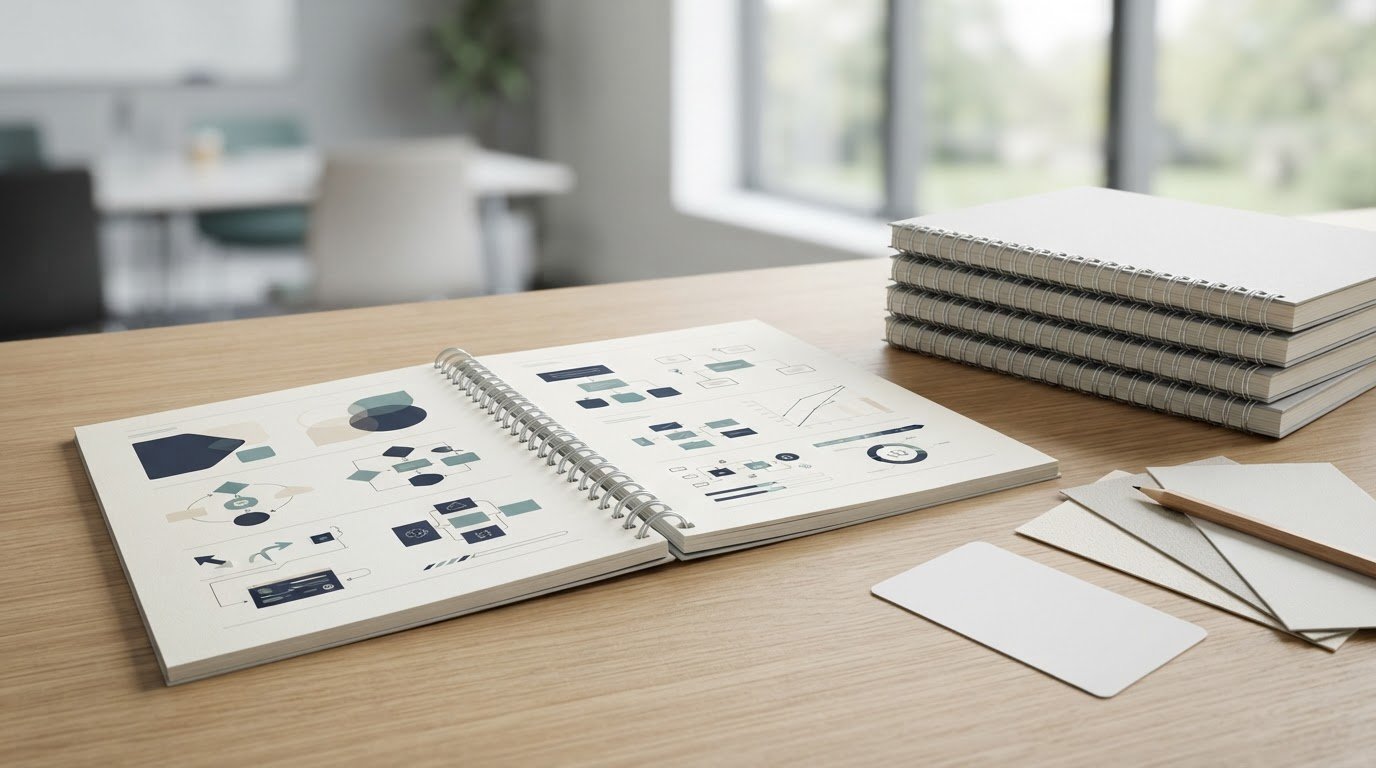
A larger print run shouldn’t be your first test of a training manual. For training manual printing in the UK, wire binding can be a practical choice when you want pages to turn easily and the document to lie flat; wire-bound books can be bound with as few as two pages. Order one copy first to review the layout, paper and finish before committing to a larger run.
A manual needs to be clear and easy to use, but small print details can affect how well it works in training. A sample lets you check the finished document in hand and spot changes before producing more copies.
This guide explains when wire binding suits your manual, what to review in a sample, and how paper, page count and artwork affect the finished result. You’ll also learn how to prepare files for printing and plan a follow-up order with confidence.
Key Takeaways
- Choose left-side binding for conventional manuals, or top binding for reference material used upright or on an easel.
- Match paper stock to how often the manual will be handled and the level of readability your training content needs.
- Set the finished page size and orientation before laying out pages to avoid awkward scaling or cropping.
- Build delivery time into your schedule, with the final artwork and order timing in mind.
- Review the printed copy for pagination, colour and trim before approving a larger run.
Are training manuals with wire binding right for me?
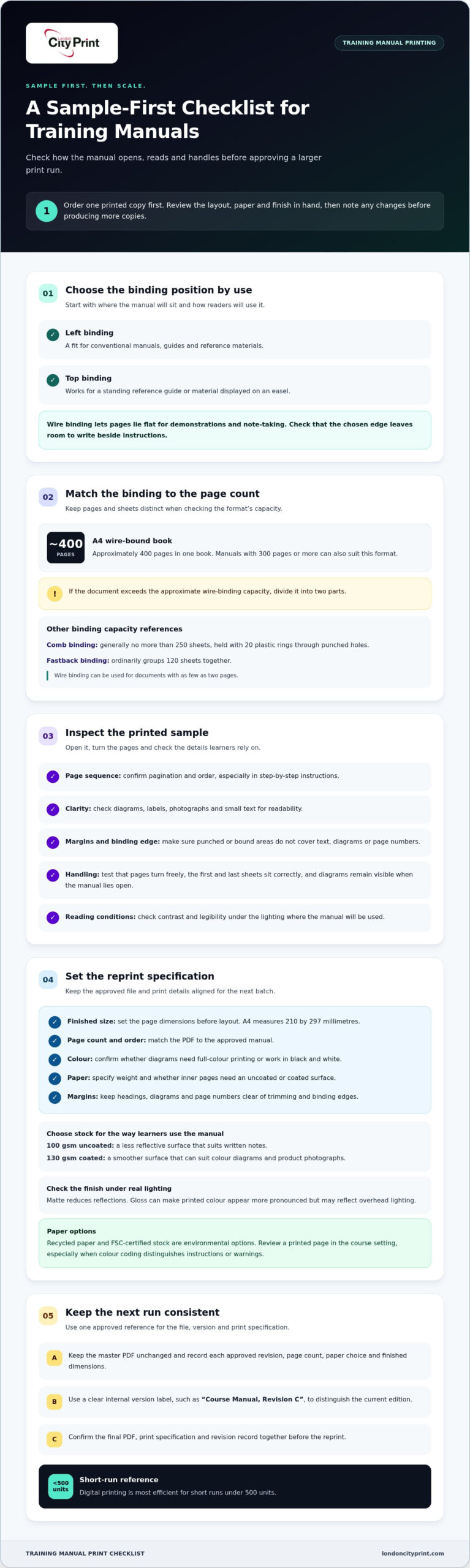
Wire binding suits training manuals that need to lie flat during note-taking or demonstrations. A single A4 wire-bound book can hold approximately 400 pages, while left or top binding depends on how people will use it.
Instruction Manual Printing and Binding
Start with the way learners will handle the manual. A step-by-step equipment guide, for example, needs pages that stay open beside the equipment, while a reference guide may need frequent page turns. Wire binding lets the manual lie flat, which can help during demonstrations and note-taking. Before you download or prepare the print file, confirm the page order, finished format and binding edge.
Check the printed sample for clear diagrams, readable labels and consistent page numbers. Those details matter in a troubleshooting sequence, where a reader may need to find a specific step quickly. A manual can be wire-bound with as few as two pages, so the format can work for short instructions as well as longer documents.
Binding Types and Page Capacity
For an A4 manual, wire binding accommodates approximately 400 pages in one book. Manuals with 300 pages or more can also suit this format, while documents exceeding the approximate capacity need dividing into two parts. Comb-bound manuals are generally kept to no more than 250 sheets. Fastback binding ordinarily groups 120 sheets together, making it a different option for shorter documents.
Choose the binding position to suit how the manual will be used. Left binding suits conventional manuals, guides and reference materials. Top binding works for a standing reference guide or material displayed on an easel. Consider where the manual will sit during training and whether readers need room to write beside each instruction.
Punching and Ring-Binding Options
Comb binding uses 20 plastic rings fed through rectangular holes punched along the page edge. This creates a distinct ring-bound format, so check that the punched margin will not cover text, diagrams or page numbers. Keep key content clear of the binding edge, especially where instructions include labels close to the trim.
Wire binding uses a metal wire comb through punched pages and allows the document to lie flat. Review the sample with the cover open and closed, then check that pages turn freely and the first and last sheets sit correctly. These practical checks help you choose between a wire-bound manual and a comb-bound one.
Digital and litho printing have different production economics, so their relative price depends on run length, setup and specification. Digital printing is generally suited to shorter runs, while litho can become more economical per copy at higher quantities; no single method is cheaper for every manual.
For accessibility, use readable type, strong contrast, plain wording and consistent headings. UK legal duties depend on the context and intended audience. Binding alone does not make printed material accessible or establish compliance.
Before approving a larger run, review a finished sample for page sequence, image clarity, margins and binding position. Test whether a diagram remains visible when the manual lies open and whether the chosen edge works on a desk or easel. This helps catch layout problems while there’s still time to adjust the file.
Need a quick reprint solution?
A smooth reprint starts with a final file that matches the approved manual. Keep the master PDF unchanged, then record each approved revision, page count, paper choice and finished dimensions. For example, label the current version “Course Manual, Revision C” in your internal file name. This helps prevent an older edition from going back into production.
Choose the paper by how learners use the course material. The available reference options include 100 gsm uncoated paper for inner pages and 130 gsm coated paper. Uncoated stock has a less reflective surface that suits written notes. Coated stock gives images a smoother surface, which can suit colour diagrams and product photographs.
Matte and glossy finishes affect how a page looks and reads. Matte surfaces reduce reflections, while gloss can make printed colour appear more pronounced but may reflect overhead lighting. For a safety procedure used under bright training-room lights, check that the text remains easy to read. Review diagrams, small labels and photographs on the selected stock before repeating the run.
Use this short specification checklist when preparing a reprint:
- Set the page size to the finished dimensions, such as A4.
- Keep the PDF page count and order aligned with the approved manual.
- Confirm whether colour diagrams need full-colour printing or work in black and white.
- Specify the paper weight and whether the inner pages need an uncoated or coated surface.
A4 measures 210 by 297 millimetres. Keep that page size consistent between the source file and print settings; selecting “fit to page” can shrink content and alter scale. If your course uses a different finished size, set the document dimensions before exporting. Check margins too, so headings, diagrams and page numbers remain clear after trimming and binding.
For environmental options, consider recycled paper or FSC-certified stock. Eco-conscious stocks can match the brightness and quality of virgin-fibre paper, giving you a responsible material choice without changing the manual’s intended appearance. Compare a printed page in the actual course setting, especially where colour coding distinguishes instructions or warnings.
Digital printing is most efficient for short runs under 500 units. For a quick reprint, keep the final PDF, print specification and revision record together, then confirm all three before sending the file. This simple sequence reduces avoidable file changes and keeps the next batch aligned with the approved course manual. For help preparing the next step, explore manual printing support.
UK delivery
Plan production around when your training team needs the manuals, allowing time for printing and delivery. For training manual printing in the UK, treat dispatch and arrival as separate milestones.
UK Delivery Options
Choose a delivery option based on the destination and the date staff need the manuals in hand. Standard delivery for A4 wire-bound books is 2 days. That transit period does not include artwork preparation or production, so schedule those stages separately. For a venue delivery, provide the full address, recipient name and any access instructions with the order details.
If manuals are going to several locations, prepare a destination list before ordering. Record the version and quantity each site needs. For example, a course delivered at separate offices may require distinct parcels for each training team. Clear allocation helps prevent copies for one location from being mixed with another group’s materials.
Quantity and Delivery Choices
Match the quantity plan to how copies will be distributed. A central training team may receive one combined delivery, while separate course locations need quantities grouped by destination. Label each version with its intended audience, especially when instructor and learner manuals contain different material. This gives the receiving team a clear way to sort copies.
Before dispatch, check that the order summary reflects the final copy count and each delivery address. A change in quantity can affect packing, while a changed destination can alter the delivery plan. Keep one current schedule for versions, quantities and recipients, then use it to check the parcels on arrival.
Production and Delivery Times
Build the schedule backwards from the training date. Include time for final artwork approval, printing, binding and transit. To secure a selected delivery date, the order and approved artwork must be submitted before 6pm. This cutoff relates to order and artwork approval; it is not a statement of production duration.
For A4 wire-bound books, the standard delivery period is 2 days. Add production time before that transit period, then leave time at the destination to sort copies and resolve any receiving issues. Next-day delivery refers to transit, not necessarily the complete time from submitting files to receiving finished manuals.
The right UK printer for training manuals is one whose production schedule, binding and delivery arrangements suit your project. Compare the written specification with your course requirements, then plan a clear handover date. A training manual printing project in the UK runs more smoothly when the final artwork, destination details and receiving contact are ready together.
Use this sequence to organise delivery:
- Set the date and destination for each course delivery.
- Confirm manual versions and quantities for every location.
- Submit the order and approve artwork before 6pm for a selected delivery date.
- Allow 2 days for standard delivery of A4 wire-bound books, plus production time.
Good delivery planning gives your team time to prepare materials before learners arrive. For training manual printing in the UK, coordinate the print schedule with venue access and the person receiving the parcels. That final handover detail helps the manuals reach the right team in time for course preparation.
Manual sizes and orientations
Set the manual’s finished size and page orientation before laying out diagrams, tables or training exercises. A4 is a familiar reference format, while portrait and landscape layouts serve different content needs.
Portrait pages suit numbered procedures, written explanations and forms with a vertical reading sequence. For example, a course workbook with short instructions followed by answer space can keep each step in a clear downward flow. Landscape pages give wide diagrams, comparison tables and equipment images more horizontal room. Choose the layout that makes each page easier to use, rather than rotating content to fit a template.
Keep the chosen page size consistent throughout the document. A manual built for one format may shrink or crop if output settings apply another. Check the PDF page dimensions against the intended finished size, then review the first and last pages and representative spreads. This catches headers, footers and page numbers that sit too close to an edge.
For mixed content, plan orientation by section. A landscape process diagram inside a portrait manual may need its own rotated page, so check how the reader will turn the bound book. Avoid frequent changes, as switching orientation can interrupt navigation and make page references harder to follow. A contents page should identify sections clearly, especially when a training course uses separate modules.
Before exporting the final file, work through this layout check:
- Confirm the finished page size in the document settings.
- Set portrait or landscape orientation to suit the dominant content.
- Check tables, labels and images at their actual printed size.
- Keep headings, page numbers and important instructions inside safe margins.
- Review every page after export, including any rotated diagrams.
Large diagrams can become difficult to read if a landscape image is compressed onto a portrait page. Instead, give the illustration a dedicated landscape page or simplify its labels. For example, a machine setup diagram should keep each callout legible without requiring readers to magnify a paper copy.
Use custom dimensions only when the content has a clear reason for a non-standard format, such as a narrow field guide designed for a specific storage sleeve. Build the source document at that finished size and check that the binding edge leaves enough room for text. A format change affects page layout, image scale and how learners handle the manual.
For a printed course booklet, review a complete sample at actual size before approving the final layout. Turn through it as a learner would, checking whether diagrams open in the right direction and whether exercises leave enough room for writing. This practical review tests the page design, not just the screen view.
Ordering a single manual before a larger order
A sample copy lets you check the finished manual before committing to a larger run. For training manual printing in the UK, use it to review text, diagrams, page order and binding against the approved digital file.
Minimum Order and Page Limits
Begin with one copy as a practical proofing step, then decide whether the manual is ready for wider distribution. Compare the printed copy with the source PDF page by page, checking that headings, page numbers and images appear correctly. A single A4 wire-bound manual can hold approximately 400 pages; split longer content into separate parts to keep each volume manageable.
For a shorter document, wire binding can start at two pages. Comb-bound manuals are generally kept to no more than 250 sheets. These limits affect how you organise training modules, appendices and reference material. If your sample approaches a format’s capacity, review the content structure before placing the larger order.
Ordering and File Upload
Prepare one final print file before starting the order. During an order, check the upload requirements for your artwork files. Export the manual as a high-resolution PDF, then confirm that its page count, dimensions and sequence match the finished specification. Use a clear file name, such as “Safety Manual Revision B,” to distinguish the approved version from earlier drafts.
Keep the approved PDF and print details together. Record the required quantity, binding position, paper choice and delivery destination in the same order notes. For example, if a safety course uses separate learner and instructor editions, label each file and its quantity clearly. This makes it easier to compare the sample with the version intended for the full run.
When the sample arrives, check it in the setting where learners will use it. Turn every page, test whether the manual lies as intended, and inspect small text, colour diagrams and margins. Mark corrections on a review copy or in a separate change list. Then update the source file and export a revised PDF, rather than relying on handwritten changes that could be missed. This keeps your UK training manual printing project aligned with the final approved artwork.
Use this approval sequence before increasing the quantity:
- Check the sample against the latest approved PDF.
- Record any corrections to wording, layout or page order.
- Export and review the corrected file.
- Approve the final specification and quantity for the larger run.
This staged process helps you catch production-ready file issues before they affect a full batch. Prepare the manual details and request training manual printing when you’re ready to move from sample review to the next run.
London City Print: Booklets and Brochures
London City Print can help when your reviewed manual is ready to move into print. Its Booklets and Brochures and Wire Binding offerings fit projects that need a bound, easy-to-use printed document.
Use the decisions in this guide to prepare your file and production details. Set the finished page size, confirm the binding position, and keep the approved artwork and quantity information together. If your training materials also need supporting display pieces, London City Print offers Posters and Roller Banners.
For your next print project, contact London City Print or visit londoncityprint.com.
Prepare your next training manual for print
A training manual can become the foundation for a consistent learning experience across future courses. Once you’ve approved the content, assign ownership of the master file and record how updates should be reviewed. This gives your team a clear starting point when procedures, diagrams or course materials change.
For training manual printing in the UK, London City Print offers Booklets and Brochures and Wire Binding for printed materials that need a bound format. Posters can support the manual with clear visual information in the training space. Keep each item aligned with the same approved content and visual identity.
When you’re ready to discuss your print project, contact London City Print. A clear file and agreed specification will help you take the next step with confidence.
Frequently Asked Questions
Where can I get training manuals printed in the UK?
London City Print produces printed booklets and manuals with wire binding. When preparing an enquiry, describe how learners will use the document and whether it needs supporting materials. For example, a technical course may need a manual plus a poster for a training room. Explaining the intended use helps you set a clear brief and choose the right format for the finished materials.
How much does training manual printing cost in the UK?
Start by defining the job: copy count, finished dimensions, page count, colour requirements and binding method. Also identify any separate editions, such as instructor and learner versions. A complete specification gives the printer the information needed to assess and plan the production work accurately. If your requirements change, update the specification so the planned job matches the final artwork.
What paper, binding, and finish options are available for training manuals?
Choose materials and binding to suit how people will handle and store each manual. A course with frequent updates may benefit from a format that supports replacement or revised editions. A polished, fixed reference document may call for a different finish. You can also consider recycled or eco-friendly paper options, available across most printing services, when selecting materials for your training documents.
How do I prepare a training manual PDF for printing?
Before exporting, check that the PDF includes the final approved copy and that its fonts display correctly on another device. Inspect diagrams at their intended printed size, especially labels and fine lines. If images or colour extend to the trimmed edge, include bleed in the artwork. A final screen review should also confirm that page breaks, section dividers and contents references match the current document.
What are typical UK turnaround times and delivery options for printed manuals?
Plan the schedule around artwork approval, production requirements and the delivery destination. Ask for production and transit stages to be set out separately so you can coordinate arrival with course preparation. If the manual contains several editions, allow time to identify and sort them at the receiving location. Share your required date and delivery address as part of the project details.
What print quantities and formats are available for training manuals?
You can plan a small sample run before deciding on the quantity for distribution. Digital printing is most efficient for short runs under 500 units. Formats can range from A6 through A0 and A0+, depending on the document’s purpose. For a course with several groups, list each edition and its intended quantity separately. This helps align the print specification with how your team will issue the manuals.